4
The Main Menu
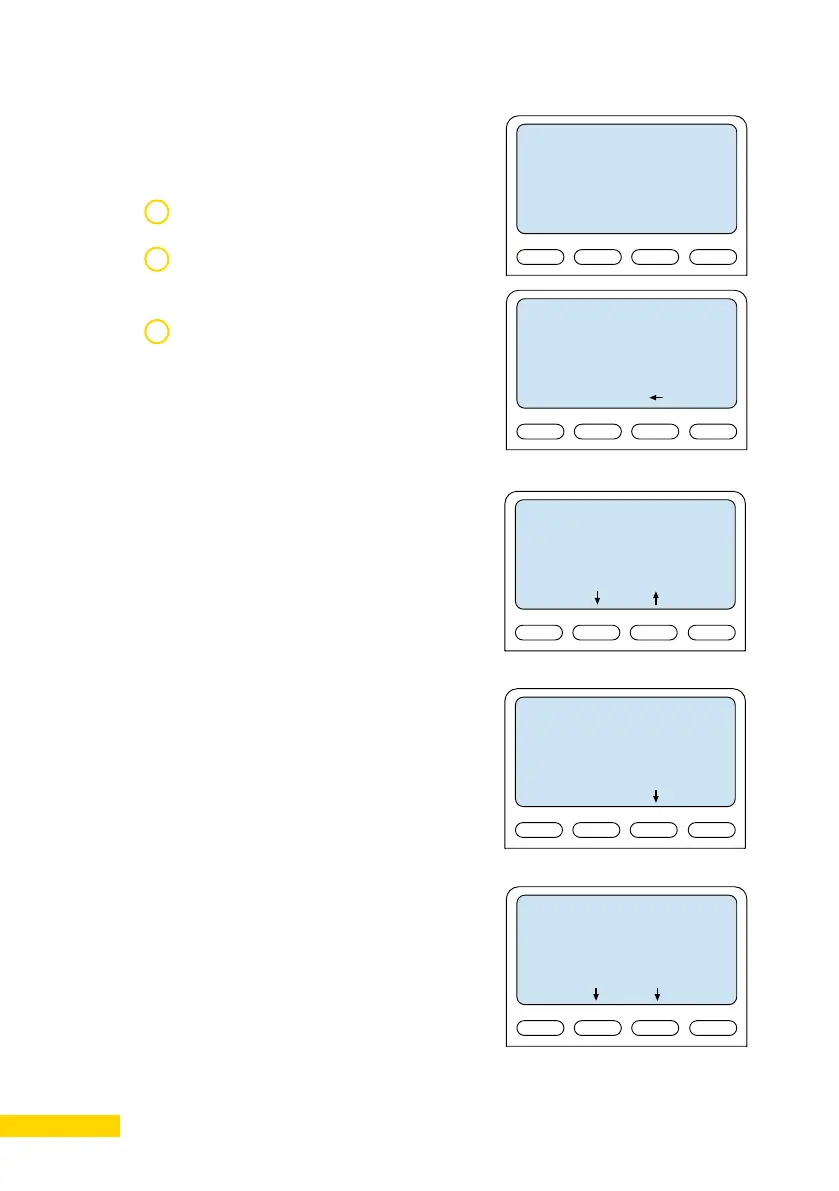
To enter the setup menu:
1
2
3
Not configured
Setup
- Enter password
1851
OK Esc
Press the Setup key
Enter the default password 1851 by
using the station keypad
Press the OK key
A menu with six options will be displayed.
Use the two arrow keys in the middle
to navigate through the menu options.
Press the Sel key to select the menu
option and the OK key to confirm data
entered. When entering data the left
arrow is used for deleting characters.
- Main Menu -
Station Info -->
IP Settings -->
Station Mode -->
SIP Mode -->
Load Defaults -->
Restart -->
Sel Back
Station Info
This shows the station MAC and
IP addresses, the configured ICX-
AlphaCom address and software version.
- Station Info -
MAC adr:0013cb000000
St IP: 169.254.1.100
AMC IP: 169.254.1.5
SW ver: 6.0.3.0
Back
IP Settings
Choose between DHCP and STATIC IP
address. If STATIC IP is chosen, it is pos-
sible to configure the IP address, mask
and gateway.
- IP settings -
< > DHCP
<*> STATIC
IPaddr: 169.254.1.100
IPmask: 255.255.0.0
IPgw: 169.254.1.1
Back
Sel




 To Next Page