3373-O
INSTALLATION STANDARDPAGE 4
Connect
an off-air
antenna
to your
Entertainment
Machine.
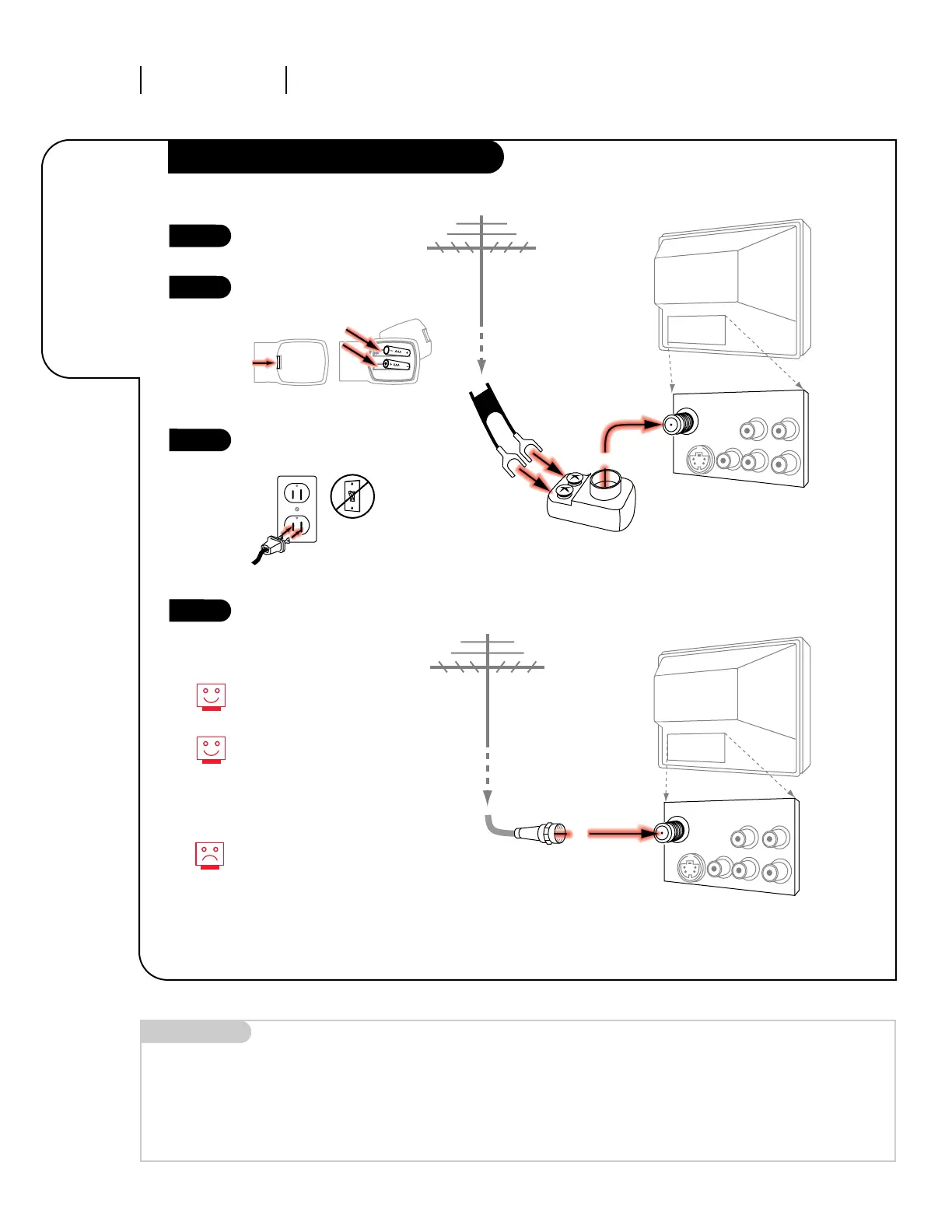
Hook Up Your Antenna to the TV
Mini glossary
75 OHM RF CABLE The wire that comes from an off-air antenna or cable service provider. Each end looks like a hex shaped nut with a wire
sticking through the middle, and it screws onto the threaded jack on the back of your TV.
300 TO 75 OHM ADAPTER A small device that connects a two-wire 300 ohm antenna to a 75 ohm RF jack. They are usually about an inch long
with two screws on one end and a round opening with a wire sticking out on the other end.
RF coaxial wire
(75ohm)
Antenna
TV back
TV back panel
(expanded view)
TV back
Flat wire
(300 ohm)
Antenna
300/75 ohm
Adapter
TV back panel
(expanded view)
Antenna
/Cable
Video
R
L
R-Audio
L/Mono
S-Video
Variable
Audio Out
Antenna
/Cable
Video
R
L
R-Audio
L/Mono
S-Video
Variable
Audio Out
If you have a 75 ohm RF cable,
then you don’t need any adapters!
Remember, when screwing RF
cables into jacks, clockwise tight-
ens, and counterclockwise loosens.
A 300 to 75 ohm adapter
is not included with your Zenith
Entertainment Machine, but can be
purchased in most consumer elec-
tronics stores.
Hook up your Entertainment
Machine.
Remove the back of the remote
and insert two AAA batteries.
Plug in your TV into a standard
120V, 60 Hz power outlet. Do not
plug it into a switched outlet.
Go to page 11 to Auto Program
your Entertainment Machine.
1
2
3
4




 To Next Page