Hook up your Entertainment
Machine.
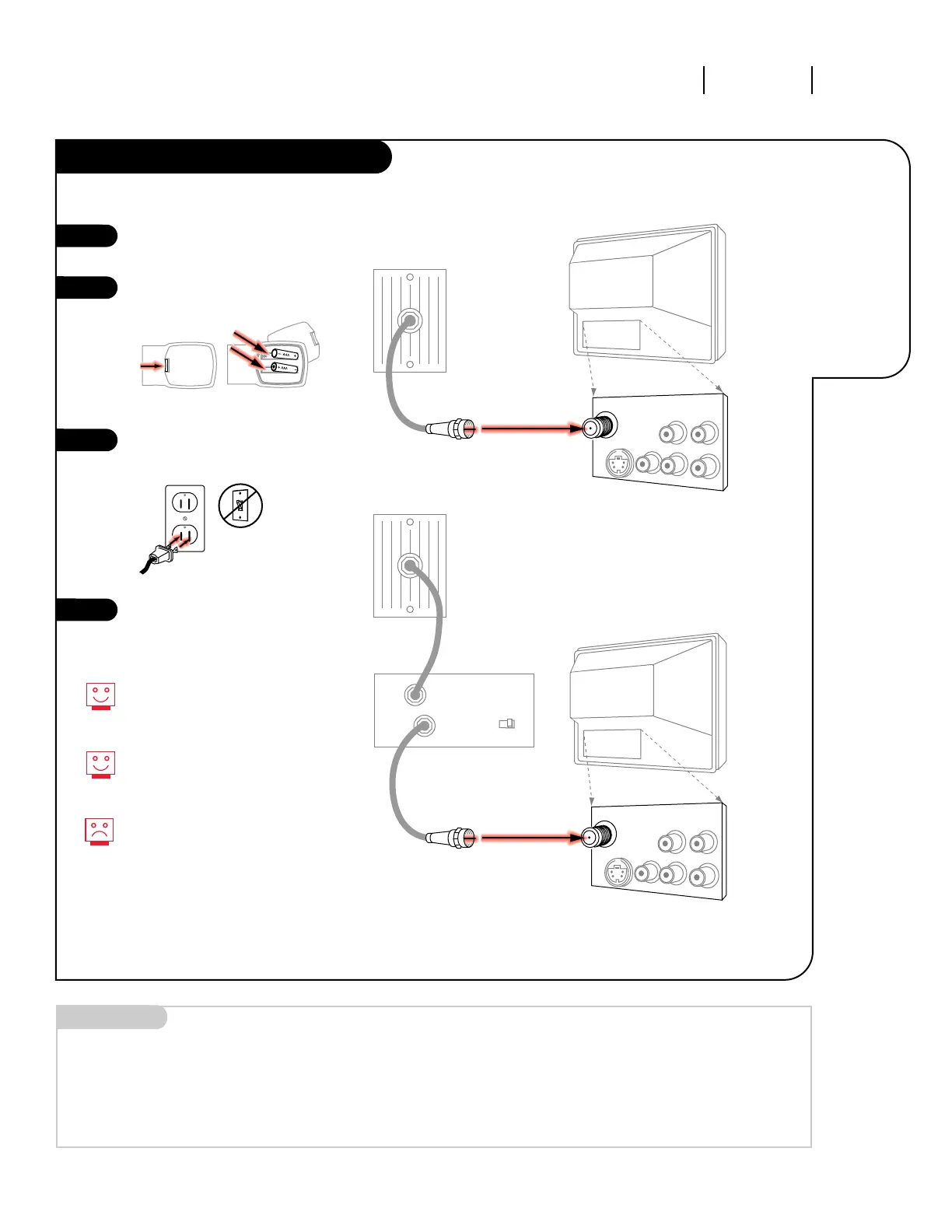
Remove the back of the remote
and insert two AAA batteries.
Plug in your TV into a standard
120V, 60 Hz power outlet. Do not
plug it into a switched outlet.
Go to page 11 to Auto Program
your Entertainment Machine.
3373-O
INSTALLATION STANDARD PAGE 5
Connect cable
to your
Entertainment
Machine.
Hook Up Your Cable (CATV) to the TV
If you’re using a cable box, leave
your TV on channel 3 or 4 and use
your cable box to change channels.
Remember, when screwing RF cables
into jacks, clockwise tightens, and
counterclockwise loosens.
If you’re using a cable box, Auto
Program might only find the chan-
nel your cable service is on (usually
channel 3 or 4). Don’t worry, that’s
all you need!
Mini glossary
CABLE SERVICE The wire that supplies all your cable TV (CATV) stations.




 To Next Page