EasyManua.ls Logo

Zenith A27A23W - Connecting VCR and Audio Devices

Zenith A27A23W
42 pages
Print Icon
To Next Page IconTo Next Page
To Previous Page IconTo Previous Page
Loading...
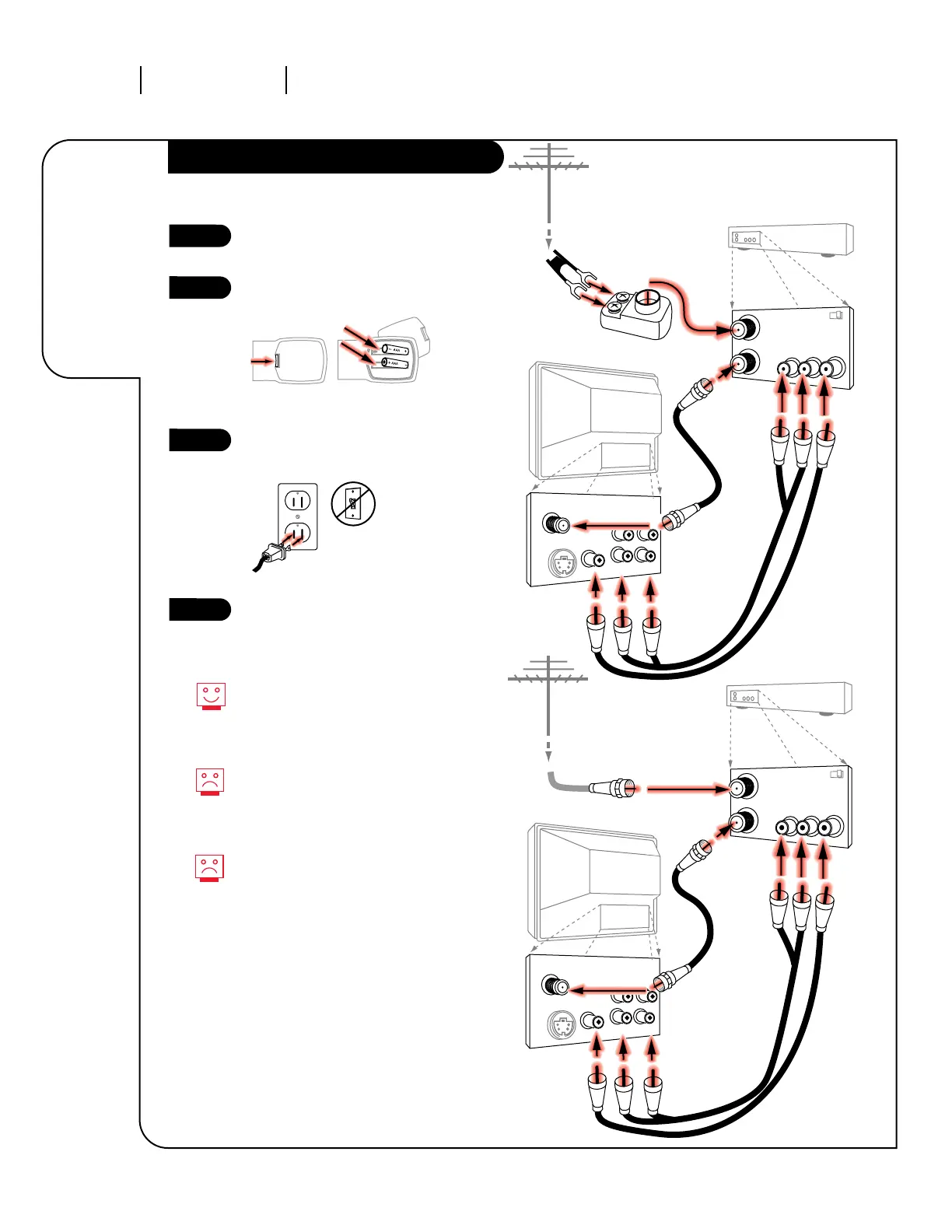
Hook up your Entertainment
Machine.
Remove the back of the remote
and insert two AAA batteries.
Plug in your TV into a standard
120V, 60 Hz power outlet. Do not
plug it into a switched outlet.
Go to page 11 to Auto Program
your Entertainment Machine.
INSTALLATION STANDARDPAGE 6
Connect an
off-air
antenna and
VCR to your
Entertainment
Machine.
Hook Up Your Antenna and VCR to TV
3373-O
TV back panel
(expanded view)
TV back
In
Out
VCR back
VCR back AV panel
In
Out
VCR back
VCR back AV panel
TV back panel
(expanded view)
TV back
Flat wire
(300 ohm)
Antenna
300/75 ohm
Adapter
Round wire (75ohm)
Antenna
RF coaxial wire
(75ohm)
not included
with TV
RF coaxial wire
(75ohm)
not included
with TV
A/V cables
not included
A/V cables
not included
with TV
Antenna
/Cable
Video
RL
R-Audio L/Mono
S-Video
Variable
Audio Out
Antenna
/Cable
Video
RL
R-Audio L/Mono
S-Video
Variable
Audio Out
output
switch
Audio
Video
Output
R
L
output
switch
Audio
Video
Output
R
L
3 4
3 4
back of
remote
1
2
3
4
Remember, when screwing
RF cables into jacks, clockwise
tightens, and counterclockwise
loosens.
No A/V cables are included with
your Zenith Entertainment
Machine, but can be purchased in
most consumer electronics stores.
Without A/V cables, most VCRs
will not play videocassettes in
stereo sound.


Other manuals for Zenith A27A23W

Related product manuals