PAGE 12
206-04006
DVD Player
Mini glossary
COMPONENT VIDEO Some video equipment uses three separate lines (Y, P
B, PR) to more precisely reproduce images. Your video equipment manual
will explain how this relates to your equipment.
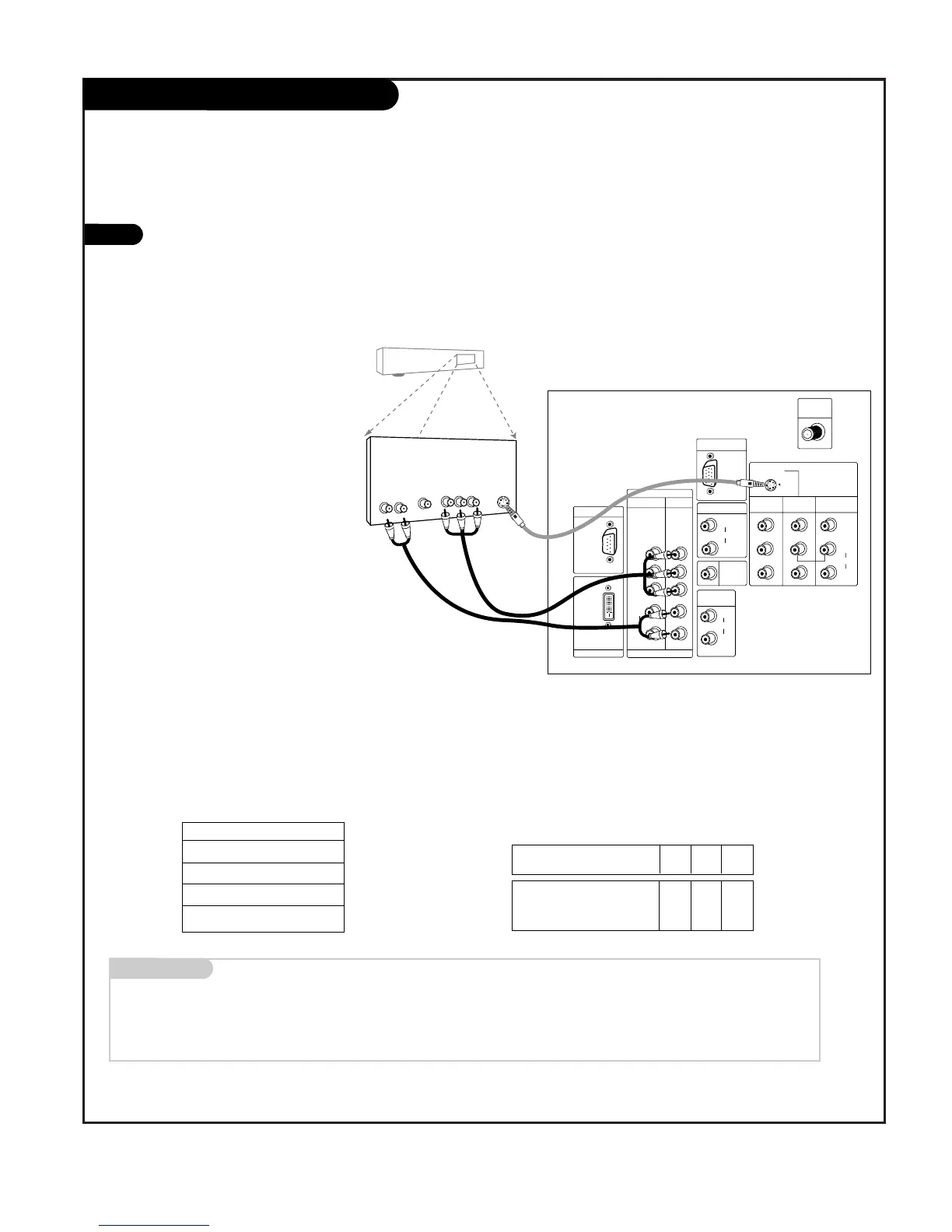
Find the audio and component or
S-Video jacks on the back of your
DVD Player and connect them fol-
lowing the instructions provided
with your equipment.
You may connect either the com-
posite video or the S-Video cables
to your TV. Do not connect both
the composite and the S-Video.
1
Component 1 (or 2) Input
Y PB PR
1920X1080i
1280X720p
720X480p
720X480i
Component input jacks
on the Monitor
Y
PB
PR
Video output jacks
on DVD player
Y
Y
Y
Y
Pb
B-Y
Cb
PB
Pr
R-Y
Cr
P
R
• Component Input ports
Connect DVD player jacks to Monitor
Component input jacks as indicated below.
A/V Cables
Not included
with TV
DVD Player
Back AV Panel
Some high-end DVD players use a
picture reproduction system
called “component video.” If
your DVD player has component
output, use the connectors
marked “Component 1/2” on the
jack panel. Please refer to your
DVD manual for proper installa-
tion.



 To Next Page