PAGE 13
206-04006
RGB-DTV/DVI-DTV Input
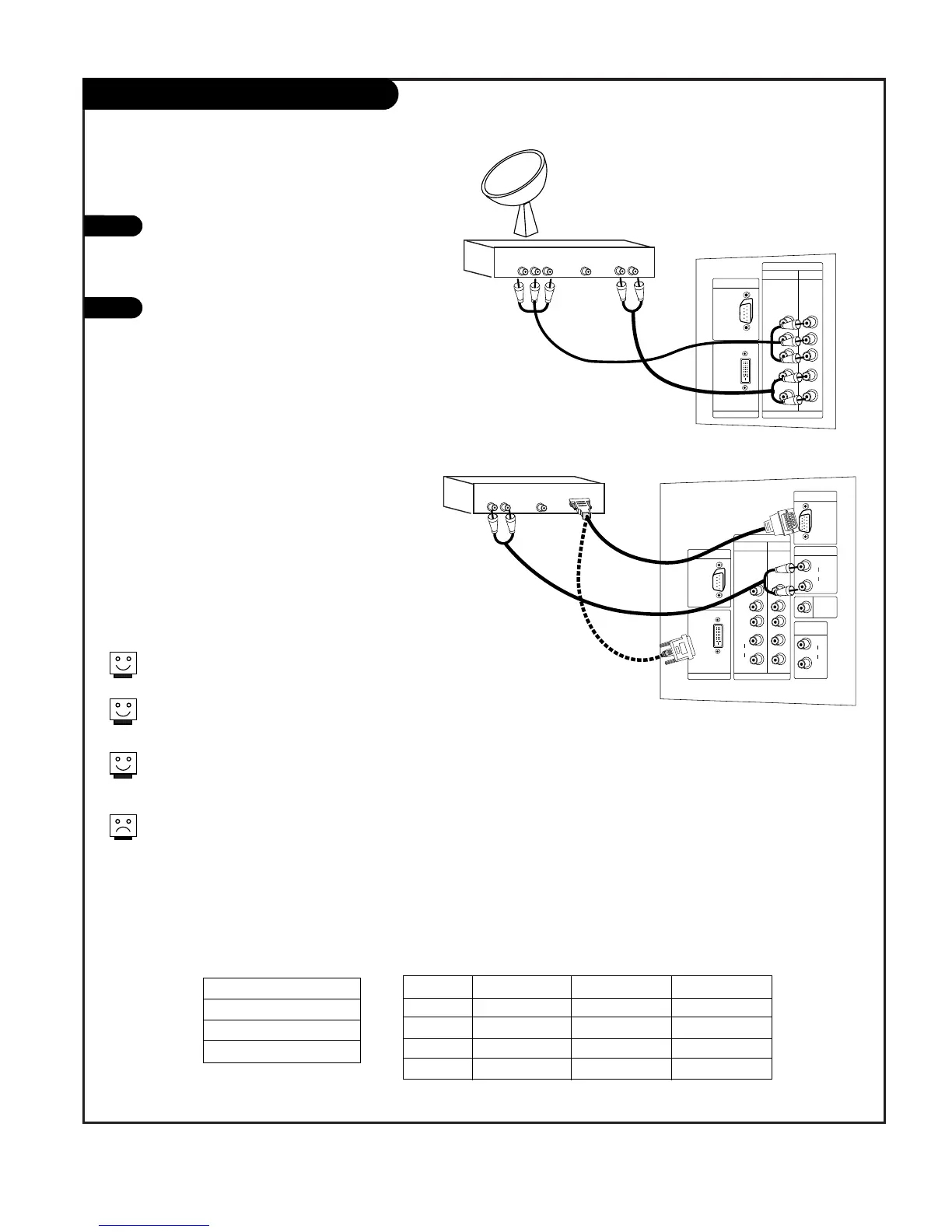
Find the audio and Y, PB, PR/RGB/DVI jacks
on the back of your DBS receiver and con-
nect them following the instructions provid-
ed with your equipment.
Connect these cables to your TV as shown.
1
2
The DTV shows the sharpest picture in 720p mode.
Select RGB-DTV Source and press ENTER. Use UP/DOWN arrows to
select the desired options (H-Position/ V-Position/Phase) and then
use LEFT/RIGHT arrows to make appropriate adjustments.
HD-SET TOP
1920x1080i
1280x720P
720x480P
RGB-DTV/DVI-DTV Input
Signal
480i
480p
720p
1080i
Component1
Yes
Yes
Yes
Yes
Component2
Yes
Yes
Yes
Yes
RGB/DVI-DTV
No
Yes
Yes
Yes
This TV supports HDCP (High-bandwidth Digital Content
Protection) protocol for DVI-DTV (480p, 720p, 1080i) mode.
DBS Receiver
DBS Receiver
A/V Cables
Not included
with TV
A/V Cables
Not included
with TV
In RGB-DTV mode, H-Position/ V-Position/Phase are not adjustable if
you choose either the POP or Twin picture modes.
or



 To Next Page