MAINTENANCE AND TROUBLESHOOTING
BEFORE CALLING FOR SERVICE
Check these items and see if you can correct the trouble by
changing the adjustment of a control or the setting of a switch.
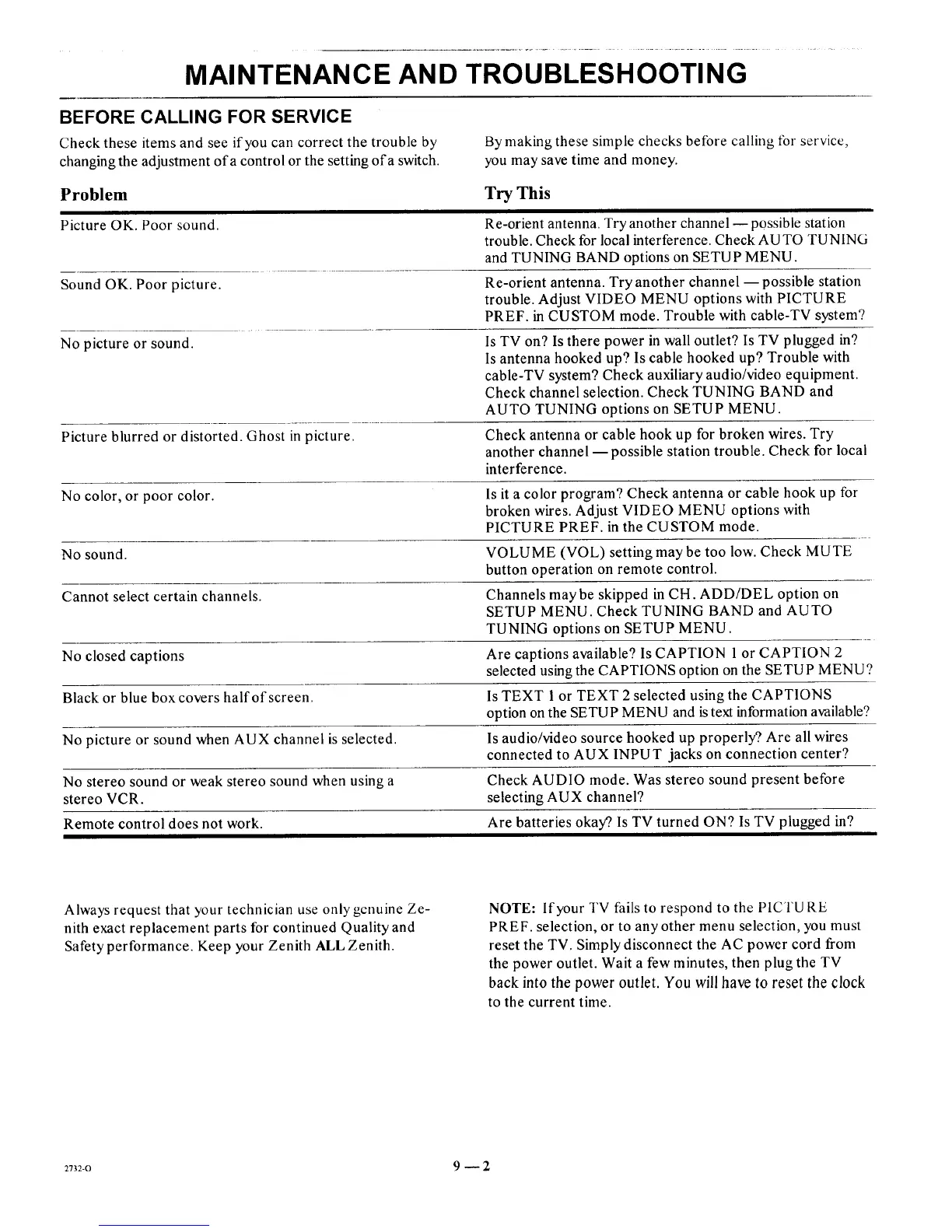
Problem
Picture OK. Poor sound.
Sound OK. Poor picture.
No picture or sound.
By making these simple checks before calling tbr service,
you may save time and money.
Try This
Re-orient antenna. Try another channel -- possible station
trouble. Check for local interference. Check AU TO TUNING
and TUNING BAND options on SETUP MENU.
Re-orient antenna. Try another channel -- possible station
trouble. Adjust VIDEO MENU options with PICTURE
PREF. in CUSTOM mode. Trouble with cable-TV system?
Is TV on? Is there power in wall outlet? Is TV plugged in?
Is antenna hooked up? Is cable hooked up? Trouble with
cable-TV system? Check auxiliary audio/video equipment.
Check channel selection. Check TUNING BAND and
AUTO TUNING options on SETUP MENU.
Picture blurred or distorted. Ghost in picture. Check antenna or cable hook up for broken wires. Try
another channel --possible station trouble. Check for local
interference.
No color, or poor color, ls it a color program? Check antenna or cable hook up for
broken wires. Adjust VIDEO MENU options with
PICTURE PREF. in the CUSTOM mode.
No sound. VOLUME (VOL) setting may be too low. Check MUTE
button operation on remote control.
Cannot select certain channels. Channels may be skipped in CH. ADD/DEL option on
SETUP MENU. Check TUNING BAND and AUTO
TUNING options on SETUP MENU.
No closed captions Are captions available? Is CAPTION 1 or CAPTION 2
selected using the CAPTIONS option on the SETUP MENU?
Black or blue box covers half of screen. Is TEXT 1 or TEXT 2 selected using the CAPTIONS
option on the SETUP MENU and istext information available?
No picture or sound when AUX channel is selected. Is audio/video source hooked up properly?. Are all wires
connected to AUX INPUT jacks on connection center?
No stereo sound or weak stereo sound when using a Check AUDIO mode. Was stereo sound present before
stereo VCR. selecting AUX channel?
Remote control does not work. Are batteries okay?. Is TV turned ON? Is TV plugged in?
Always request that your technician use only genuine Ze-
nith exact replacement parts for continued Quality and
Safety performance. Keep your Zenith ALL Zenith.
NOTE: If your TV fails to respond to the PICTU RE
PREF. selection, or to any other menu selection, you must
reset the TV. Simply disconnect the AC power cord from
the power outlet. Wait a few minutes, then plug the TV
back into the power outlet. You will have to reset the clock
to the current time.
2732-0 9 --2




 To Next Page