CONNECTIONS FOR YOUR TV
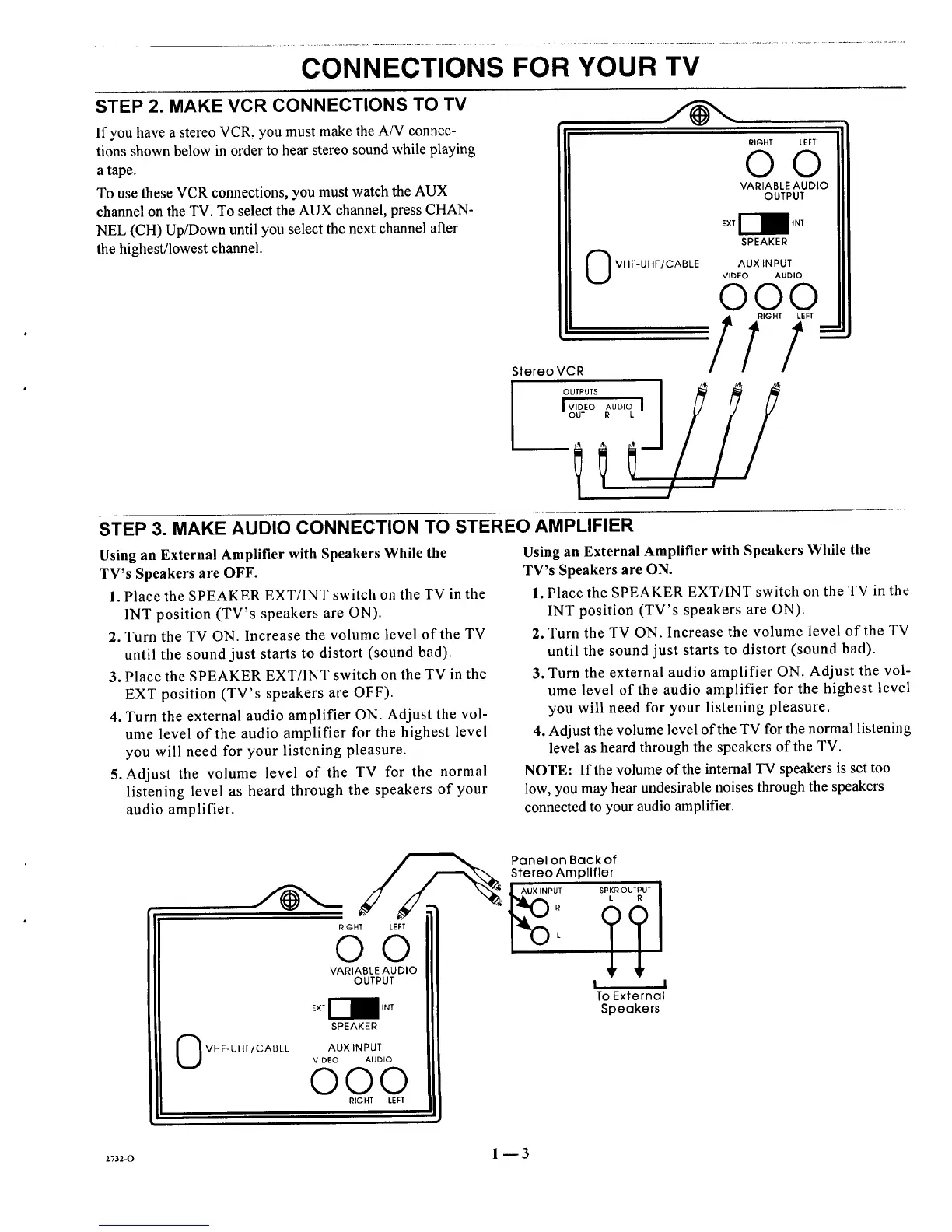
STEP 2. MAKE VCR CONNECTIONS TO TV
If you have a stereo VCR, you must make the A/V connec-
tions shown below in order to hear stereo sound while playing
a tape.
To use these VCR connections, you must watch the AUX
channel on the TV. To select the AUX channel, press CHAN-
NEL (CH) Up/Down until you select the next channel after
the highest/lowest channel.
RIGHT
OO
VHF-UHF/CABLE
OUTPUT
SPEAKER
AUX INPUT
VIDEO AUDIO
000
STEP 3. MAKE AUDIO CONNECTION TO STEREO AMPLIFIER
Using an External Amplifier with Speakers While the
TV's Speakers are OFF.
1. Place the SPEAKER EXT/INT switch on the TV in the
1NT position (TV's speakers are ON).
2. Turn the TV ON. Increase the volume level of the TV
until the sound just starts to distort (sound bad).
3. Place the SPEAKER EXT/INT switch on the TV in the
EXT position (TV's speakers are OFF).
4. Turn the external audio amplifier ON. Adjust the vol-
ume level of the audio amplifier for the highest level
you will need for your listening pleasure.
5. Adjust the volume level of the TV for the normal
listening level as heard through the speakers of your
audio amplifier.
Using an External Amplifier with Speakers While the
TV's Speakers are ON.
1. Place the SPEAKER EXT/INT switch on the TV in the
INT position (TV's speakers are ON).
2. Turn the TV ON. Increase the volume level of the TV
until the sound just starts to distort (sound bad).
3. Turn the external audio amplifier ON. Adjust the vol-
ume level of the audio amplifier for the highest level
you will need for your listening pleasure.
4. Adjust the volume level of the TV for the normal listening
level as heard through the speakers of the TV.
NOTE: If the volume of the internal TV speakers is set too
low, you may hear undesirable noises through the speakers
connected to your audio amplifier.
VHF-UHF/CABLE
Panel on Backof I
Stereo Amplifier
00
VARIABLE AUDIO
OUTPUT
SPEAKER
AUX INPUT
VIDEO AUDIO
©©©
RIGHT LEFT
I I
To External
Speakers
2732-0 1 -- 3




 To Next Page