THE FIRST TIME YOU OPERATE YOUR TV
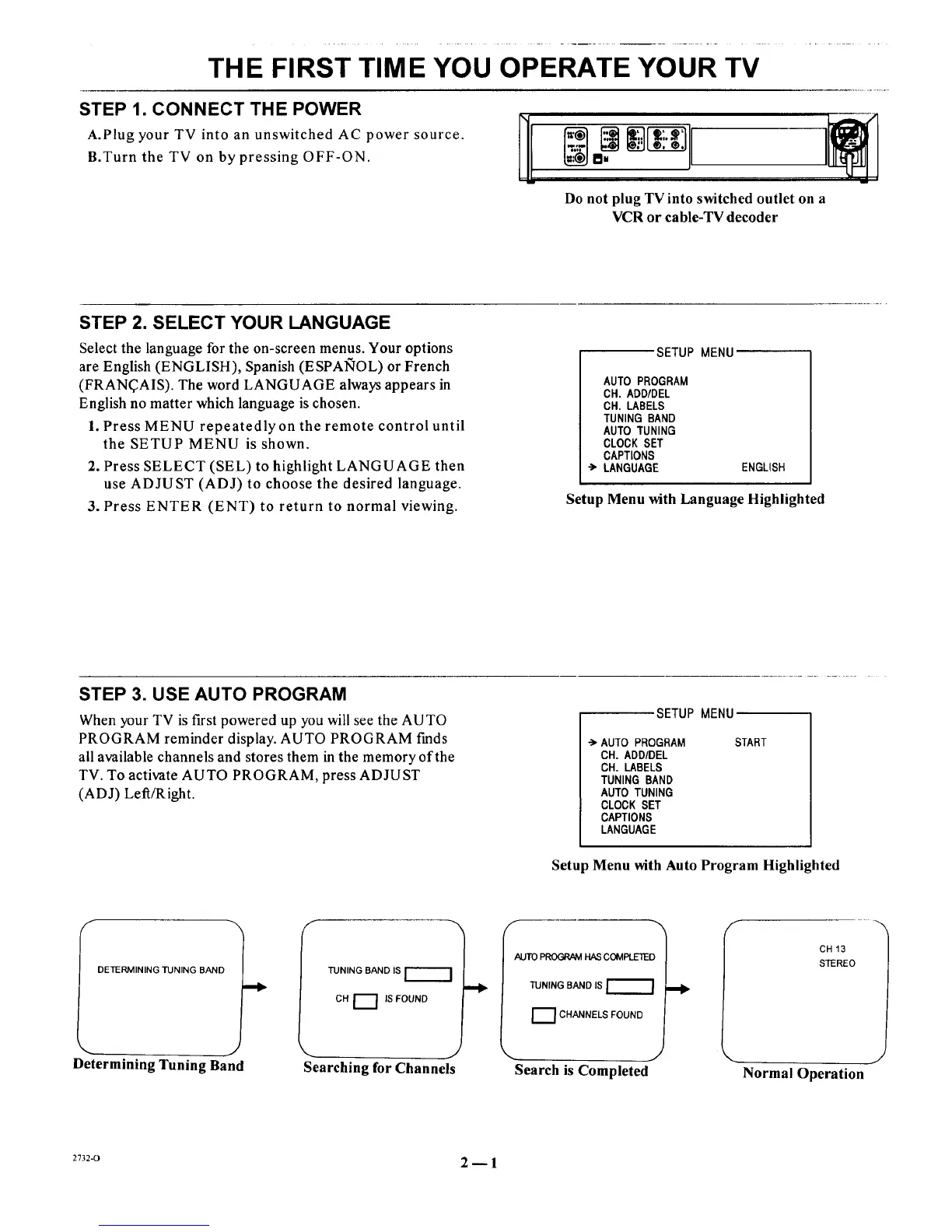
STEP 1. CONNECT THE POWER
r_
A.Plug your TV into an unswitched AC power source. ]1[
B.Turn the TV on by pressing OFF-ON.
w |
Do not plug TV into switched outlet on a
VCR or cable-TV decoder
STEP 2. SELECT YOUR LANGUAGE
Select the language for the on-screen menus. Your options
are English (ENGLISH), Spanish (ESPAI_OL) or French
(FRAN(_AIS). The word LANGUAGE always appears in
English no matter which language is chosen.
1. Press MENU repeatedly on the remote control until
the SETUP MENU is shown.
2. Press SELECT (SEL) to highlight LANGUAGE then
use ADJUST (ADJ) to choose the desired language.
3. Press ENTER (ENT) to return to normal viewing.
SETUP MENU
AUTO PROGRAM
CH. ADD/DEL
CH. LABELS
TUNING BAND
AUTO TUNING
CLOCK SET
CAPTIONS
LANGUAGE ENGLISH
Setup Menu with Language Highlighted
STEP 3. USE AUTO PROGRAM
When your TV is first powered up you will see the AUTO
PROGRAM reminder display. AUTO PROGRAM finds
all available channels and stores them in the memory of the
TV. To activate AUTO PROGRAM, press ADJUST
(ADJ) Left/Right.
SETUP MENU
-_ AUTO PROGRAM
CH. ADD/DEL
CH. LABELS
TUNING BAND
AUTO TUNING
CLOCK SET
CAPTIONS
LANGUAGE
START
Setup Menu with Auto Program Highlighted
DETERMINING TUNING BAND
TUNING BAND IS
CH [_] IS FOUND
Determining Tuning Band Searching for Channels
AUTO PROGRAM HAS COMPLETED
TUNING BAND IS
1_1 CHANNELS FOUND
Search is Completed
f
CH 13
STEREO
Normal Operation
2732-0 2_1




 To Next Page