This function enables you to set a recording length
simply by pressing RECORD/OTR button on the
TV/VCR.
Make sure...
• Power is turned on.
• The erase-prevention tab has not been removed.
NOTE: This function CANNOT be done from the
remote control.
1 Select the channel to be recorded
Press number buttons on the remote control or the
CHANNEL • or • button.
2 Begin OTR
Press RECORD/OTR button on (,T,_....
the TV/VCR as many times as
needed. The recording length
will be determined by the
number of times you press p
RECORD/OTR button.
Push(es)
1push
2 pushes
3 pushes
17 pushes
18 pushes
HINTS:
Each additional push will increase the recording time by
30 minutes up to 8 hours.
Display Recording length
(normal recording)
0:30 30 minutes
1:00 60 minutes
8:00 480 minutes
(normal recording)
• Recording starts immediately when the REC/OTR
button is pressed.
• When REC/OTR button is pressed 18 times, the
TV/VCR switches back to the Normal Recording
mode.
• To stop the OTR operation, press STOP button on the
TV/VCR or on the remote control.
• To show the remaining time, press SELECT button
until "OTR" appears on the TV screen.
• Recording stops when 0:00 is reached.
• Please note that in the SLP mode maximum record-
ing time, assuming the tape is started at the begin-
ning, is 8 hours using T- 160 (or 6 hours using T- 120).
• If the tape runs out before the end time, the TV/VCR
will switch to the Stop mode immediately, eject the
tape and the TV/VCR power will turn off.
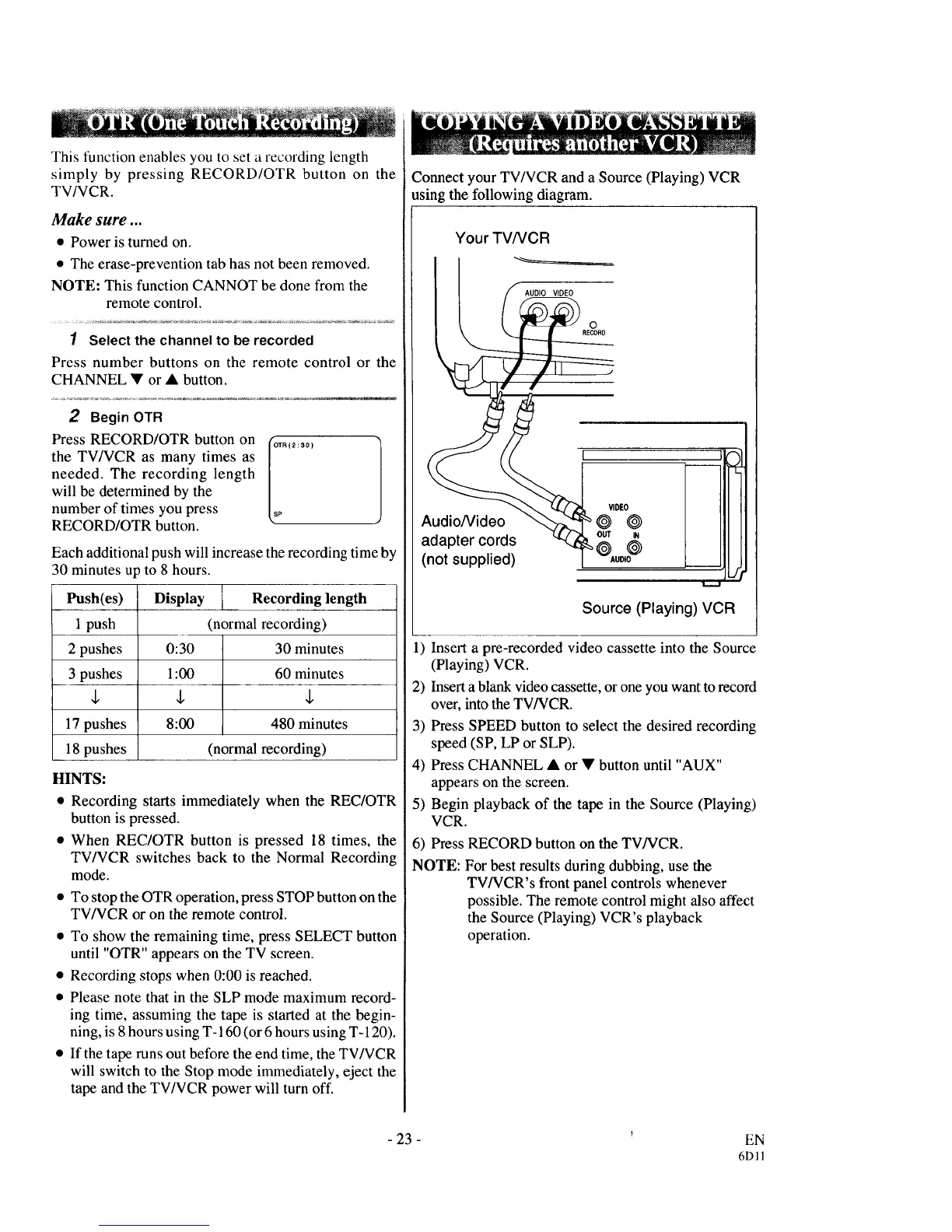
Connect your TV/VCR and a Source (Playing) VCR
using the following diagram.
Your TV/VCR
AUDIO VIDEO
o
RECORD
VIDEO
Audio/Video @ @
adapter cords OUT ,N
@
(not supplied)
J
Source (Playing) VCR
1) Insert a pre-recorded video cassette into the Source
(Playing) VCR.
2) Insert a blank video cassette, or one you want to record
over, into the TV/VCR.
3) Press SPEED button to select the desired recording
speed (SP, LP or SLP).
4) Press CHANNEL • or • button until "AUX"
appears on the screen.
5) Begin playback of the tape in the Source (Playing)
VCR.
6) Press RECORD button on the TV/VCR.
NOTE: For best results during dubbing, use the
TV/VCR's front panel controls whenever
possible. The remote control might also affect
the Source (Playing) VCR's playback
operation.
- 23 -
EN
6Dll



 To Next Page