_Jl LKAI IfN_ _ON KUL, b AJND i_ U_LliO_
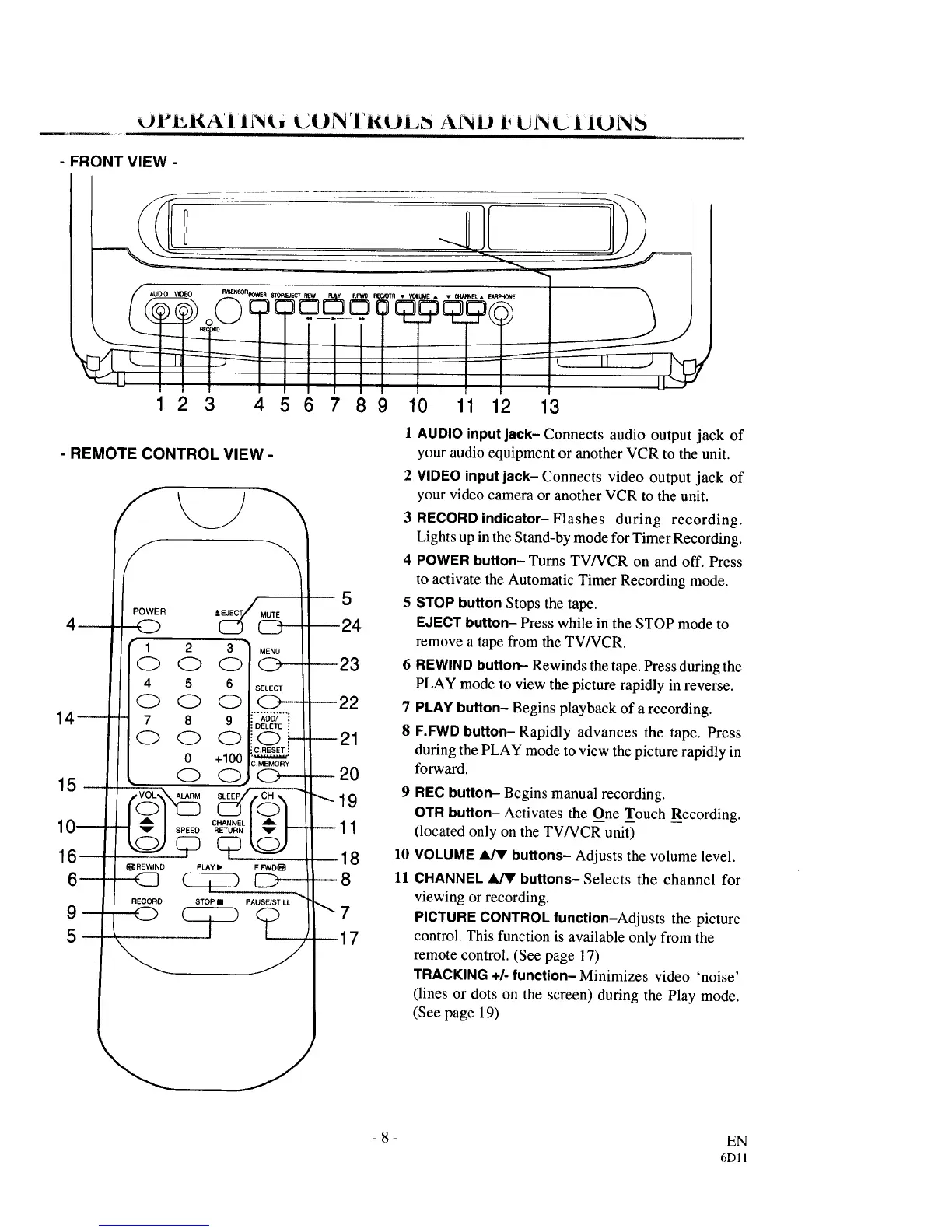
- FRONT VIEW -
1 2 3 4 5 6 7 8 9 10 11 12 3
- REMOTE CONTROL VIEW -
15
POWER
_REWlND
RECORO
SELECT
(D
ADD/ :
DELETE !
(D--
C.RESET :
),MEMORY
C>--
5
24
23
10
11
1 AUDIO inputlack- Connects audio output jack of
your audioequipment or anotherVCR to theunit.
2 VIDEO inputjack- Connectsvideo outputjack of
your video camera or another VCR to the unit.
3 RECORD indicator-Flashes during recording.
Lights up in the Stand-by mode for Timer Recording.
4 POWER button-Turns TV/VCR on and off. Press
to activate the Automatic Timer Recording mode.
5 STOP button Stops the tape.
EJECT button- Presswhile in the STOP modeto
remove a tape from the TV/VCR.
6 REWINDbutton- Rewinds the tape. Press during the
PLAY mode to view the picture rapidly in reverse.
7 PLAY button- Begins playback of a recording.
8 F.FWD button-Rapidly advances the tape. Press
during the PLAY mode to view the picture rapidly in
forward.
REC button- Begins manual recording.
OTR button- Activates the One Touch Recording.
(located only on the TV/VCR unit)
VOLUME _ buttons- Adjusts the volume level.
CHANNEL _ buttons- Selects the channel for
viewing or recording.
PICTURE CONTROL function-Adjusts the picture
control. This function is available only from the
remote control. (See page 17)
TRACKING +/- function- Minimizes video 'noise'
(lines or dots on the screen) during the Play mode.
(See page 19)
-8-
EN
6D11



 To Next Page