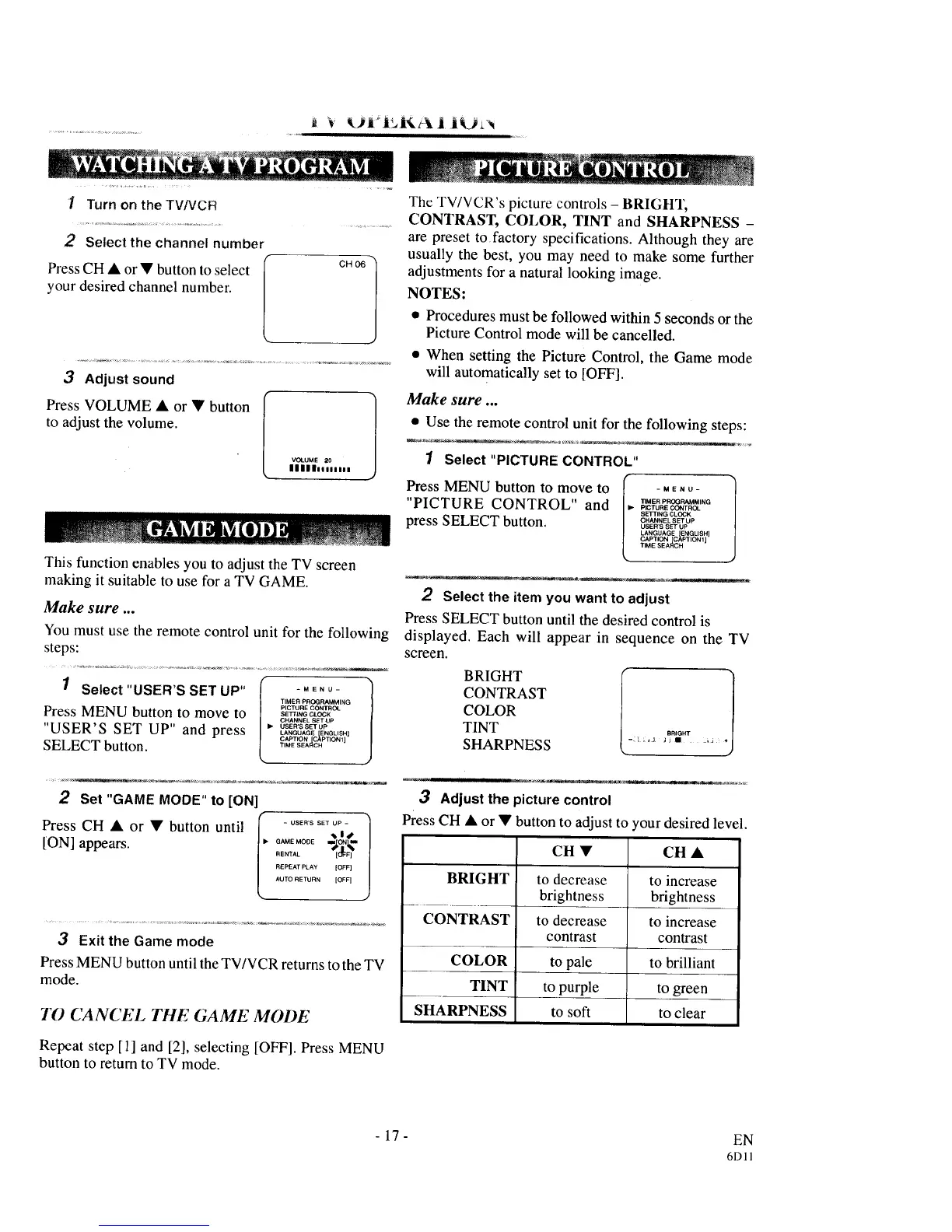
1 Turn on the TVNCR
2 Select the channel number
Press CH • or • button to select
your desired channel number.
CH 06
3 Adjust sound
Press VOLUME • or • button
to adjust the volume.
VOLUME 20
lllililiilnl
This function enables you to adjust the TV screen
making it suitable to use for a TV GAME.
Make sure ...
You must use the remote control unit for the following
steps:
1 Select "USER'S SET UP" I -"_N_-
TIMER PROGRAMMING
PLGTURECONTROL
Press MENU button to move to SE'_,N_0_0CN
CHANNEL SETUP
"USER'S SET UP" and press ..... 'SSE,_LANGUAGE ENGLISH l
CAPTION [C_PTION 1]
SELECT button. '.........
2 Set "GAME MODE"to [ON]
Press CH • or • button until f ..... .......
EM _.1_
[ON] appears, l" _AM.ENT,_O0_._o_k-to%
REPEAT PLAY [OFF]
AUTO RETURN [OFF]
3 Exit the Game mode
Press MENU button until the TV/VCR returns to the TV
mode.
TO CANCEL TIlE GAME MODE
Repeat step [1] and [2], selecting [OFF]. Press MENU
button to return to TV mode.
The TV/VCR's picture controls - BRIGHT,
CONTRAST, COLOR, TINT and SHARPNESS -
are preset to factory specifications. Although they are
usually the best, you may need to make some further
adjustments for a natural looking image.
NOTES:
• Procedures must be followed within 5 seconds or the
Picture Control mode will be cancelled.
• When setting the Picture Control, the Game mode
will automatically set to [OFF].
Make sure ...
• Use the remote control unit for the following steps:
1 Select "PICTURE CONTROL"
Press MENU button to move to _" -M_No-
J
"PICTURE CONTROL" and /" _._"Oa'_',.Gp,0_0RE_T.OL
SETTING CLOCK
press SELECT button. C""NE_osE,SS_S_UPOP
LANGUAGE [ENGLISH
CAP'FION _AP'IION 1
T ME SEARCH
COLOR
TINT
SHARPNESS
2 Select the item you want to adjust
Press SELECT button until the desired control is
displayed. Each will appear in sequence on the TV
screen.
CONTRAST
BRIGHT
-:l ,,J _JI _J
3 Adjust the picture control
Press CH • or • button to adjust to
CH •
BRIGHT to decrease
brightness
CONTRAST to decrease
contrast
to pale
to purple
to soft
COLOR
TINT
SHARPNESS
'our desired level.
CH •
to increase
brightness
to increase
contrast
to brilliant
to green
to clear
-17- EN
6Dll



 To Next Page