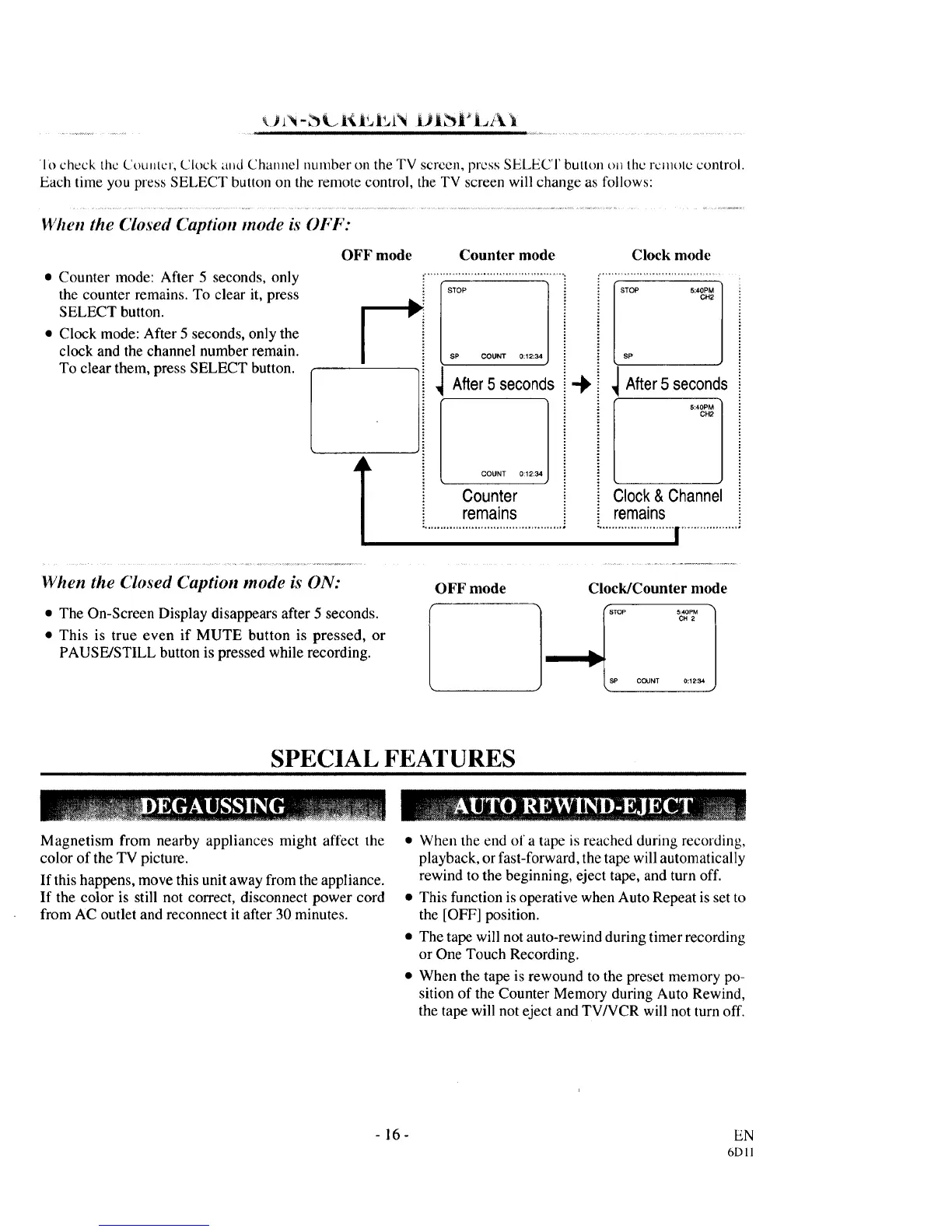
rio check the CiouJltcr, Clock a_d Channel number on the TV scrcen, press SELECT button t)_ the remote control.
Each time you press SELECT button on the remote control, the TV screen will change as follows:
When the Closed Caption mode is OFF:
OFF mode Counter mode
• Counter mode: After 5 seconds, only
the counter remains. To clear it, press
SELECT button. [
• Clock mode: After 5 seconds, only the
clock and the channel number remain.
To clear them, press SELECT button.
$P COUNT 0:12:34
COUNT 0:12:34
Counter
remains
Clock mode
STOP 5:40PM
CH2
SP
_ After5 seconds
5:40PM
OH2
Clock & Channel
remains
......................... .................. •
When the Closed Caption mode is ON:
• The On-Screen Display disappears after 5 seconds.
• This is true even if MUTE button is pressed, or
PAUSE/STILL button is pressed while recording.
OFF mode Clock/Counter mode
SP COUNT 0:12:34
SPECIAL FEAT URES
Magnetism from nearby appliances might affect the
color of the TV picture.
If this happens, move this unit away from the appliance.
If the color is still not correct, disconnect power cord
from AC outlet and reconnect it after 30 minutes.
• When the end of a tape is reached during recording,
playback, or fast-forward, the tape will automatically
rewind to the beginning, eject tape, and turn off.
• This function is operative when Auto Repeat is set to
the [OFF] position.
• The tape will not auto-rewind during timer recording
or One Touch Recording.
• When the tape is rewound to the preset memory po-
sition of the Counter Memory during Auto Rewind,
the tape will not eject and TV/VCR will not turn off.
-16-
EN
6DI1



 To Next Page