Make sure ...
• The remote control needs to be used.
• Power must be turned on.
lit/he eaample below, lhe clock will be sel Io."
March 1st, 1996 at 5:40PM
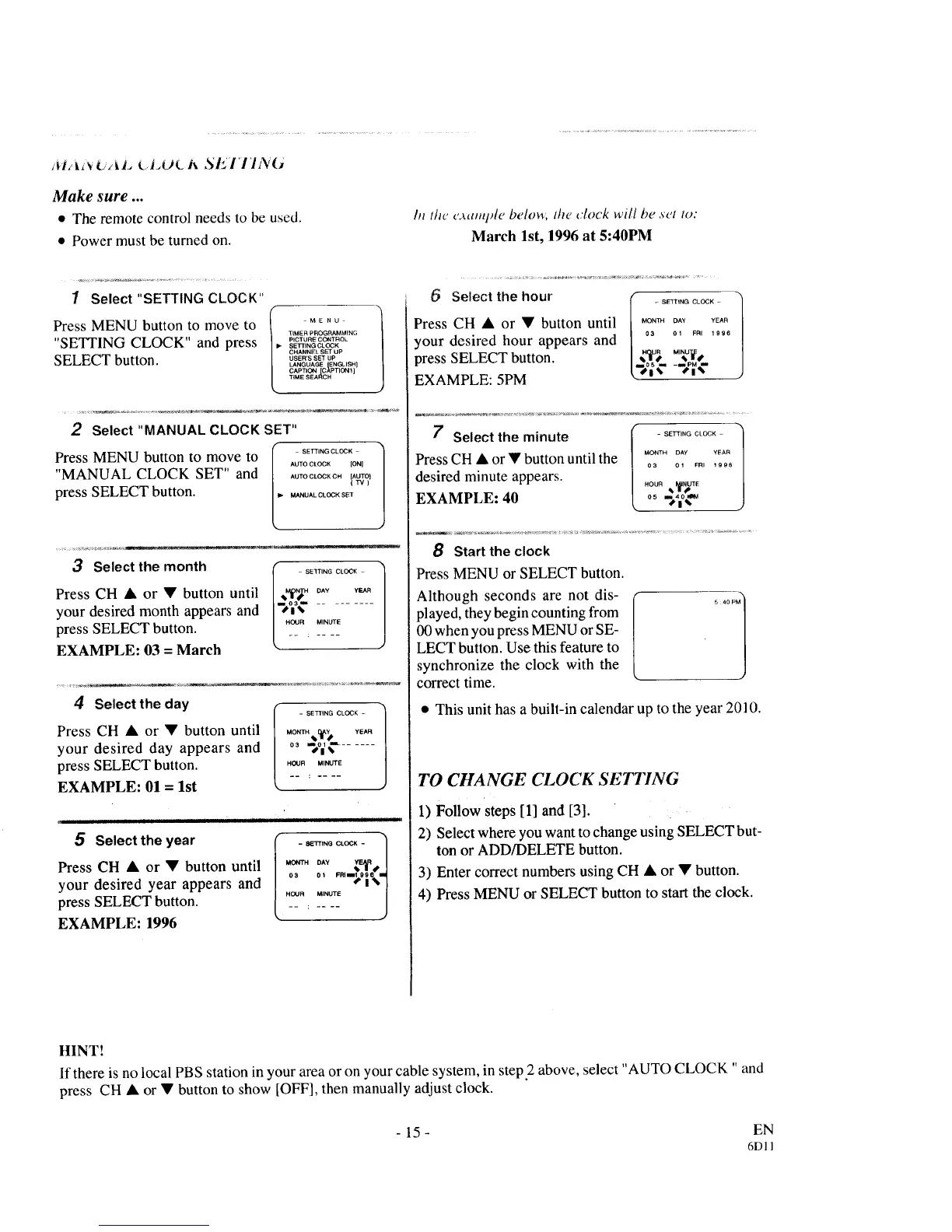
1 Select "SETTING CLOCK"
Press MENU button to move to
"SETTING CLOCK" and press
SELECT button.
Ill=* MENU
TLMER PROGRA_MLNG
PICTURE CONTROL
SEI3"ING CLOCK
CHANNEL SET UP
USER'S SET UP
LANGUAGE ENGLISH]
CAPTION [C_PTION1 ]
TIME SEARCH
2 Select "MANUAL CLOCK SET"
II_ SETTING CLOCK
Press MENU button to move to AUTOC_OC_to,_
"MANUAL CLOCK SET" and ...... OC_oNtAUTO_
press SELECT button ............ _'
3 Select the month
Press CH • or • button until
your desired month appears and
press SELECT button.
EXAMPLE: 03 = March
OUR MINUTE
4 Selectthe day
Press CH • or • button until
your desired day appears and
press SELECT button.
EXAMPLE: 01 = 1st
- SETTING CLOCK -
MON_H,._, YEA.
o, ._oI¢ ......
HOUR MINUTE
ii i ii iii i i ii i i i
5 Select the year
Press CH • or • button until
your desired year appears and
press SELECT button.
EXAMPLE: 1996
- 8ETTtNG CLOCK -
/
MONTH DAY _E_R•
....... -:,%.]
HOUR MINUTE /
J
Select the hour
Press CH • or • button until
your desired hour appears and
press SELECT button.
EXAMPLE: 5PM
- SETTING CLOCK -
MONTH DAY YEAR
03 01 FRI 1996
M'N2
t')l_" -'_1¢
7 Select the minute _SETT,N_C_O_,-
MONTH DAY YEAR
Press CH • or • button until the o..........
desired minute appears.
,ous,,_gTE
EXAMPLE: 40 o_._o_
8 Start the clock
Press MENU or SELECT button.
Although seconds are not dis-
played, they begin counting from
00 when you press MENU or SE-
LECT button. Use this feature to
synchronize the clock with the
correct time.
5 40PM 1
• This unit has a built-in calendar up to the year 2010.
TO CHANGE CLOCK SETI7NG
1) Follow steps [1] and [3].
2) Select where you want to change using SELECT but-
ton or ADD/DELETE button.
3) Enter correct numbers using CH • or • button.
4) Press MENU or SELECT button to start the clock.
HINT!
If there is no local PBS station in your area or on your cable system, in step2 above, select "AUTO CLOCK " and
press CH • or • button to show [OFF], then manually adjust clock.
- 15 - EN
6DI 1



 To Next Page