TIMER
i
You may set the TV/VCR to record while you are away.
You can set 8 programs to record on a specific day, daily
or weekly within a 1 year period.
In the example below, the timer is set to record at:
DATE: MAY 6th, 1996
SETTING TIME: 7:30PM to 8:50PM
CHANNEL: CH61
TAPE SPEED: LP
PROGRAM # : 4
NOTE: Use the remote control for this procedure.
Make sure ...
• Be sure the clock is set to the correct time and date
before setting the timer.
Avoid over lap of programs...
There is a case that a program will not be performed.
when programs overlap;
• The program with an earlier start time has priority.
• Once the earlier program finishes, the overlapping
programs will begin recording in sequence.
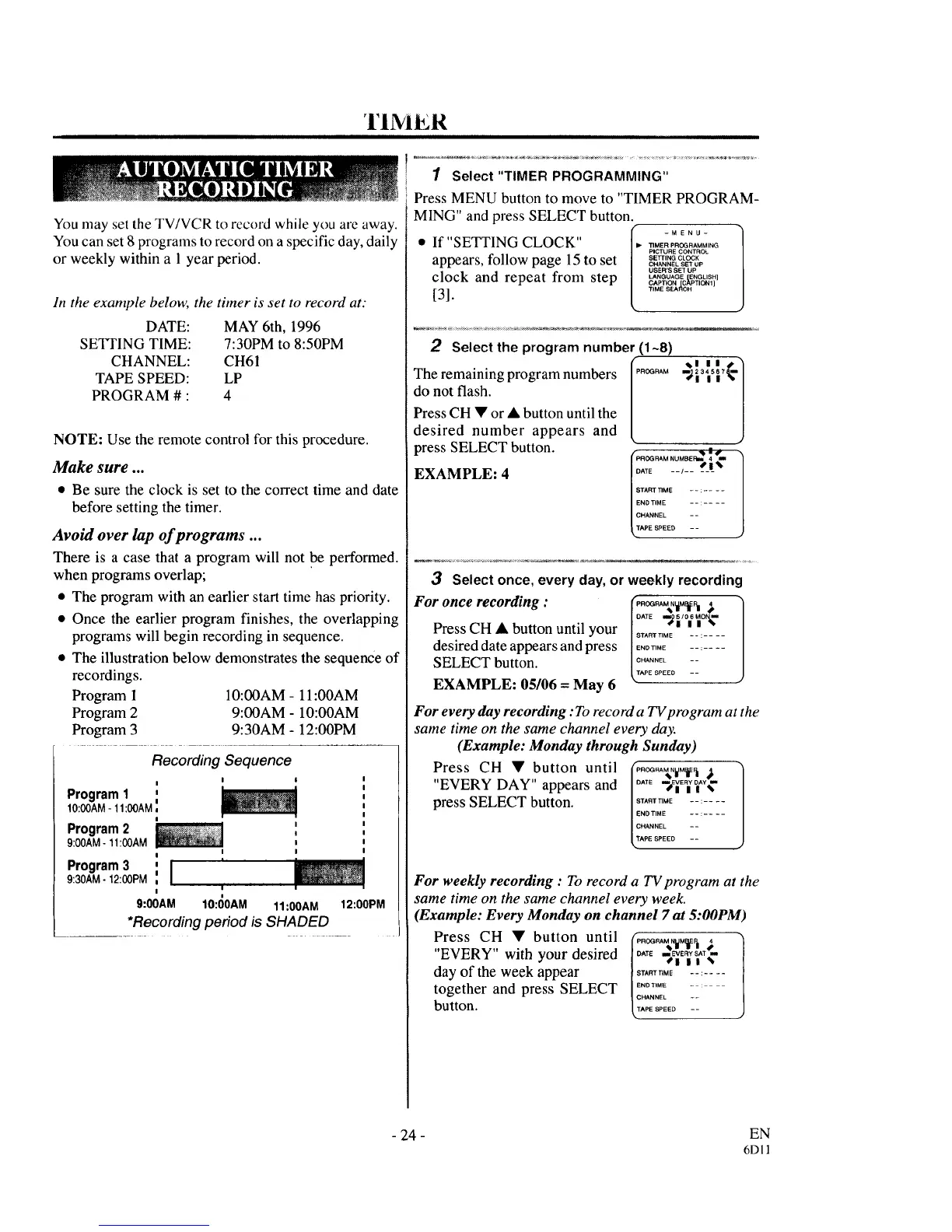
• The illustration below demonstrates the sequence of
recordings.
Program 1 10:00AM- 11:00AM
Program 2 9:00AM - 10:00AM
Program 3 9:30AM - 12:00PM
Recording Sequence
Program 1 '
IO:00AM-11:00AM_=
Program 2 I
9:00AM - 11:00AM i
I I
!
Program3 ',1 '
9:30AM - 12:00PM
= i
I =
9:00AM 10:00AM 11:00AM 12:00PM
*Recording period is SHADED
1 Select "TIMER PROGRAMMING"
Press MENU button to move to "TIMER PROGRAM-
MING" and press SELECT button.
I_. -MENU-
• If"SETTING CLOCK" _..... o_......
PICTURE CONTROL
appears, follow page 15 to set s_........
CHANNEL SET UP
USER'S SET UP
clock and repeat from step CAPTIoNLANGUAGE[c_PTICHljENGLISH]
[31. ,....... CH
2 Select the program number (1~8)
/
The remaining program numbers [P.O_NA_
do not flash.
L
PressCH • or • button until the
desired number appears and
press SELECT button.
EXAMPLE: 4
J
ATE --_-- _S_!%
TARTTIME - - : ....
END TIME --
CHANNEL - -
APE SPEED - -
3 Select once, every day, or weekly recording
For once recording : _..O_RA%N_"=
Press CH • button until your |°ATE_,_o_o_-
SIS _m TIME -- : ....
desired date appears and press l!,E........
SELECT button. _'N_EE° --
EXAMPLE: 05106 = May 6
For every day recording: To record a TV program at the
same time on the same channel every day.
(Example: Monday through Sunday)
Press CH • button until _P,O_RA_,,W,M_.t _ "]
"EVERY DAY" appears and IC`'E --_E]Y]A_¢
press SELECT button. :_,_E _:_-__
ITACHANNEL --
PE SPEED --
For weekly recording : To record a TV program at the
same time on the same channel every week.
(Example: Every Monday on channel 7 at 5:00PM
Press CH • button until (P,O_RAMN_ ,
"EVERY" with your desired /°"E ._E,_S,T.
€111%
day of the week appear IS'A"_T'_ .......
together and press SELECT L:T_:_'N_ _-
button. ,PESPEED--
- 24 - EN
6Dll



 To Next Page