i KO _ bLi_iiOO 1 1_ tJ is Is iiib
If you have thoroughly read this instructions manual and are still having some difficulties operating your TV/VCR,
the chart below will help you to locate the problem and give you corrective measures to fix it. Find which symptom
best matches the difficulty you are experiencing and use the information in the columns on the right to remedy the
problem.
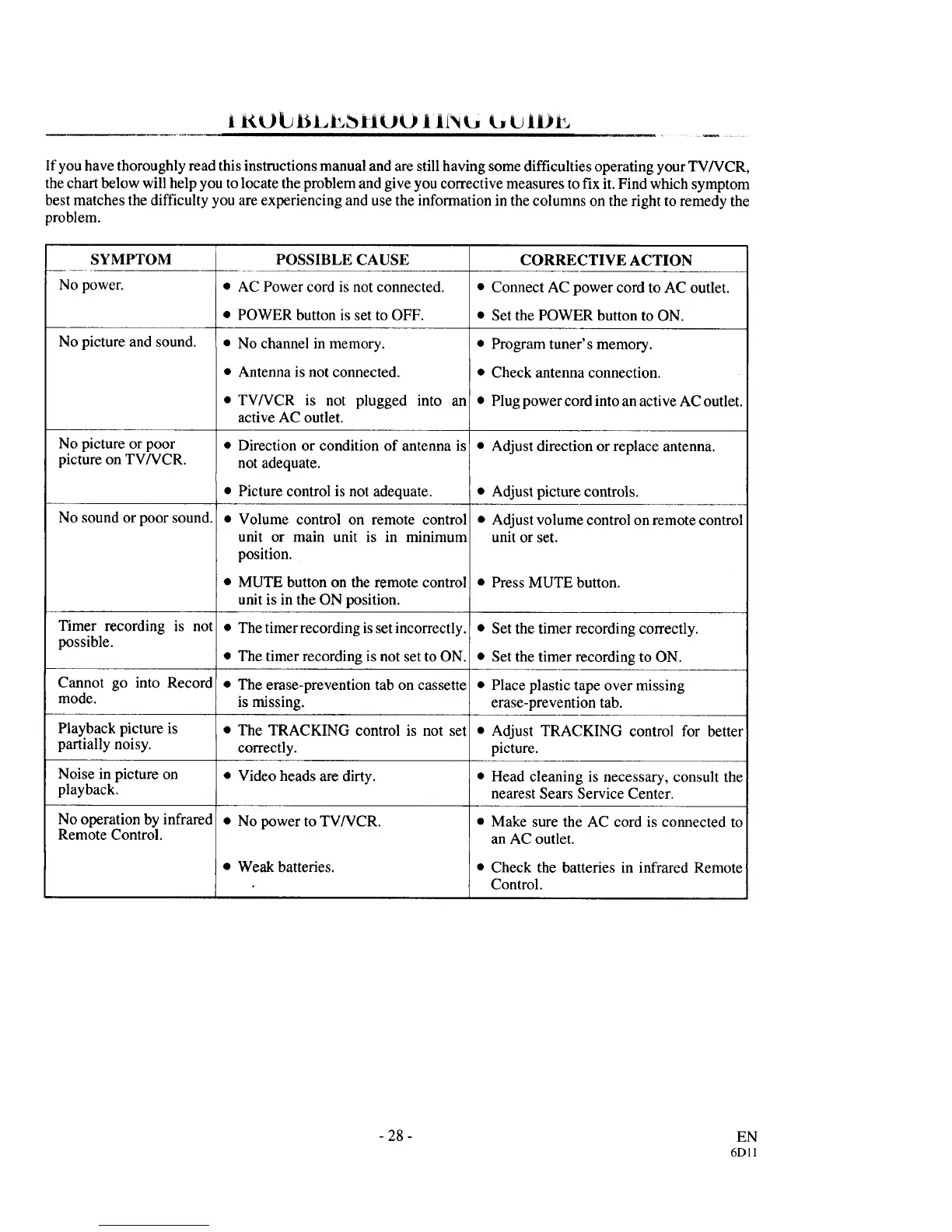
SYMPTOM
No power.
No picture and sound.
No picture or poor
picture on TV/VCR.
No sound or poor sound.
Timer recording is not
possible.
Cannot go into Record
mode.
Playback picture is
partially noisy.
Noise in picture on
playback.
No operation by infrared
Remote Control.
POSSIBLE CAUSE
• AC Power cord is not connected.
• POWER button is set to OFF.
• No channel in memory.
• Antenna is not connected.
• TV/VCR is not plugged into an
active AC outlet.
• Direction or condition of antenna is
not adequate.
• Picture control is not adequate.
• Volume control on remote control
unit or main unit is in minimum
position.
• MUTE button on the remote control
unit is in the ON position.
• The timer recording is set incorrectly.
• The timer recording is not set to ON.
• The erase-prevention tab on cassette
is missing.
• The TRACKING control is not set
correctly.
• Video heads are dirty.
• No power to TV/VCR.
• Weak batteries.
CORRECTIVE ACTION
• Connect AC power cord to AC outlet.
• Set the POWER button to ON.
• Program tuner's memory.
• Check antenna connection.
• Plug power cord into anactive AC outlet.
Adjust direction or replace antenna.
• Adjust picture controls.
• Adjust volume control on remote control
unit or set.
• Press MUTE button.
• Set the timer recording correctly.
• Set the timer recording to ON.
• Place plastic tape over missing
erase-prevention tab.
• Adjust TRACKING control for better
picture.
• Head cleaning is necessary, consult the
nearest Sears Service Center.
• Make sure the AC cord is connected to
an AC outlet.
• Check the batteries in infrared Remote
Control.
- 28 -
EN
6Dll



 To Next Page