Install the MXK
MXK Hardware Installation Guide
43
Power on the MXK 823 is located on both the front of the chassis and the rear
of the chassis.
For the procedure on connecting the wiring between the MXK terminal block
and the power supplies in the rear of the MXK 823 chassis, see Connect
power to the rear of the MXK 823 and ground the chassis on page 47
Connecting power and grounding the chassis to the front of
the MXK
Use the following procedure to connect the wiring between the MXK terminal
block and the power supplies in the front of the MXK chassis.
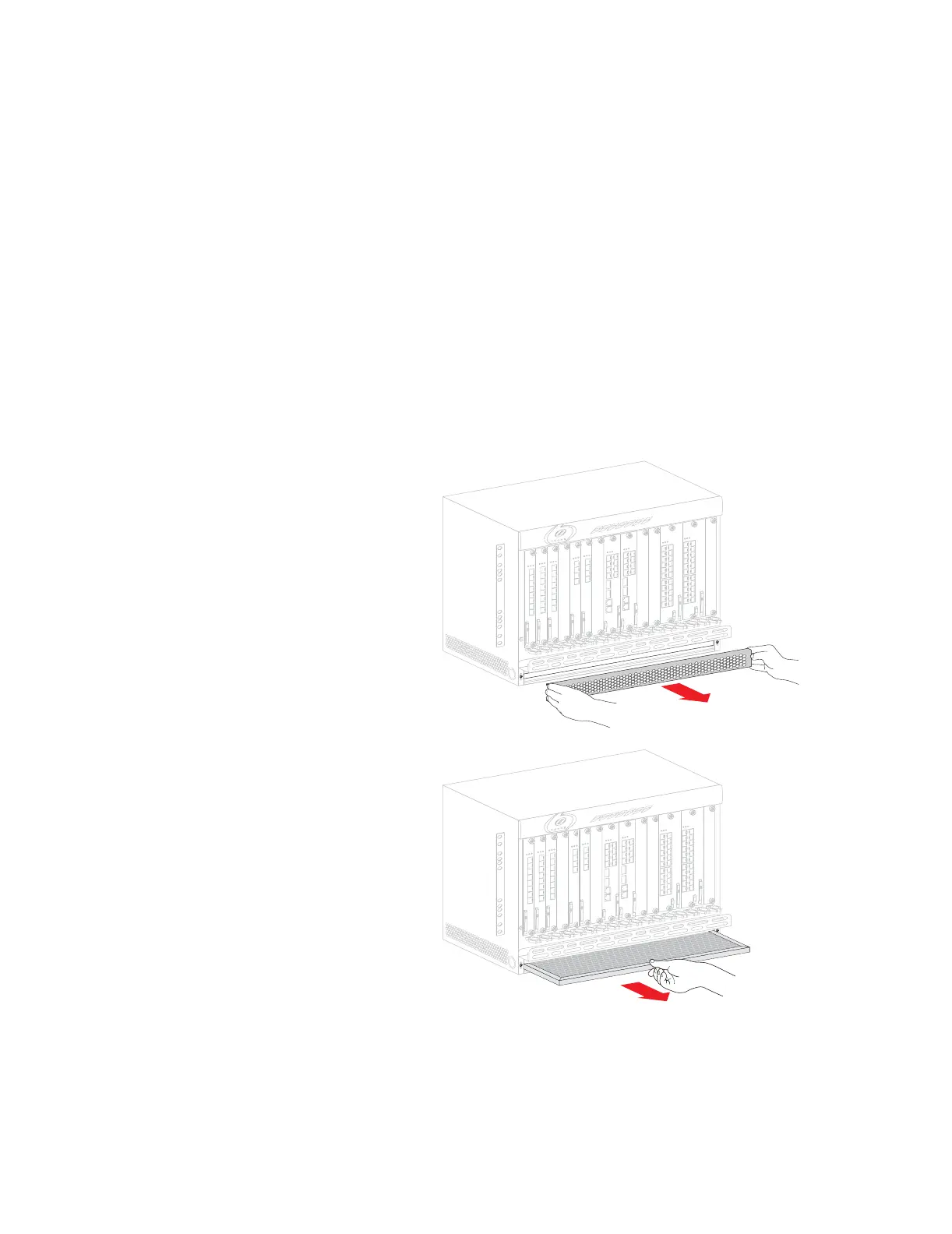
1 Remove the MXK lower bezel (Figure 14).
2 Remove the air filter (Figure 14).
Figure 14: Removing the front bezel and air filter
3 Locate the terminal block in the lower portion of the chassis.
4 Loosen the screws that attach the terminal block to the chassis.
5 Carefully remove the terminal block from the chassis.


 To Next Page