After the restart is complete, the WiFi relay is set up, and the router has access to the external network through the
upper WiFi. Connect your device to the router via wired or WiFi (this WiFi refers to the WiFi sent by 9809M, named zlan+id,
the default password is 8 sixes) to access the Internet.
3.2.2. WIFIBridge Mode
When the LAN port of 9809M needs to be in the same network segment as the parent network, the WIFI needs to be set to bridge
mode.
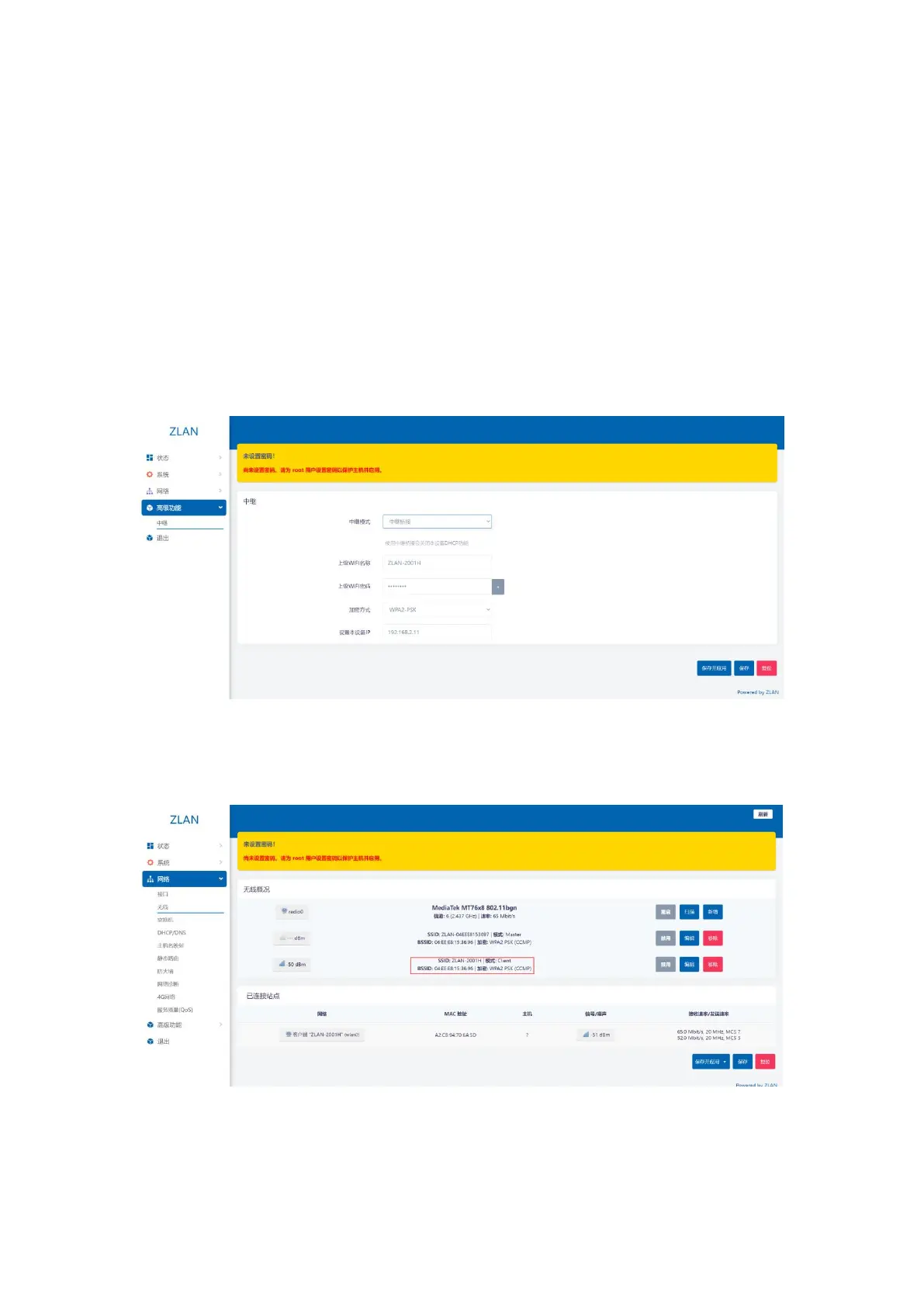
Step 1: Enter the web page, click on the left menu bar: Advanced Functions -> Relay, select Relay Bridging for Relay Mode, select the
name of the AP to be bridged for the Parent WIFI Name, fill in the AP password for the Parent WIFI Password, and select the corresponding
encryption method. It is best to set the IP of this device to an IP in a different network segment from the parent router:
picture18Advanced Features
Step 2: After filling in the required information, click "Save and Apply" in the lower right corner. After the application is completed,
the relay is successful. Menu bar: Network -> Wireless:
picture19Relay Wireless Overview
The parent WiFi will appear here. If the encryption method also appears, it means that the connection to the parent WiFi is successful.
Then click the menu bar: Network->Interface:
12


 To Next Page