22
Water temperature display
ORP mV display (shows chlorinaon eciency)
Setpoint display
Chlorinaon is o (setpoint = 0%)
ALARMS
Measured temperature too high or too low (non-blocking)
Measured salt concentraon too high or too low (non-blocking)
Measured pH too high or too low (non-blocking)
Measured ORP value too high or too low (non-blocking)
Values too high
Values too low
pH pump stopped
pH pump fuse blown
Cell damaged or calcied
Water ow problem
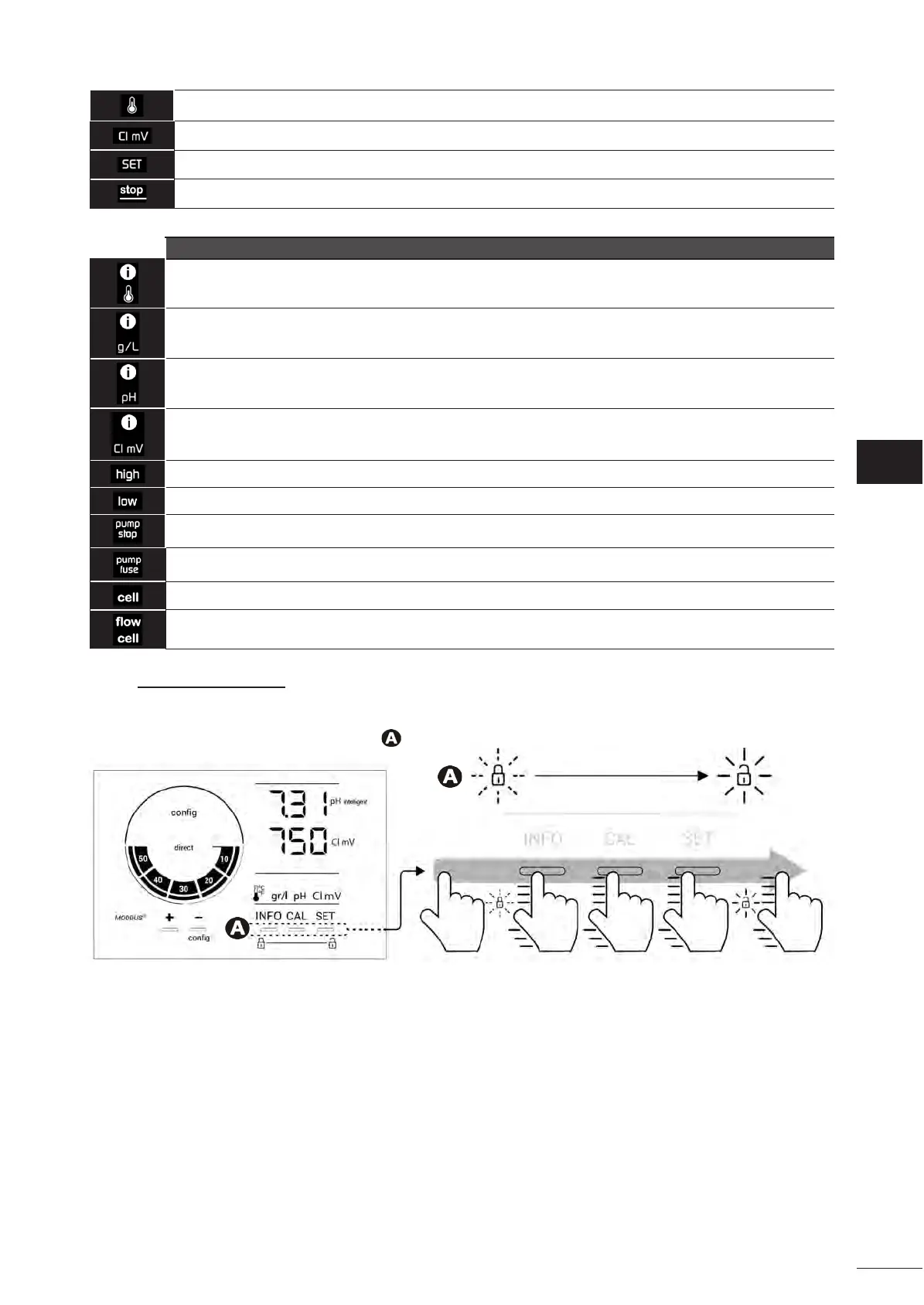
4.1.2. Unlocking the screen
Aer a while whitout any use, chlorinator user interface goes into standby display to save energy (depending on the
seng in the conguraon menu). To wake it up, screen needs to be unlocked :
• Slide your nger across the unlocking zone ( ) to the edge of the screen.







 To Next Page