23
4.2 I Roune use
4.2.1. Adjusng chlorine producon
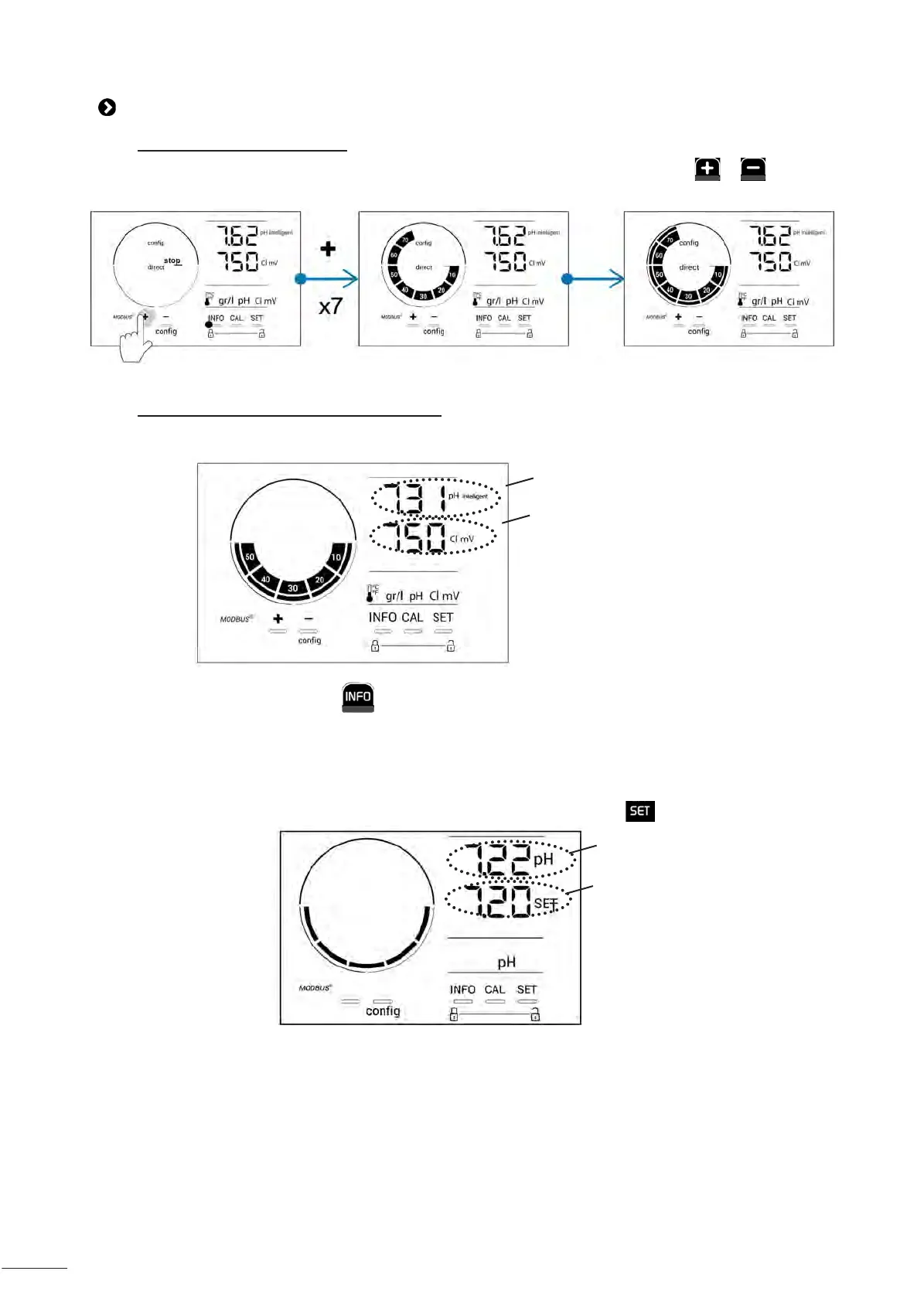
Chlorine producon can be manually adjusted between 0 and 100% in intervals of 10%, by using or : the
chlorine producon setpoint indicator is adjusted (in the following example, for producon at 70%).
The setpoint value remains valid unl next modied.
4.2.2. Displaying values and conguring setpoints
The pH and ORP values are automacally displayed on the home screen.
“Example with pH setpoint adjustment below (same logic for ORP setpoint).”
Measured pH value
Measured ORP value
To access all values and setpoints, press :
- Press once to access the temperature value and setpoint,
- Twice to access the salt concentraon value and setpoint,
- Three mes to access the pH value and setpoint,
- Four mes to access the ORP value and setpoint.
• The measured value appears at the top, the setpoint underneath (indicated by the icon).
Measured value
Setpoint
Example with pH setpoint adjustment
(same logic for ORP setpoint)







 To Next Page