34
5❺ Remote control using Fluidra Connect and NN app
5.1 I Wiring the chlorinator to Fluidra Connect power center
The chlorinator is a connectable device: informaon on the status of the swimming pool can be accessed at any
moment (to check the dashboard, change a seng, etc.) from a smartphone or tablet via the Fluidra Connect NN app.
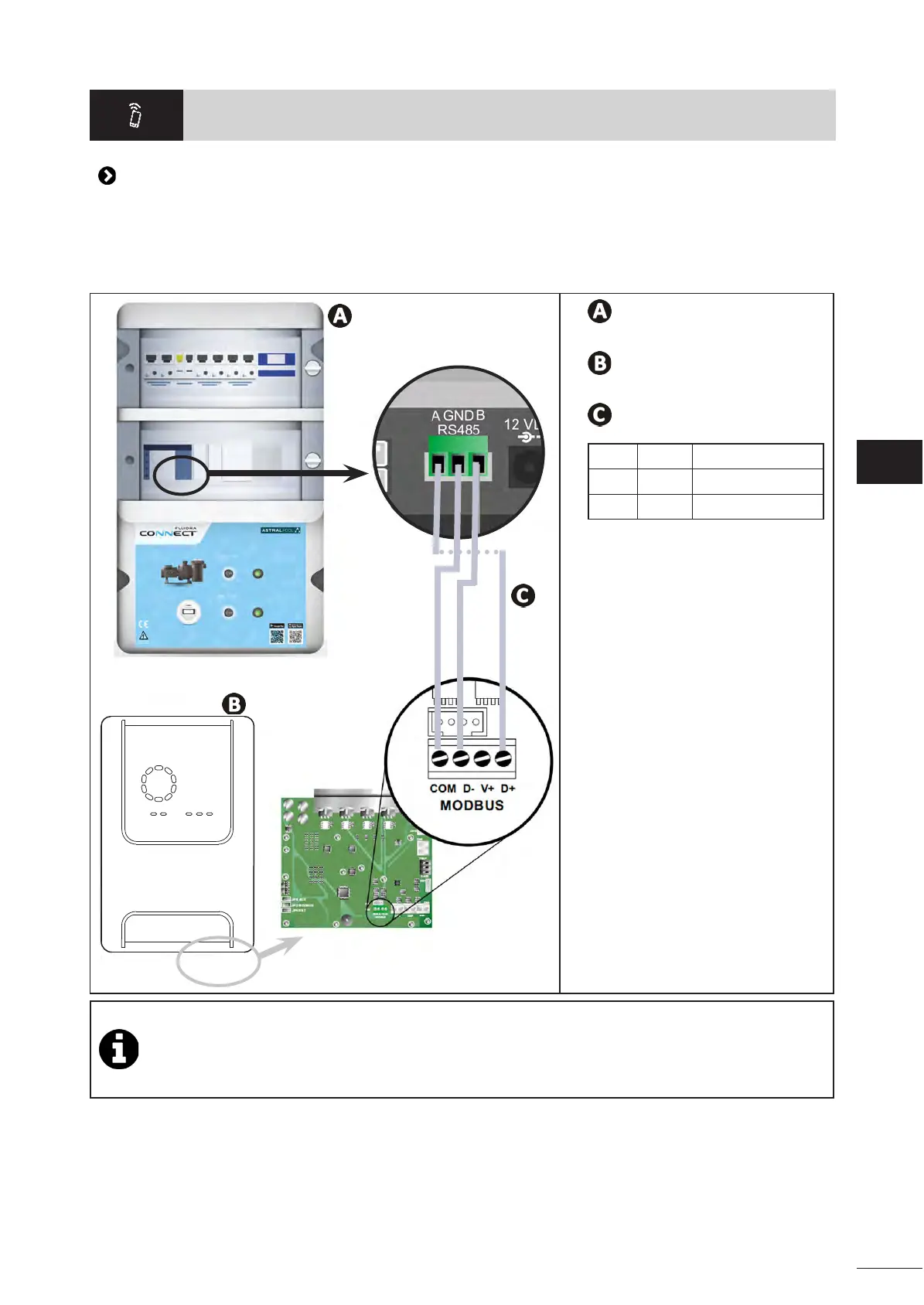
For this, the chlorinator must rst be connected to a Connect & Go automaon power center, following the connecon
method shown below.
Connect & Go automaon unit
Chlorinator
Connecons:
A D+ BLUE
GND COM BROWN
B D- WHITE
• It’s strongly advised to use a specic RS485 cable to wire the chlorinator to the Connect & Go power
center. If not available, an Ethernet cable can be used (RJ45 connectors cannot be used).
• The Fluidra Connect NN app also provides the possibility to locate professionals who can remotely check
the swimming pool, access the measurement history, and display errors through a Fluidra Connect service
plaorm.







 To Next Page