32
4.4 I Calibrang the sensors (pH or pH/ORP models)
4.4.1. Choosing the calibraon mode
• The pH sensor and the ORP sensor can be calibrated in "Standard" mode
• The pH sensor can also be calibrated in "Fast" mode
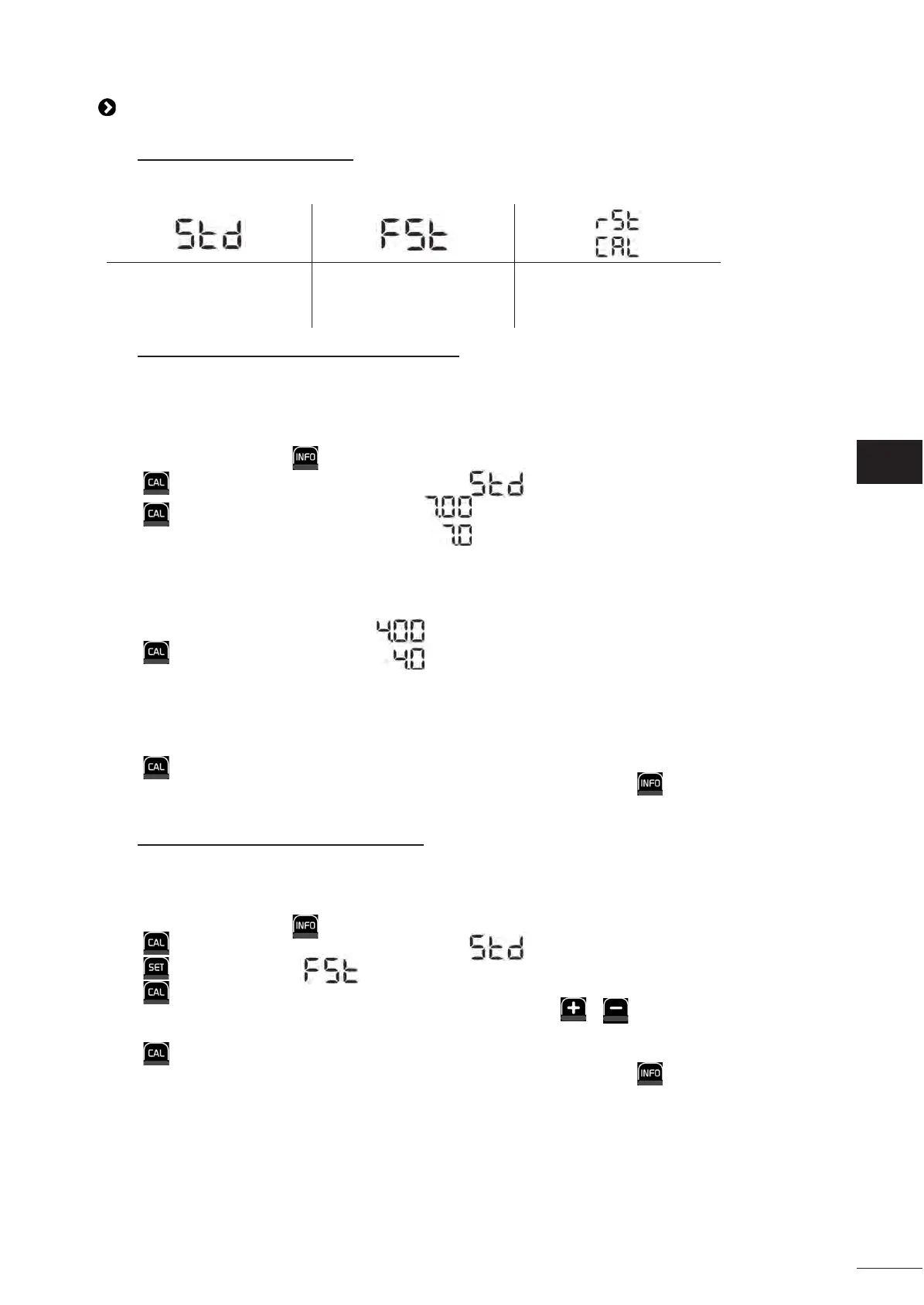
Standard mode (pH & ORP) Fast mode "Fast" (pH) Restart
Calibrate the sensor by
removing it
Calibrate without removing
the sensor
Restart calibraon
4.4.2. Calibrang the pH sensor in "Standard" mode
In “Standard” mode, the pH sensor is calibrated in 2 point calibraon (pH 4 and pH 7) ; 2 point calibraon is recommended
for more accurate measurement.
• Switch o the pool's pump and close the necessary valves in order to isolate the cell and the sensors.
• From the home screen, press 3 mes to access the pH values.
• Press to enter Calibraon mode. The screen displays ("Standard").
• Press to select this mode. The screen displays .
• Remove the sensor.
• Rinse the p of the sensor with tap water.
• Shake it to remove any residual water. Do not touch the glass bulb at the end of the pH sensor.
• Place the p of the pH sensor in the pH 7 soluon.
• Wait 15 seconds.
• Press to connue. The screen displays .
• Rinse the p of the sensor with tap water.
• Shake it to remove any residual water. Do not touch the glass bulb at the end of the pH sensor.
• Place the p of the pH sensor in the pH 4 soluon.
• Wait 15 seconds.
• Replace the sensor back in its holder.
• Press . Calibraon is complete.
• If necessary, adjust the setpoint (see § “4.4.4. Conguring the pH setpoint”) or press to return to the home
screen.
4.4.3. Calibrang the pH sensor in "Fast" mode
In “Fast” mode, the pH sensor is calibrated in 1 point calibraon ; 1 point calibraon is possible if the pH 7 and pH 4
soluons provided are not available.
• From the home screen, press 3 mes to access the pH values.
• Press to enter Calibraon mode. The screen displays ("Standard").
• Press . The screen displays ("Fast" calibraon mode).
• Press . The second displayed value ashes.
• Place a pH meter in the pool's water then modify this second value with or so that it matches the value
displayed by the pH meter.
• Press to conrm. The current sensor measurement has been replaced.
• If necessary, adjust the setpoint (see § “4.4.4. Conguring the pH setpoint”) or press to return to the home
screen.







 To Next Page