31
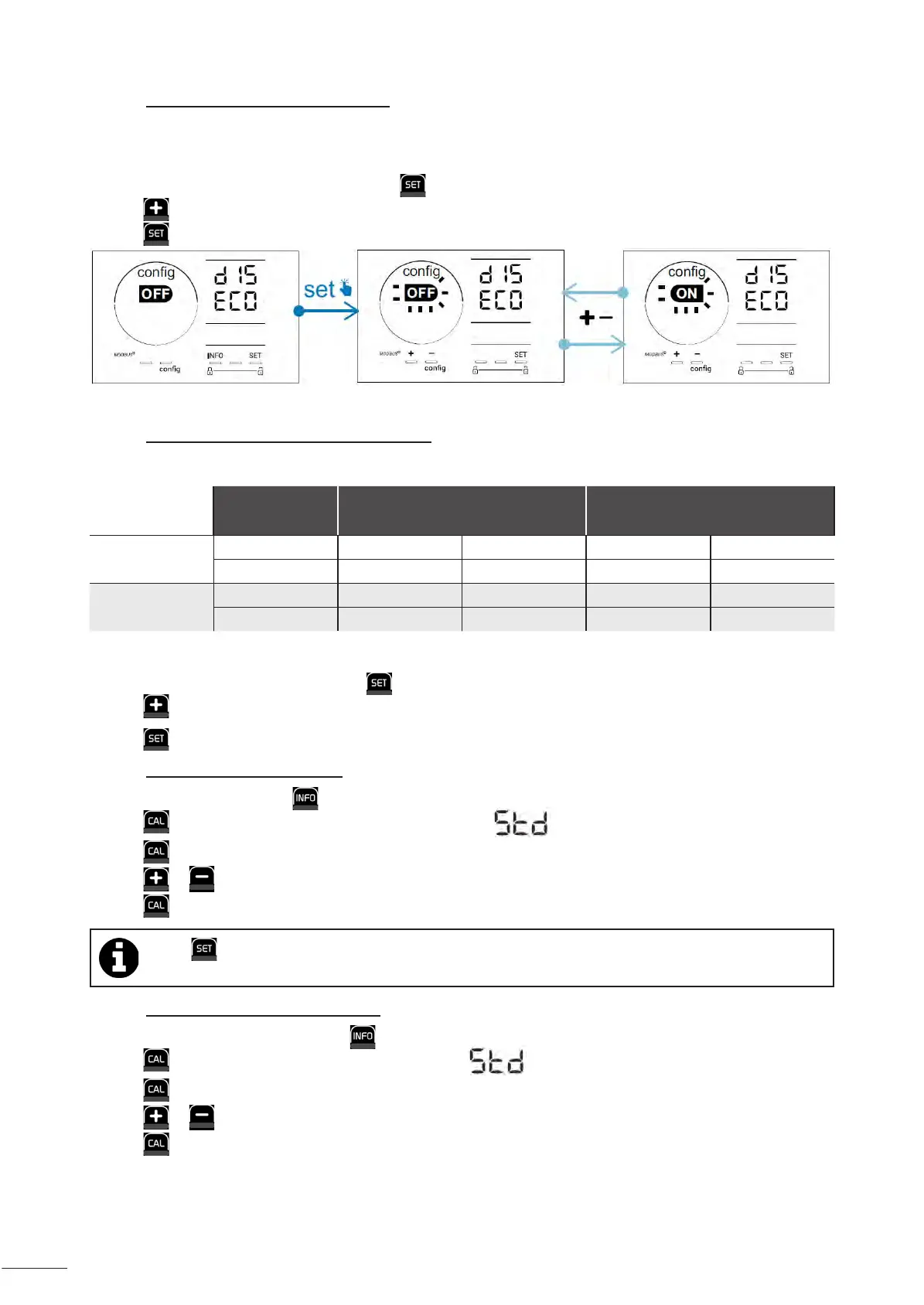
4.3.15. User interface energy saving mode
By default, the screen power saving mode is activated and an appliance which is unused goes into standby: an
animated production indicator is displayed and the measured values are not visible. To deactivate this mode:
• From the Conguraon/D15 ECO mode, press : “OFF” ashes.
• Press to switch to “ON”.
• Press to conrm.
4.3.16. "Bio": "Bio pool" mode for natural pools
The "Bio" mode is used to modify the pH and ORP setpoints and the related high and low alarms (see the values in the
table below) so they are best suited to natural pools.
« Bio pool »
mode
Threshold
Alarm
High (HI) Low (LO)
pH
OFF (default) 7.0 7.8 > 8.5 < 6.5
ON 6.5 8.5 > 9.0 < 6.0
ORP (mV)
OFF (default) 600 850 > 855 < 600
ON 300 850 > 855 < 300
By default, this mode is disabled; to acvate it:
• From the Conguraon/bio mode, press : "OFF" ashes.
• Press to acvate it ("ON").
• Press to conrm.
4.3.17. Calibrang the temperature
• From the home screen, press to access the temperature values (*).
• Press to enter the Calibraon mode. The screen displays (“Standard”).
• Press to select this mode. The value ashes.
• Press or to change the value.
• Press to conrm.
Press at this step to switch between a temperature display in degrees Celsius (°C) and degrees Fahrenheit
(°F).
4.3.18. Calibrang the salt concentraon
• From the home screen, press twice on to access the salinity values.
• Press to enter Calibraon mode. The screen displays (“Standard”).
• Press to select this mode. The value ashes.
• Press or to change the value.
• Press to conrm.







 To Next Page