28
10)Press
to end the parameter setting mode and return to the ordinary status.
3. Setting on whether to call the pattern number
User sets the machine not to read the inoperative pattern in case the unnecessary pattern is
called. Additionally, the available pattern can be called when necessary.
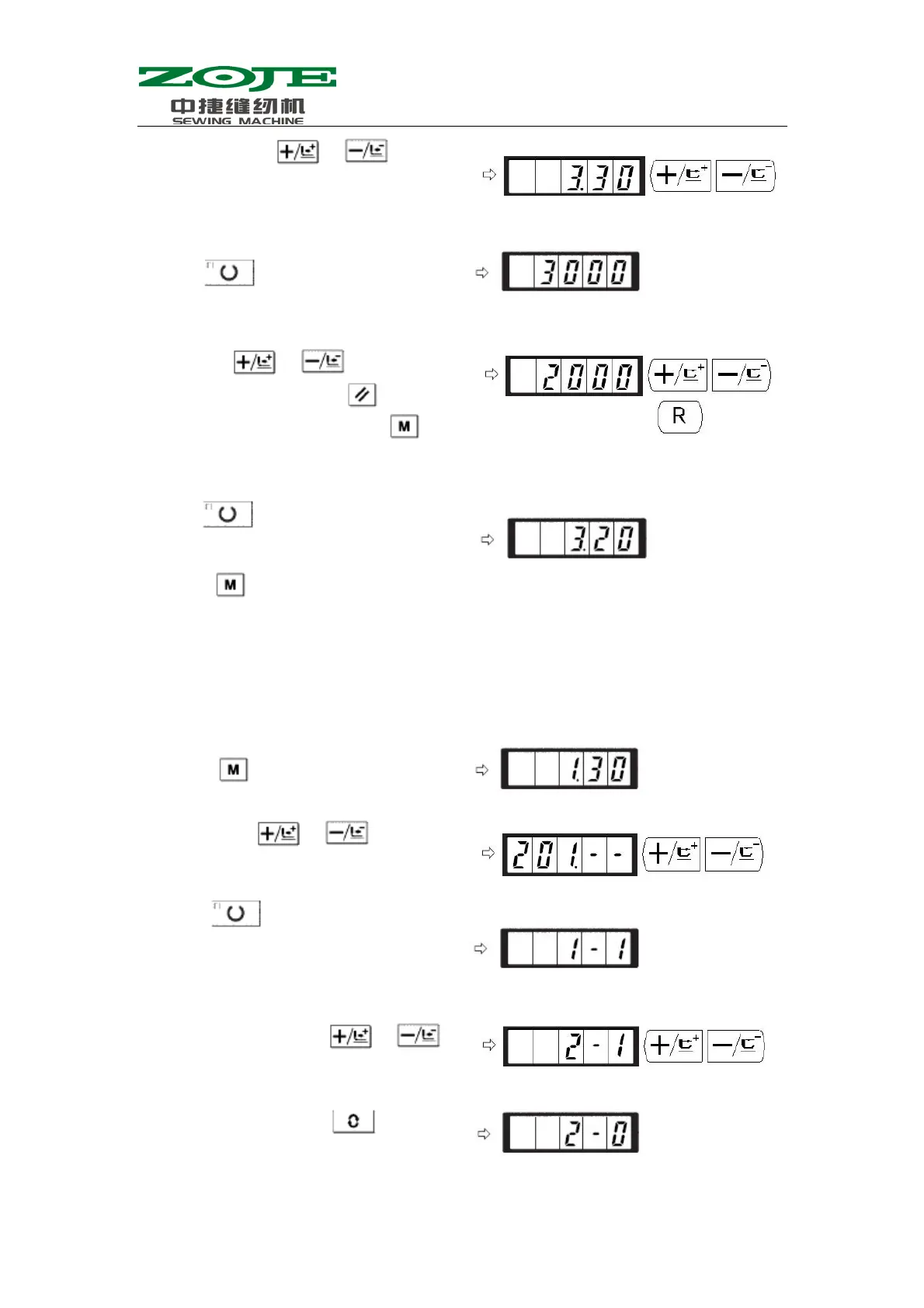
Emp.: Set the No.2 & No.3 patterns as the inoperative.
6)By pressing the
& , user can
display the parameter code No.3 at screen.
And the sewing speed of the 2
nd
stitch is
dis
la
at here as well.
7)Press
to turn on the Sewing LED and
display the set value of the 2
nd
stitch.
8)By using
& , user can input
“2000” in the screen Press to return to
default setting. If user presses
, the
existing operations will be cancelled and
system will return to the status in step 6).
9)Press
to turn off the Sewing LED and
save the set value of the 2
nd
stitch.
1)Press
when the Sewing LED is Off.
2)User can use
& to let screen
display parameter code No.201.
3)Press to turn on Sewing LED, at the
same time the set value of pattern No.1 is
displayed. Set value 1: Readable; 0:
Unreadable.
4)Set pattern No. 2 with
& .
5)Set the value to 0 with
.



 To Next Page