11
Recording
■
Adjusting input levels
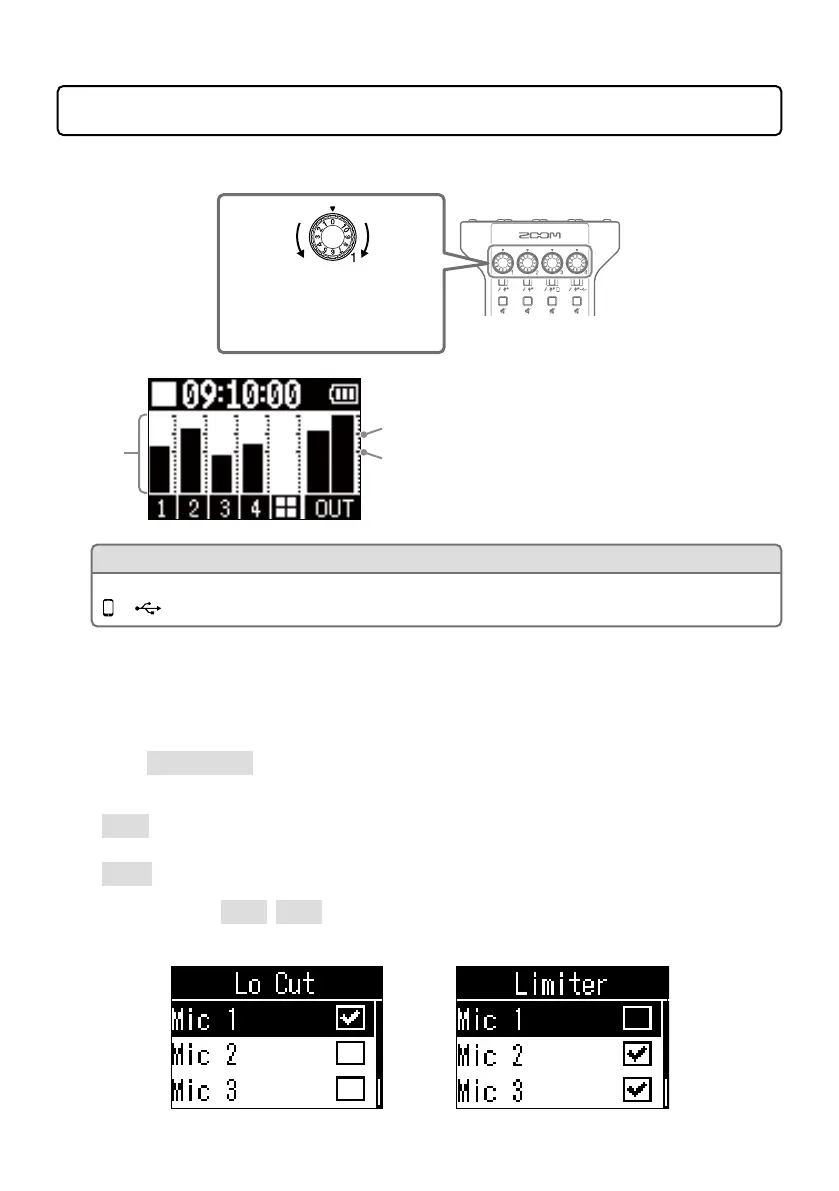
INPUT knobs 1–4
Use to adjust input levels.
Raise
Lower
Level
−6 dBFS
−12 dBFS
Input levels are shown on the display.
Adjust the levels so that they are
between −12 dBFS and −6 dBFS.
HINT
When smartphone or USB audio return signals are being input (INPUT SELECT switches are set to
or ), the input will be in stereo and stereo level meters will be shown.
■
Making mic settings (Mic Settings)
The Lo Cut and Limiter functions can be turned on/off for each input.
The factory default setting is on for all.
1.
Select Mic Settings on the MENU screen.
2.
Select a setting
• Lo Cut: This can cut low frequencies to reduce the sound of air conditioning, wind, vocal pops
and other noise.
• Limiter: This can prevent distortion by reducing input signals that have excessively high levels.
3.
Select the mic (Mic 1–Mic 4) for which you want to turn this function on.
The Lo Cut or Limiter setting is on for the mics that have check marks.



 To Next Page
 Loading...











