10
■
Connecting smartphones
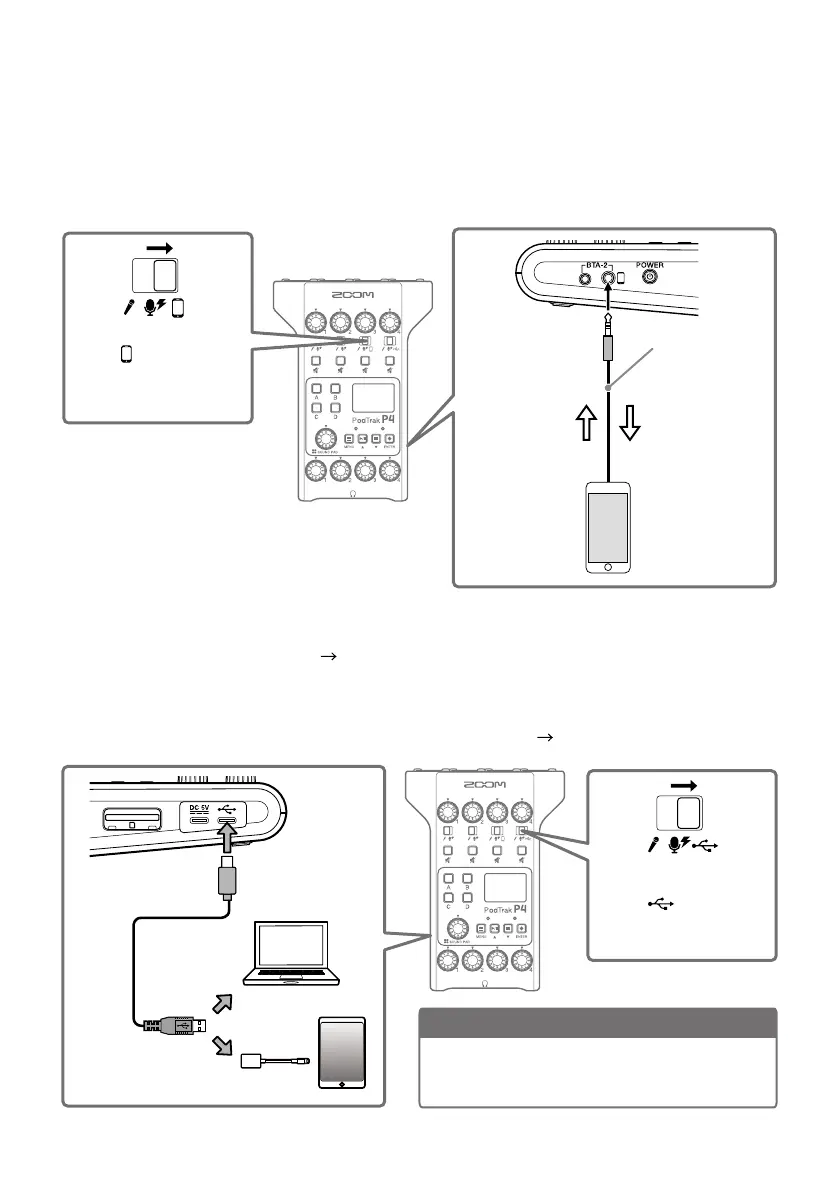
When podcasting, the voice of a guest participating by phone can be input on channel 3. By
using a 4-contact mini-plug cable, a signal can be input from a smartphone and a mono signal
can be sent back to it simultaneously. Since this output signal does not include the sound from
channel 3, guests participating by phone will not have an echo.
4-contact mini-
plug cable
INPUT SELECT switch 3
Set to
.
Master output
signal (excludes
audio signal
from phone
participant)
Audio signal
from phone
participant
■
Connecting a computer, smartphone or tablet by USB
Using the audio interface function ( page 15), music, interviews and other audio played back
on a computer, smartphone or tablet can be input through channel 4. Sound input through the
P4
and sound played with SOUND PAD buttons can also be streamed live directly.
Recording files on SD cards can also be transferred for editing. (
page 13)
NOTE
Use a Lightning to USB Camera Adapter (or
Lightning to USB 3 Camera Adapter) to connect to
an iOS/iPadOS device with a lighting connector.
INPUT SELECT switch 4
Set to
.
USB Type-C
port



 To Next Page
 Loading...











