12
Recording (continued)
S
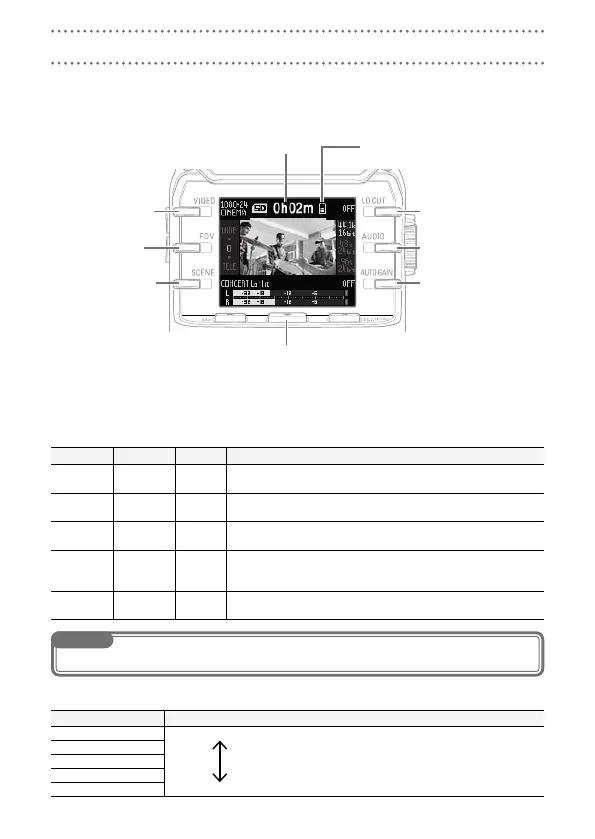
Using the Recording Screen
Set recording operations and the recording format on this screen.
Start recording
Stop recording (press while recording)
When recording: recording time
When paused: available recording time
Remaining battery level
VIDEO setting
FOV setting
SCENE setting
LO CUT setting
AUDIO setting
AUTO GAIN setting
S
Setting the recording format
Use the buttons on both sides of the screen to change the settings.
VIDEO: video recording resolution setting
Setting Resolution
Frames/second
Explanation
1080·30
VIDEO
1920×1080 30 This is good for all types of video recording.
1080·24
CINEMA
1920×1080 24
This records with the frame rate used for filming movies. This
is good for recording movies and music videos.
720·30
VIDEO
1280×720 30
This provides a good balance between recording time and video
quality.
720·24
CINEMA
1280×720 24
This records with the frame rate used for filming movies.
This provides a good balance between recording time and
video quality.
CAMERA
OFF
Use this to just record audio.
NOTE
If the setting is VIDEO and PAL is selected for HDMI Out, the frames/second will be 25.
FOV: field of view setting
Setting Explanation
WIDE Widen the field of view.
•
0
•
TELE Narrow the field of view.



 To Next Page