21
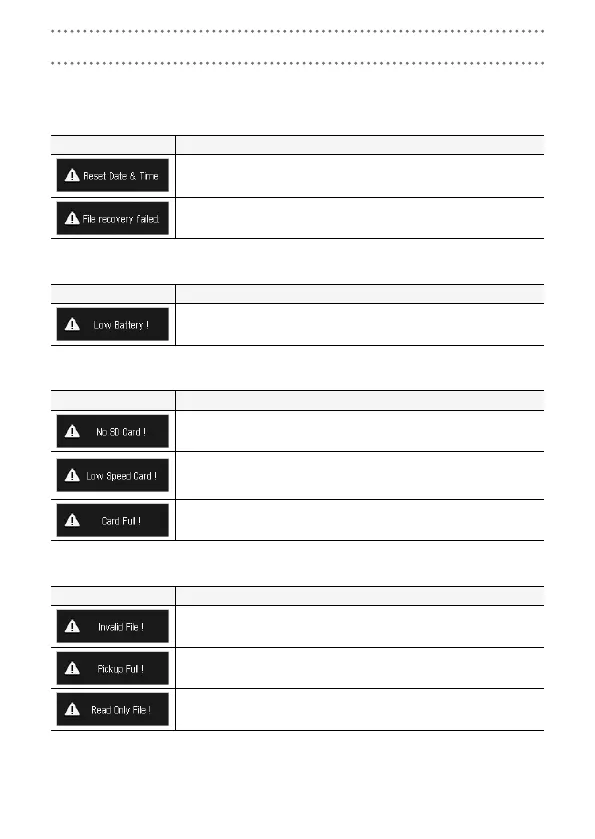
If one of the following Alert Messages appears, respond according to the contents.
S
Alert Messages that appear during startup
Message Explanation and response
The clock has been set to its default. Reset the time on the Setting
Screen. (→ P. 9)
Since proper data recording did not complete, data recovery efforts were
made but recovery was not possible.
S
Alert Message that appears when batteries are used
Message Explanation and response
The remaining battery charge has become low. Replace the batteries
with new ones.
S
Alert Messages that appear when the Recording Screen is open
Message Explanation and response
No SD card is loaded. Load an SD card.
Recording stopped because writing to the SD was not fast enough. Use
a recommended SD card that has been formatted by the Q. For a
list of recommended SD cards, visit www.zoom.co.jp.
The SD card has become full. Delete unnecessary data or replace it with
a new SD card.
S
Alert Messages that appear when the Playback Screen is open
Message Explanation and response
This file is invalid. Files that were not created by a Q and invalid
files that did not complete recording properly cannot be played back.
The number of files checked for deletion exceeds the limit (256). Reduce
the number of checked files.
The file is protected, so it cannot be deleted. Use a computer to check
the status of the file.
Responding to Alert Messages



 To Next Page