Need help?
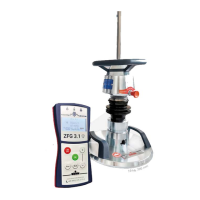
Do you have a question about the ZORN INSTRUMENTS ZFG 3000 GPS and is the answer not in the manual?
Instructions for powering the device on and off, requiring a long press.
Details on how the GPS module acquires satellite signals for position fixing.
Enables adding text notes to measurements, including character selection.
Describes the mandatory three preloading pulses before starting a measurement.
Procedure for initiating a measurement, including executing the first pulse.
Explains how to view, interpret, and print measurement results and data.
Refers to preparation and execution steps for taking measurements.
Instructions for viewing and printing data previously saved on the SD card.
Procedure to delete all saved individual measurements from the SD card.
Details on adjusting device settings like language, unit, and input functions.
Guide for setting the device's internal clock and date.
Displays device data such as version, serial number, and calibration details.
Procedure for performing a self-test and checking calibration values.
Information on updating the device's firmware based on manufacturer's suggestion.
Instructions for cleaning and maintaining the mechanical loading device.
Guidance on proper battery care, charging, and status indicators.
Information on the battery's total discharge protection feature.
Details on the device's automatic power-off function after inactivity.
 General
| Brand | ZORN INSTRUMENTS |
|---|---|
| Model | ZFG 3000 GPS |
| Category | Measuring Instruments |
| Language | English |

 To Next Page