10
Basic Operations
The following topics outline basic features and operations of your hotspot.
Basics
The following topics offer an overview of your hotspot’s basic operations.
Device Installation
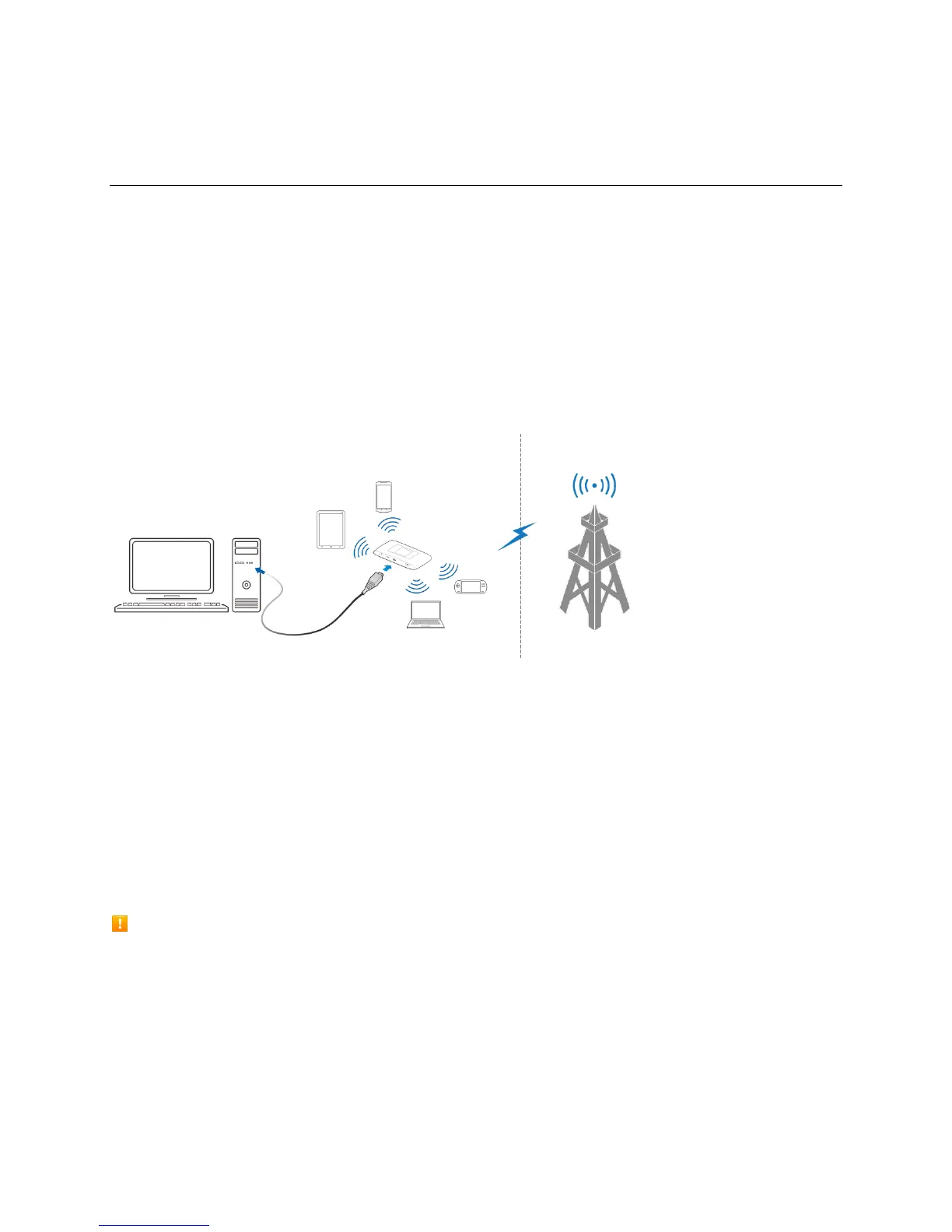
The ZTE Warp Connect works with your wireless service provider’s cellular network.
Put the ZTE Warp Connect in a place where there is a strong signal from a signal tower, typically near a
window or outside wall.
Wi-Fi (WLAN) Overview
Below are some basics of your hotspot's Wi-Fi (WLAN) function.
Wi-Fi (WLAN) Information
● Advanced Settings: Change your hotspot's Wi-Fi (WLAN) settings as required.
● Simultaneous Connection: Use your device to connect up to 10 Wi-Fi devices simultaneously.
● Automatic Updates for Optimizing Wi-Fi Connection: When connected by Wi-Fi, connection
optimizing settings may be automatically received and updated.
Wi-Fi (WLAN) Usage Cautions
For added security, it is recommended that you change the default network name (SSID) and security
key (WPA) after setting up your hotspot.
Wi-Fi (WLAN) Overview
● Your hotspot supports 802.11b/g/n. Connect Wi-Fi devices (PC, game console, etc.) via Wi-Fi for
wireless data transfers.


 To Next Page