17
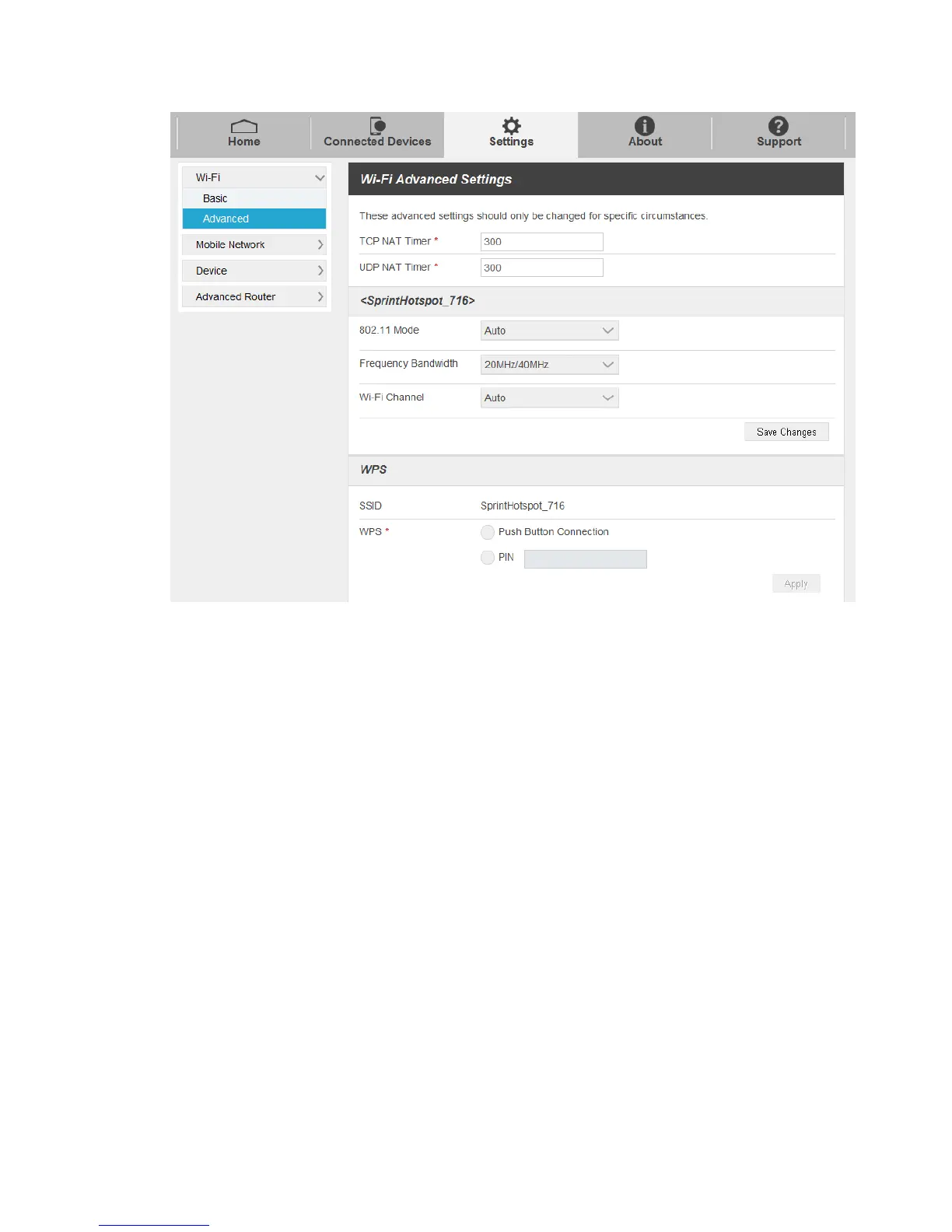
TCP NAT Timer: Set TCP NAT time.
UDP NAT Timer: Set UDP NAT time.
802.11 Mode: Select an 802.11 mode from the drop-down list.
Frequency Bandwidth: Select a frequency bandwidth from the drop-down list.
Wi-Fi Channel: Select a Wi-Fi channel from the drop-down list.
2. Click Save Changes to save your settings.
WPS Settings
You can enable Wi-Fi Protected Setup (WPS) by PIN (PIN Code) or PBC (push-button) mode on this
page. If your client device supports WPS, there’s no need to enter password manually when WPS is
available.
● SSID: Select the wireless network name that you want to connect to.
● PIN: Enter the PIN that is generated by wireless access client.
● Push Button Connection:To set up a Push Button Connection:
1. Select the PBC mode in the client WPS UI.
2. Select Push Button Connection mode in the WPS page of your hotspot and click Apply.


 To Next Page