1320 Electronics LLC ALDL Bluetooth Adapter
User’s Guide
ALDL Scan App - Installing an .aldl File
Note: ALDL protocols are now loaded with the ALDL Scan App. Using .aldl files should only be necessary
for troubleshooting purposes.
Note: To facilitate file manipulation, you should install a File Manager application on your Android
device first.
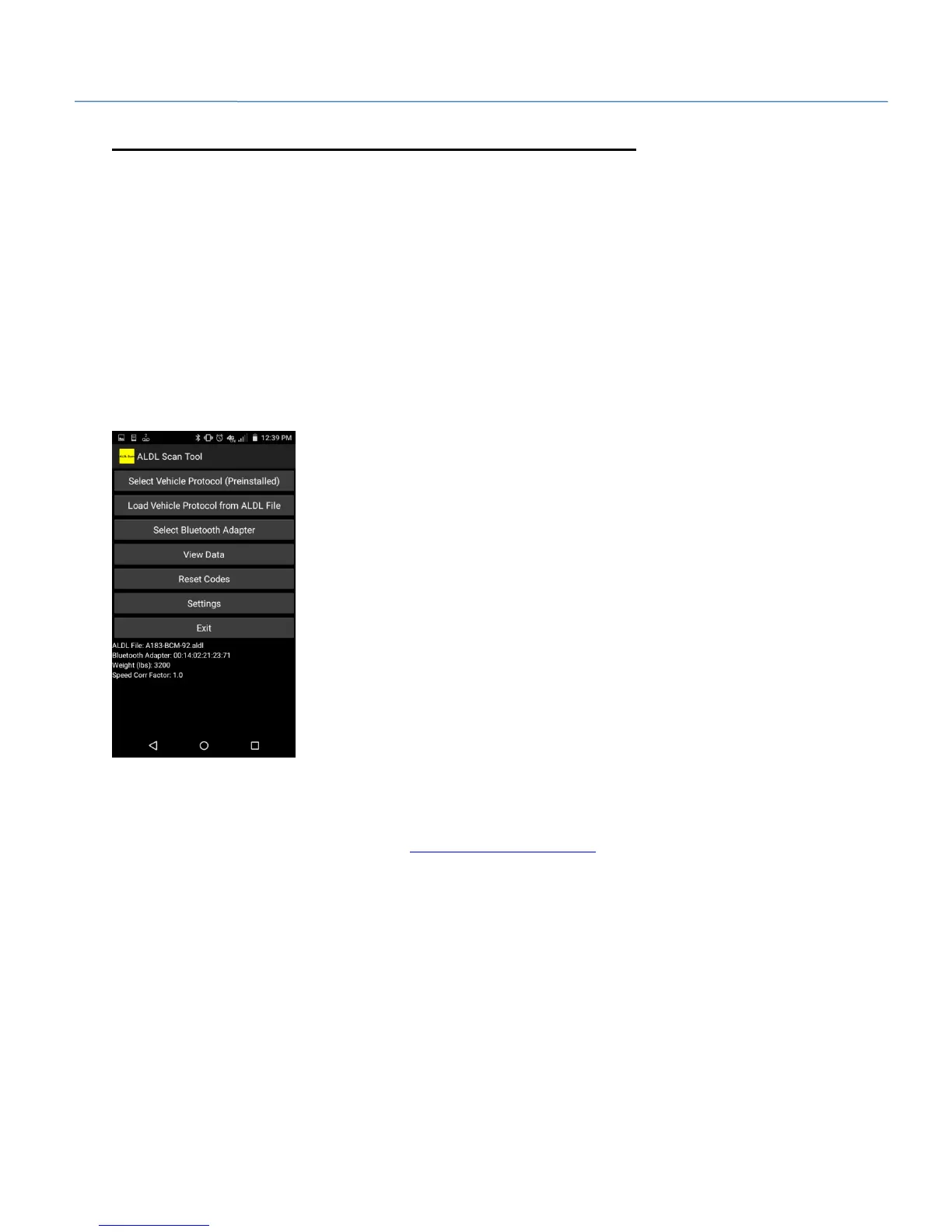
1. Click the 'ALDL Scan' icon.
2. The first screen opens. The application also creates the 'ALDL' folder if one does not exist. At this
point we aren't going to select a file, we are just allowing the app to create the 'ALDL' folder.
3. Click the 'Exit' button to exit out of the application and return to the main screen.
4. Using the Android browser, navigate to www.1320electronics.com.
5. Download the .aldl file for your vehicle from the 'Downloads' section. The file will be stored in the
'Download' directory on your device.
6. Click the 'File Manager' icon.
7. Navigate to the 'Download' directory.
8. Move the .aldl file from the 'Download' directory to the 'ALDL' directory.


 To Next Page