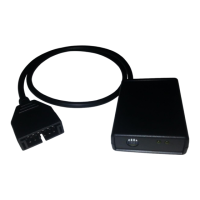
1320 Electronics LLC ALDL Bluetooth Adapter
User’s Guide
Quick Start Instructions
1. Download the ‘ALDL Scan’ App from Google Play onto your Android device.
2. Visit our downloads section on our website to determine the ALDL protocol for your vehicle.
3. Connect the supplied power cord to the ‘ALDL Bluetooth Adapter’.
4. Plug the ‘ALDL Bluetooth Adapter’ into the ALDL connector of your vehicle. Configure switches
1-4 prior to applying power.
5. Plug the supplied power cord into the utility power receptacle of your vehicle.
6. Start your vehicle.
7. Go into your Android Device Settings.
8. Go into your Device’s Bluetooth Settings.
9. Pair the Bluetooth adapter to your Android device.
10. Start the ‘ALDL Scan’ App.
11. Press the 'Select Vehicle Protocol (Preinstalled)' button.
12. Select the ALDL Protocol for your vehicle from the list.
13. Select one of the two menu items: View Data, or Reset.
14. Select the Bluetooth adapter from the pop-up list.
15. The main app window should now be visible. Press the ‘Start/Stop (opposing arrows)’ button
to view data from your vehicle’s computer .
16. When finished, press the ‘Start/Stop (opposing arrows)’ button to stop data collection.
17. Press the ‘Exit (X)’ button to exit.


 To Next Page