Installation manual 2N® IP Force
•
•
•
•
•
•
•
•
•
•
•
Dynamic IP Address Setting
Follow the instructions below to switch on theDynamic IP addressmode
(DCHP ON):
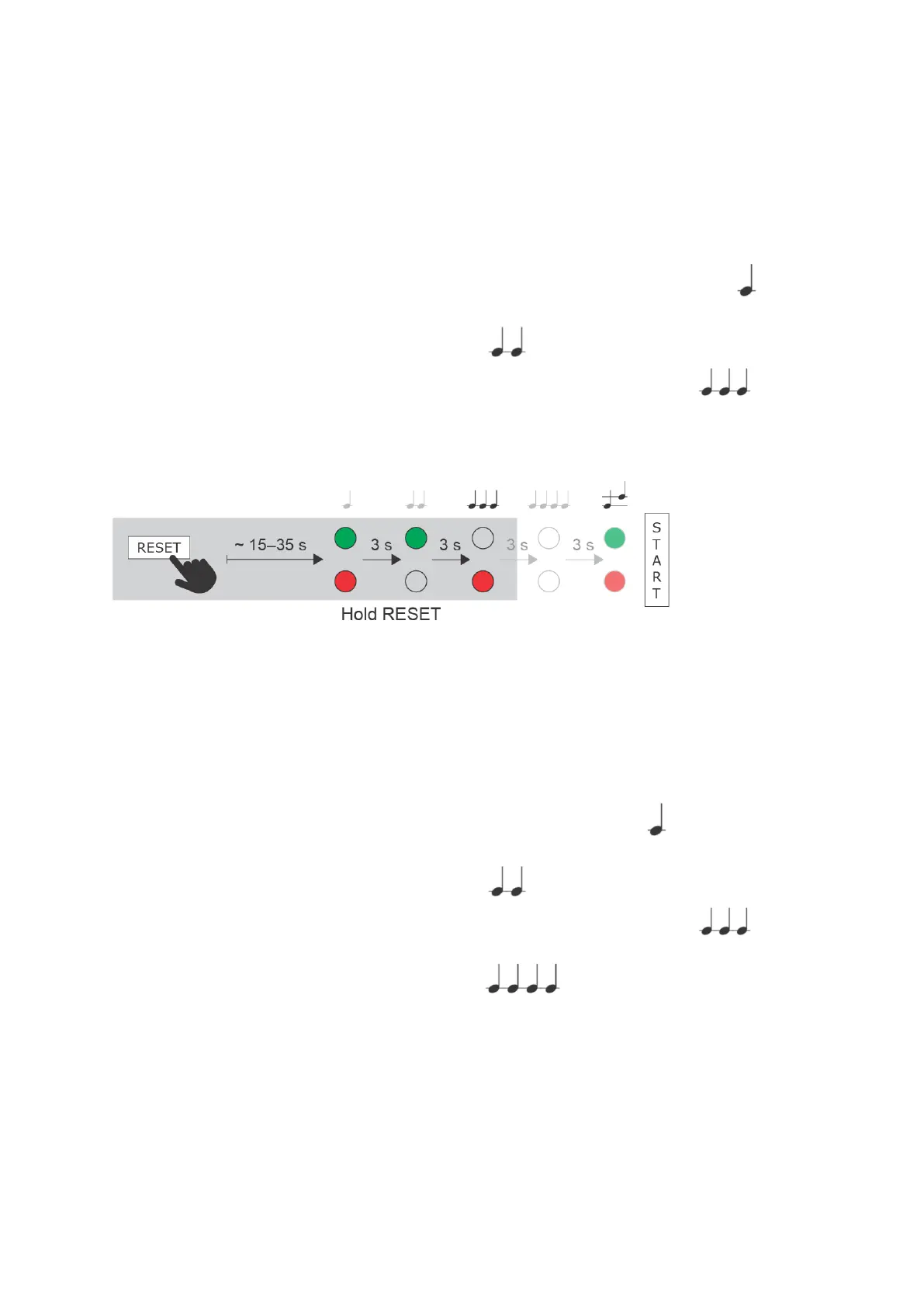
Press and hold the RESET button.
Wait until the red and green LEDs go on simultaneously on the device and the acoustic signal can be
heard (approx. 15–35 s).
Wait until the red LED goes off andthe acoustic signal can be heard (approx. for another 3 s).
Wait until the green LED goes off and the red LED goes on again andthe acoustic signal can be
heard (approx. for another 3 s).
Release the RESET button.
Factory Reset (PCB version 555v5 and higher)
Follow the instructions below toreset the factory default values:
Press and hold the RESET button.
Wait until the red and green LEDs go on simultaneously and the acoustic signal can be heard (approx.
15–35 s).
Wait until the red LED goes off andthe acoustic signal can be heard (approx. for another 3 s).
Wait until the green LED goes off and the red LED goes on again andthe acoustic signal can be
heard (approx. for another 3 s).
Wait until the red LED goes off andthe acoustic signal can be heard (approx. for another 3 s).
Release the RESET button.



 To Next Page