Maintenance page
www.3ware.com 209
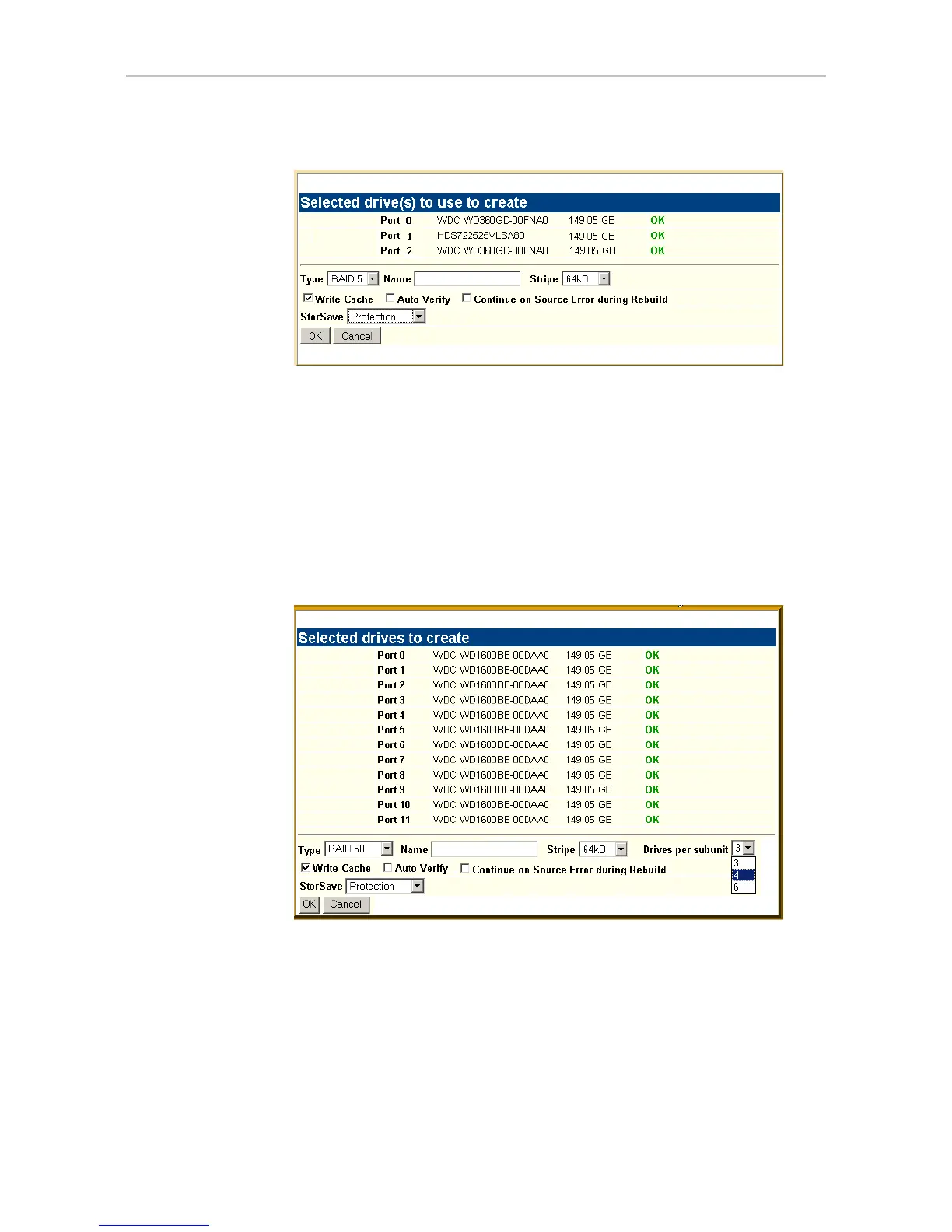
Figure 97. Configuration Window in 3DM
For more detailed instructions, see “Configuring a New Unit” on page 91.
Type. The drop-down list lists the possible RAID configurations for the drives
selected in the list of Available Drives. Available configurations may include
RAID 0, RAID 1, RAID 5, RAID 6, RAID 10, RAID 50, Single Disk, and
Spare Disk. For information about these configurations, see “Available RAID
Configurations” on page 5.
When you are configuring a RAID 50 with twelve drives, an additional field
appears, in which you select the number of drives per subunit—3, 4, or 6.
Figure 98. Configuring a RAID 50 with 12 Drives
Name. You can enter a name for the unit.
Stripe. The drop-down list of stripe sizes lists the possible stripe sizes for the
configuration you selected in the RAID level drop-down.
The default stripe size of 64KB will give the best performance with
applications that have many sequential reads and writes. A larger stripe size
will give better performance with applications that have a lot of random reads
and writes. In general, the smaller the stripe size, the better the sequential I/O



 To Next Page