31
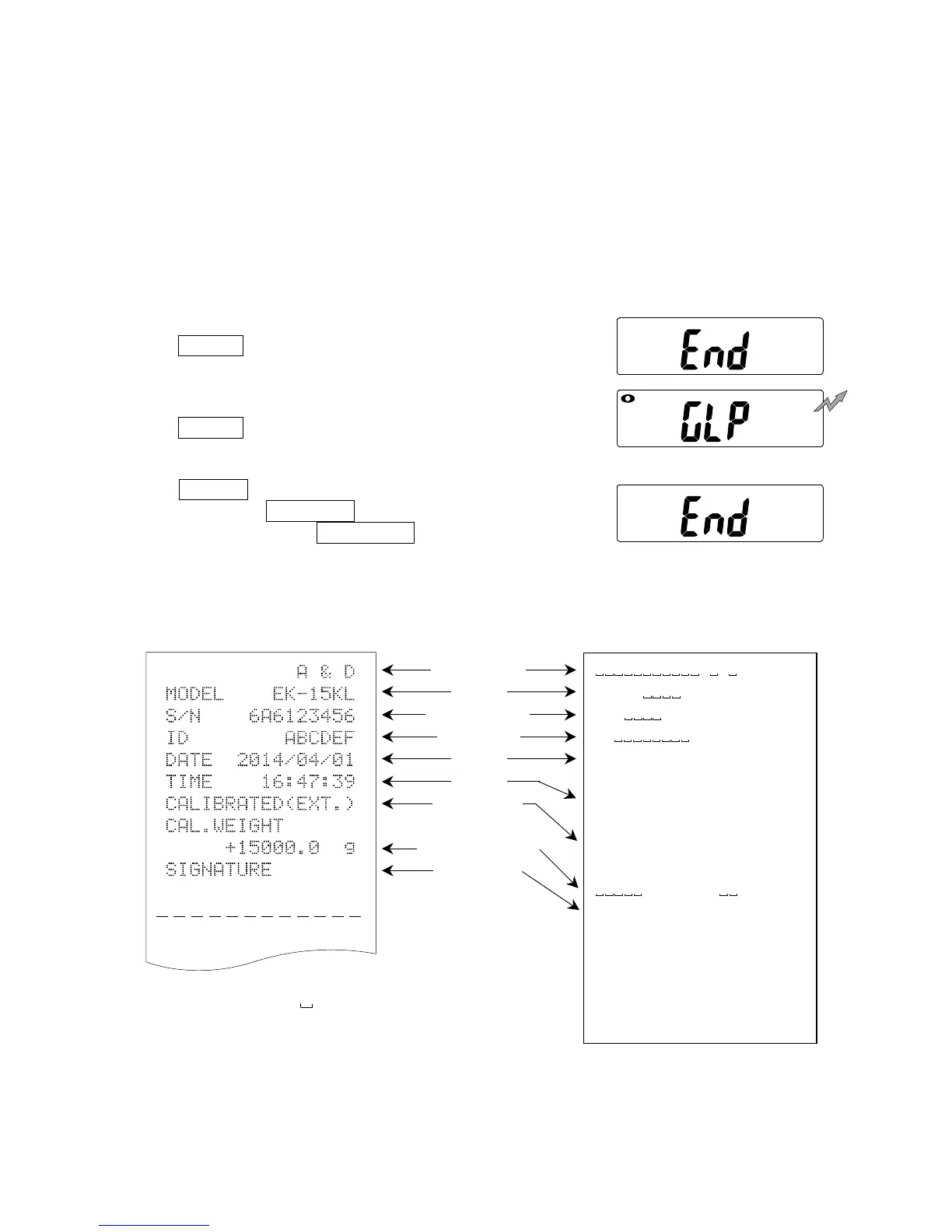
`~~~~~~~~~~A~&~D<CRLF>
MODEL~~~ EK-15KL<CRLF>
S/N~~~~6A6123456<CRLF>
ID~~~~~~~~ABCDEF<CRLF>
DATE<CRLF>
<CRLF>
TIME<CRLF>
<CRLF>
CALIBRATED(EXT.)<CRLF>
CAL.WEIGHT<CRLF>
~~~~~+15000.0~~
g
<CRLF>
SIGNATURE<CRLF>
<CRLF>
<CRLF>
---------------~<CRLF>
<CRLF>
<CRLF>
10-2. GLP report
To print the GLP report to an AD-8121B printer, select the function setting “info 1”
and “pUse 1” and use MODE 3 of the printer.
To output the GLP report to a personal computer, select the function setting “info
2” and “pUse 0.”
Calibration report
1. Perform calibration according to “7-3. Calibration
using a calibration weight.”
2. end appears when the calibration is
complete.
3. glp appears and calibration report is
output.
4. end appears again. Remove the weight.
Press the ON/OFF key to turn the power
OFF or press the RE-ZERO key.
AD-8121 format “info 1” General format “info 2”
: Space, ASCII 20h
CR: Carriage return, ASCII 0Dh
LF: Line feed, ASCII 0Ah
To out


 To Next Page