5
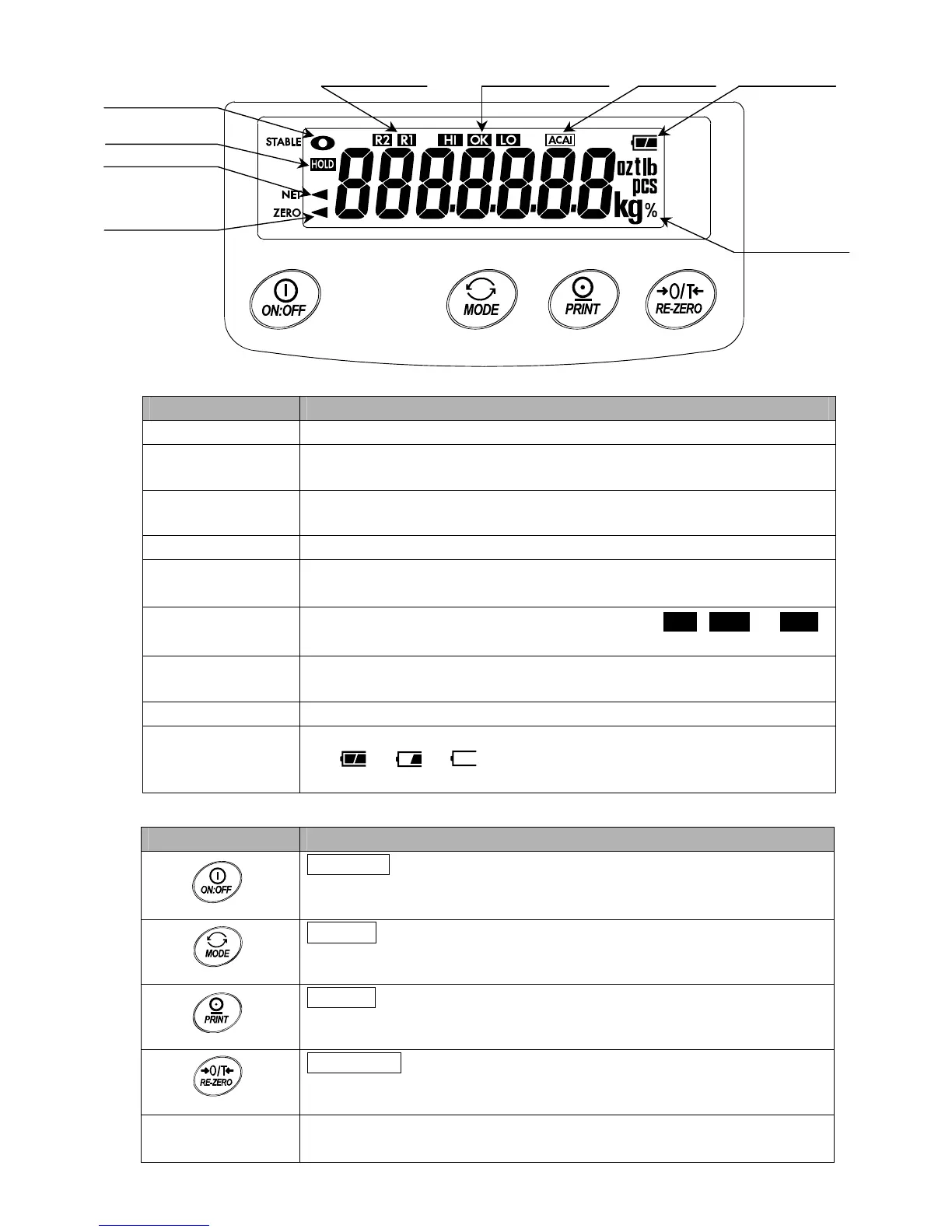
Indicator Description
STABLE indicator Turns on when the weight value is stable and is ready to be read.
HOLD indicator
Turns on while the display lock is being performed.
Does not turn on when the display lock function is disabled.
NET indicator
Turns on when the net weight is displayed.
(The tare operation is in progress.)
ZERO indicator Turns on when zero is displayed.
Weighing range
indicators
Indicates a weighing range.
Turns on when the automatic range function is selected for the EK-30KL.
Comparator results
Indicates the results of comparison by turning on HI , OK or LO .
Does not turn on when the comparator function is disabled.
ACAI indicator
Turns on or blinks when the ACAI function is being performed.
Does not turn on when the ACAI function is disabled.
Weighing units The weighing units stored in memory turn on.
Battery indicator
Changes as the battery capacity decreases as follows:
Full → → Recharging required
Does not turn on when the AC adapter is used.
Key Description
1ON/OFF key
Turns the power ON or OFF.
When turned ON, the scale is automatically set to zero. (power-on zero).
1MODE key
Switches the weighing units.
1PRINT key
Outputs the weight data to a printer or personal computer.
1RE-ZERO key
Sets the display to zero.
CAL switch
Located under the calibration switch cover.
Press and hold the switch to enter the calibration mode.
Weighing units
Battery indicator
STABLE indicator
HOLD indicato


 To Next Page