20
6-3 Percent Mode (Pct)
This is the mode to display the weight value in percentage compared to a 100% reference mass and
is used for target weighing or checking the sample variable.
Selecting the percent mode
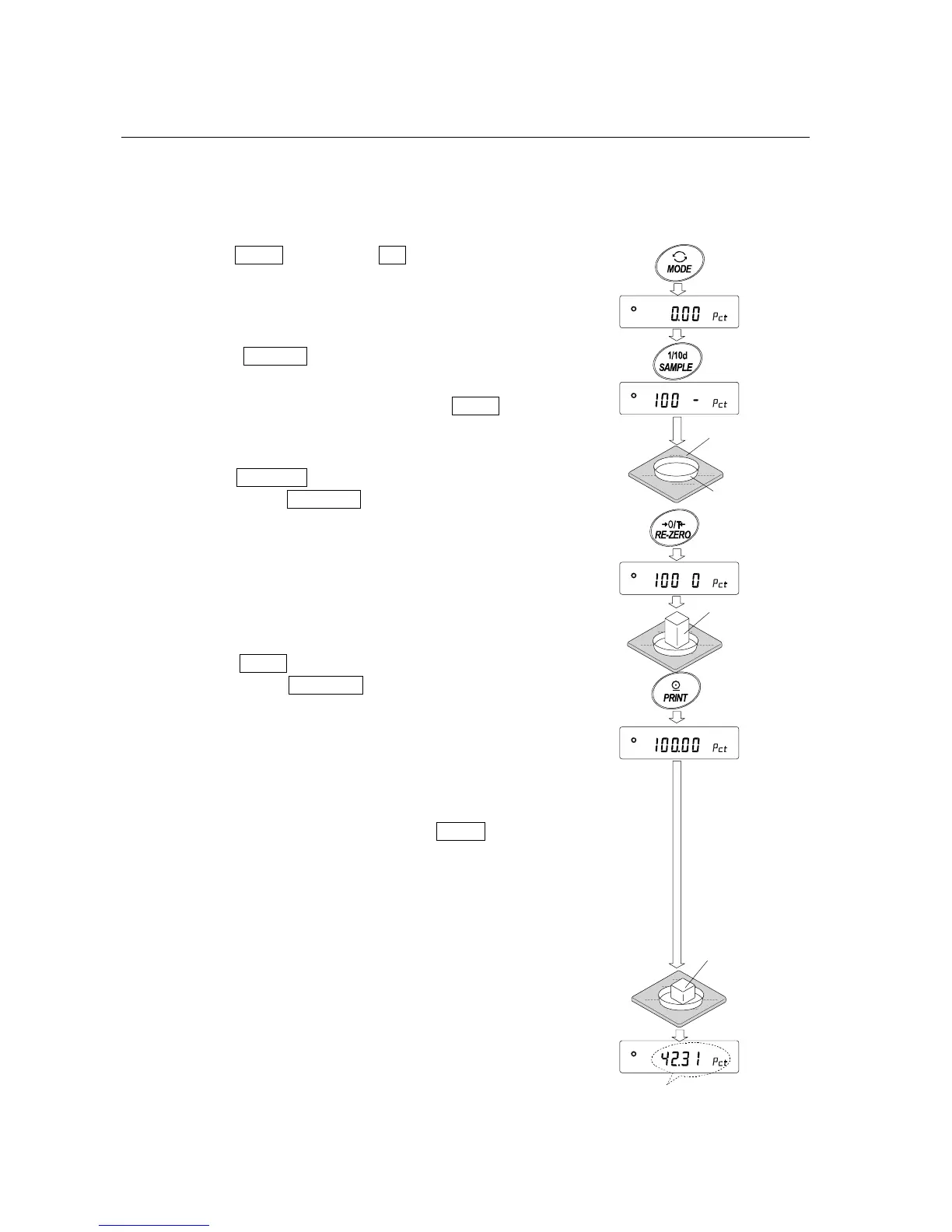
1 Press the MODE key to select pct (percent mode). If the
percent mode can not be selected, refer to “5.
WEIGHING UNITS”.
Storing the 100% reference mass
2 Press the SAMPLE key to enter the 100% reference
mass storing mode.
Even in the storing mode, pressing the MODE key will
switch to the next mode.
3 Place a container on the weighing pan, if necessary.
Press the RE-ZERO key to cancel the weight (tare). The
balance displays 100 0 pct .
4 Place the sample to be set as the 100% reference mass
on the pan or in the container.
5 Press the PRINT key to store the reference mass. The
balance displays 100.00 pct . (The decimal point position
depends on the reference value. The reference mass is
stored in non-volatile memory, and is maintained even if
the AC adapter is removed.)
Note
If the balance judges that the mass of the sample is too
light to be used as a reference, it displays lo .
6 Remove the sample.
Reading the percentage
7 Place a sample to be compared to the reference mass on
the pan. The displayed percentage is based on the 100%
reference mass.
Weighing
pan
Container
Sample
(100%)
Place sample
to be weighed
Weighing result
compared to 100%
reference mass



 To Next Page