Milan / Paylink System Manual Issue 1.5 29 January 2020
CONFIDENTIAL
Not to be disclosed without prior written permission from Aardvark Embedded Solutions Ltd
Page 58 of 71
Merged Paylink: Here the configuration file specifies normal Paylink peripherals and Money
control USB peripherals. The two sets of peripherals are merged together by the
driver program, and the result present as a unified whole. This mode is selected
where USB peripherals are specified and a “Using Dongle” line is not present.
On Linux this requires the Paylink executable, which is only available on some
Intel distributions.
Merged Lite: Here the configuration file specifies Money control USB peripherals and a
Protocol that is specified as “on Paylink Lite”. The two sets of peripherals are
merged together by the driver program, and the result present as a unified
whole. On Linux this requires the Paylink executable, which is only available on
some Intel distributions.
Note: If only USB peripherals are specified, but the “Using Dongle” line is not present in the System
section, then the system will default to expecting a normal external Paylink to be connected -
which will continue to support the switches and meter.
External Paylink Peripheral Specification
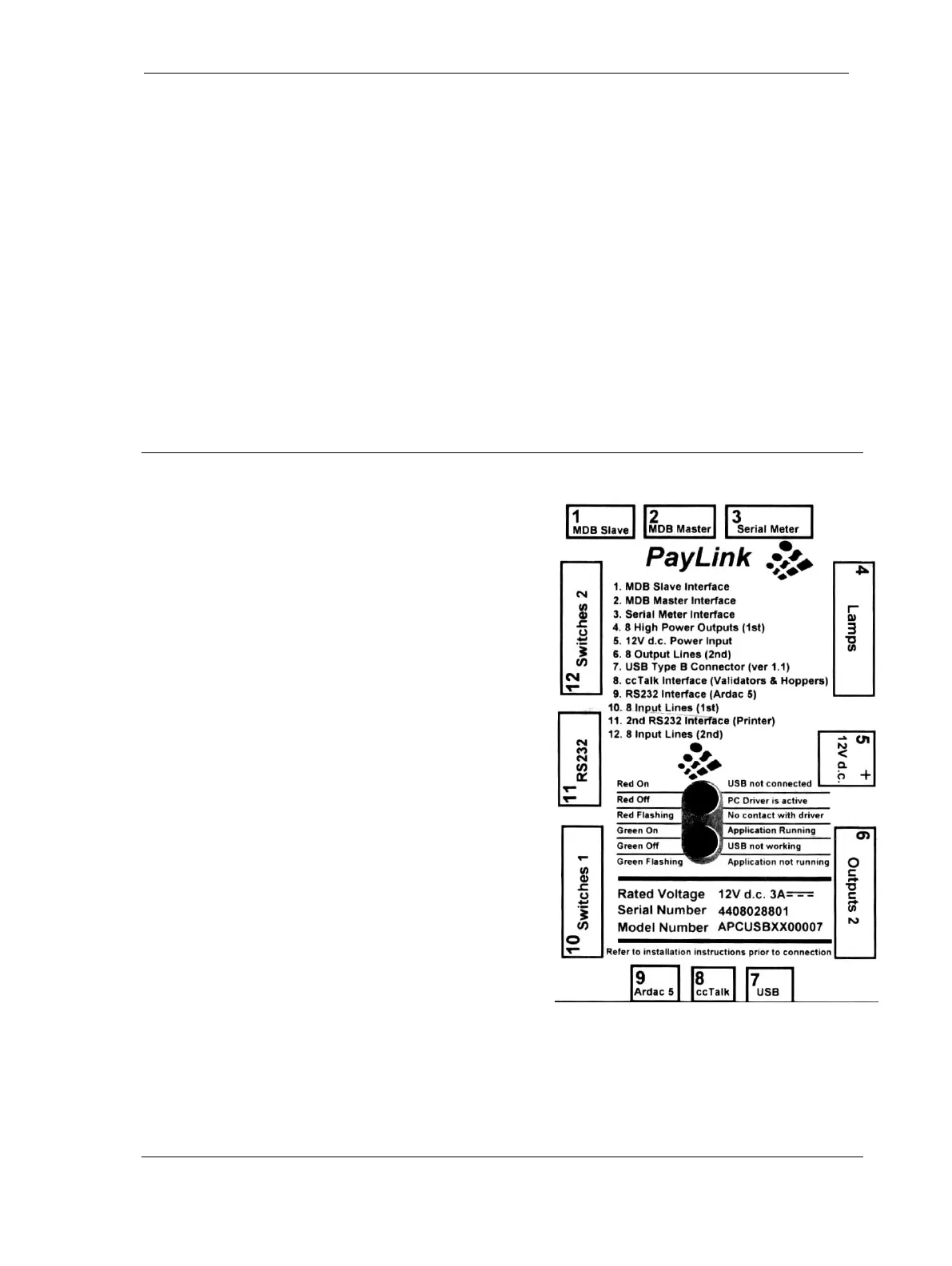
The Paylink unit contains two types of interface:
• Interfaces to specific hardware, where the
peripheral in question is essentially fully described
by the hardware.
• General interfaces to peripherals where one of the
Milan / Paylink can be connected to many different
peripherals.
The first sort of interface is identified as connectors 3, 4,
6, 10 & 12 on the Paylink lid.
These connectors are provided to connect
Milan / Paylink to an SEC meter, switch inputs and
LEDs or other outputs.
These interfaces may be connected or not connected,
but the item they are connected to is completely defined
by the electrical connection (so far as Milan / Paylink is
known)
The second sort of interfaces is identified as connectors
1, 8, 9 and 11 on the Paylink lid.
These connectors provide the connections to peripherals concerned with handling currency. In this
case there are many possible peripherals that can be connected to the Milan / Paylink unit. The
peripherals actually connected are specified in the configuration file.



 To Next Page