+33 4 7642 9550 www.aaton.com Cantar-X User Manual v2.26 (r13) 2009 April 27
p.5
p.5
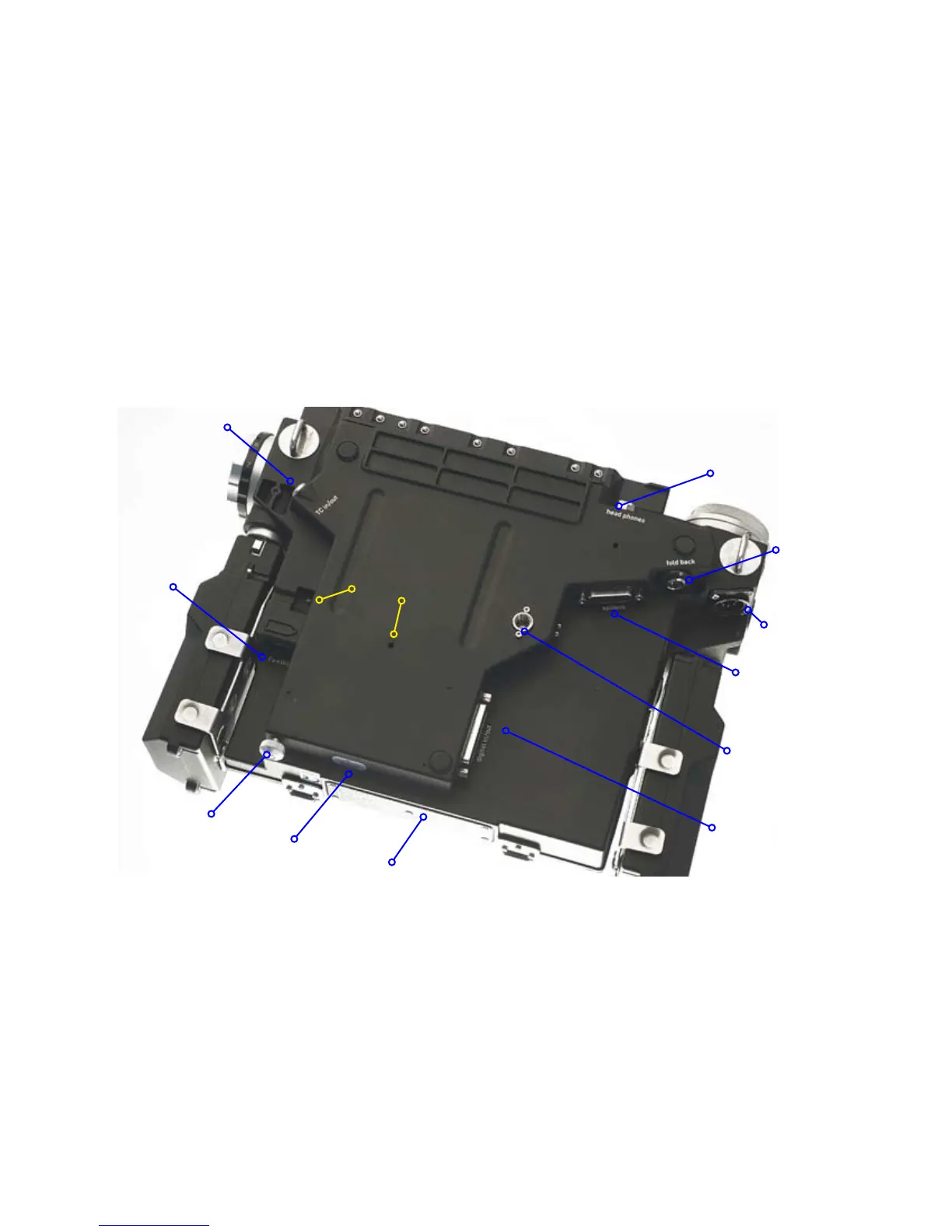
Protected ins & outs
To complement the waterproof design, all audio sockets are
pointed toward Earth, the same direction that rain falls. This
concept has the notable side effect that no plugs protrude
from the sides; this allows third party designers to build very
narrow 'Made for Cantar' carts!
• The SubD 15 (p.57) is used to connect CantaRem (p.53)
or a USB-PS2 keyboard adapter .
• The SubD 25 (p.57) is the AES in/out connector which can
loop playback signals when in "REC&PLAY" mode.
• The 3/8” screw is placed at the center of gravity
between three rubber pads, and is used to secure the Can-
tar onto a cart.
•The weep hole, underneath the phone-jack socket, is a
drainage port for water that has entered through the phone-
jack.
•To extract the internal DVD/DVD-RAM burner, first remove
its lateral retaining screw (Aaton ref. 20 110 45), then intro-
duce a pencil or tooth pick into the DVD extractor hole to
push the drive out of the Cantar housing (see the DVD burner
extraction arrows on the picture below).
DESCRIPTION 2, BOTTOM VIEW
Rules about FireWire cables
•• The cable retainer screw should be used at all times
(use gaff-tape if your Cantar is not equipped with it) to avoid
intermittent contact or sudden cable pull-out. An intermittent
FireWire connection can induce 'bus hangs' and can even
stop recording on both the external and internal disks.
•• DO NOT plug a cable into the Cantar FireWire socket
while it is powered. The FireWire 6 socket that powers
external disks and burners has a HOT 12V pin in it;
If the plug enters at an angle, it will produce a short between
the +12V pin and the in/out pins and DESTROY the Cantar
FireWire driver. Please follow the HDD formatting instruc-
tions (p.36).
•• For 15" MacBookPro with 800 FireWire socket only, use
an 800 to 400 cable, google ie9496-3.
•• Only use ferrite choke ring equipped high quality
FireWire cables, not the cheap skinny ones.
FireWire
Timecode
Headphones
Foldback
Cable retainer
Ident label
AES in/out
3/8" cart holder
Line-out
phones' jack
water exhaust
DVD burner
extraction
'options'
Bluetooth Tx



 To Next Page