+33 4 7642 9550 www.aaton.com Cantar-X User Manual v2.26 (r13) 2009 April 27
p.54
p.54
Functions
• Remotely controls Bluetooth equipped Cantars in TEST,
PPR and REC • Sets input and output routings • Displays
modulometers and fader gains • Edits scene, take, take-
type, comments and track-names. Arcan-W runs under
Windows Mobile 5, not Mobile 6. Arcan-P for Palm-OS is
no longer maintained, i.e. the remote-record function has not,
nor will it be, implemented in this application.
Installation
The Win-Mobile 5 PDA must feature a
VGA screen (640x480), not a QVGA
screen (320x240), and an MS Blu-
etooth stack, not a Broadcom stack,
e.g. Qtek 9000, DELL Axim-51v, HTC
X7500, Fujitsu Loox N560.
Download
'rcan_214.cab' from the
Aaton web site to a PC or Mac and copy it through USB
into a folder of the PDA. Then open this folder and execute
'rcan_214.cab'.
Connection to Cantar
Cantar side Set TECHSET.17 'Serial Com' to 'Bluetooth'.
The 3m range Cantar transmitter is low power (Idle: 0.1mA,
Connecting: 4mA) and may remain active at all times.
PDA side Click Arcan's icon in the PDA 'programs' screen.
1. Select a Link: Bluetooth. 2. Search: found Bluetooth devic-
es are shown in the
'Pick
one
' pulldown menu; click
the ID for the Cantar you
want to store in the PDA
memory. 3. Pick one: the
list of Cantar IDs in mem-
ory is shown; click the desired one. 4. Connect: the latest
Cantar ID will show at next connection. 5. Status: for main-
tenance engineers.
Working Screens
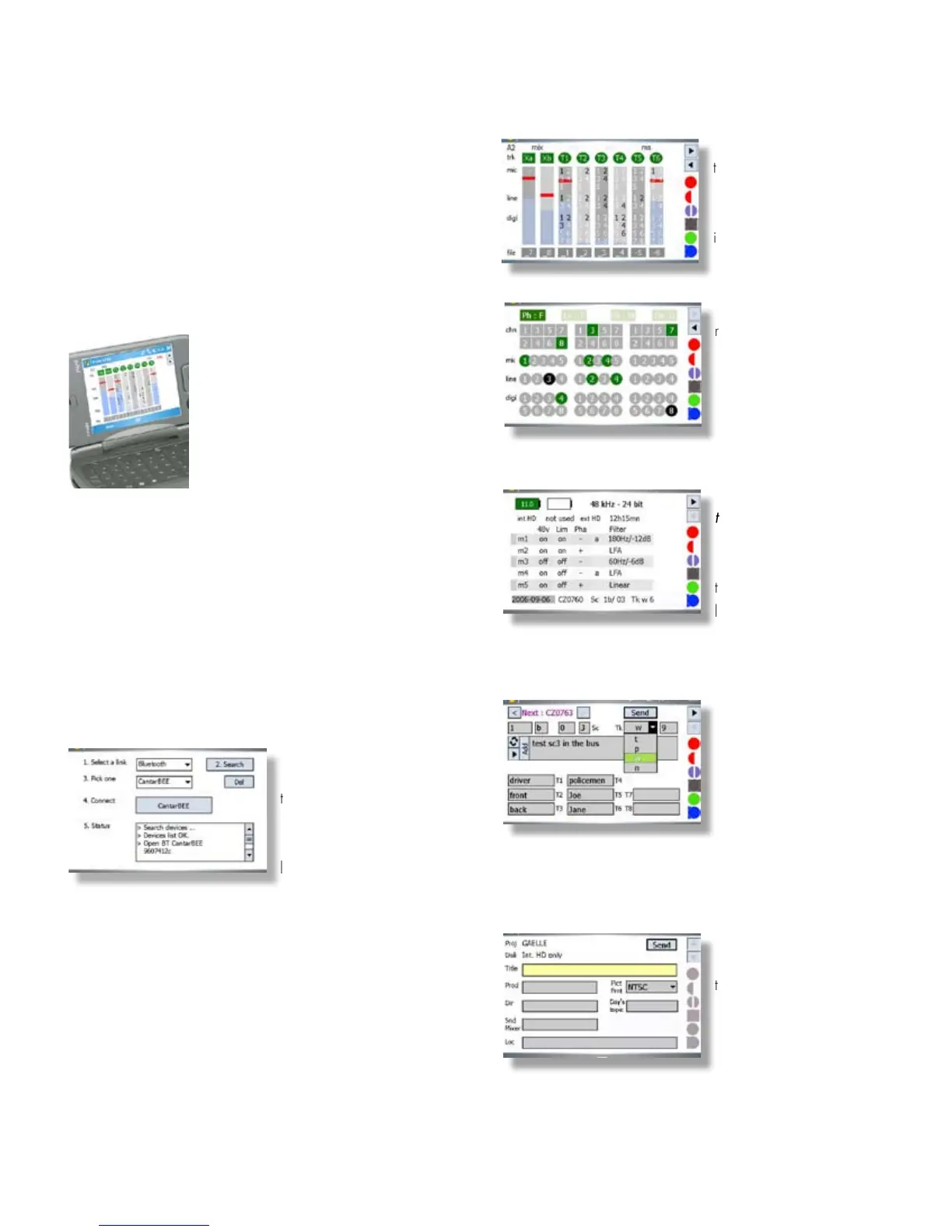
Arcan-w displays the modulometers, prefader and mixer
gains, plus the mic-preamp settings. It sets the ins and outs
routings, and enters/edits scene, take, take-type, track-names
and comments.
1 In-Grids
track (dis)-arming (file rank
becomes light grey), m-s
status, inputs to tracks rout-
ings can be modified in
STOP position.
2 Out-Maps
recorded signals appear in
green; the non-recorded,
sent directly to outputs, ap-
pear in black. Outputs
mapping can be modified
in STOP position.
3 Physical parameters
top: battery voltage, sam-
ple rate and bit-depth, inter-
nal/external disk recording
time. middle: phantom,
limiter, phase, high-pass fil-
ter in STOP position; fader/mixer gains in TEST, PPR and REC.
bottom: date, filetags, scene, take, and take-type.
4 Metadata editing
Scene, take, take-type, com-
ments, and track-names
with auto completion and
memorized text insertion
are edited in REC, PPR
and BROWSE. To erase older comments, go to the bot-
tom-left field, toggle from 'Pen' to 'Trash', your stored com-
ments appear over a red background; click to erase.
5 Sound-Report editing
Arcan-w is a great helper
to enter and modify the
Sound-Report's headers.
Several entries per day
are allowed. A new .ALE
page, a new .CSV page and a new Sound-Report page is
opened anytime a header item is changed.
See the complete Arcan-w user's instructions on http:// www.
aaton.com/products/sound/arcan/index.php
COMPANIONS ARCAN-W



 To Next Page