+33 4 7642 9550 www.aaton.com Cantar-X User Manual v2.26 (r13) 2009 April 27
p.55
p.55
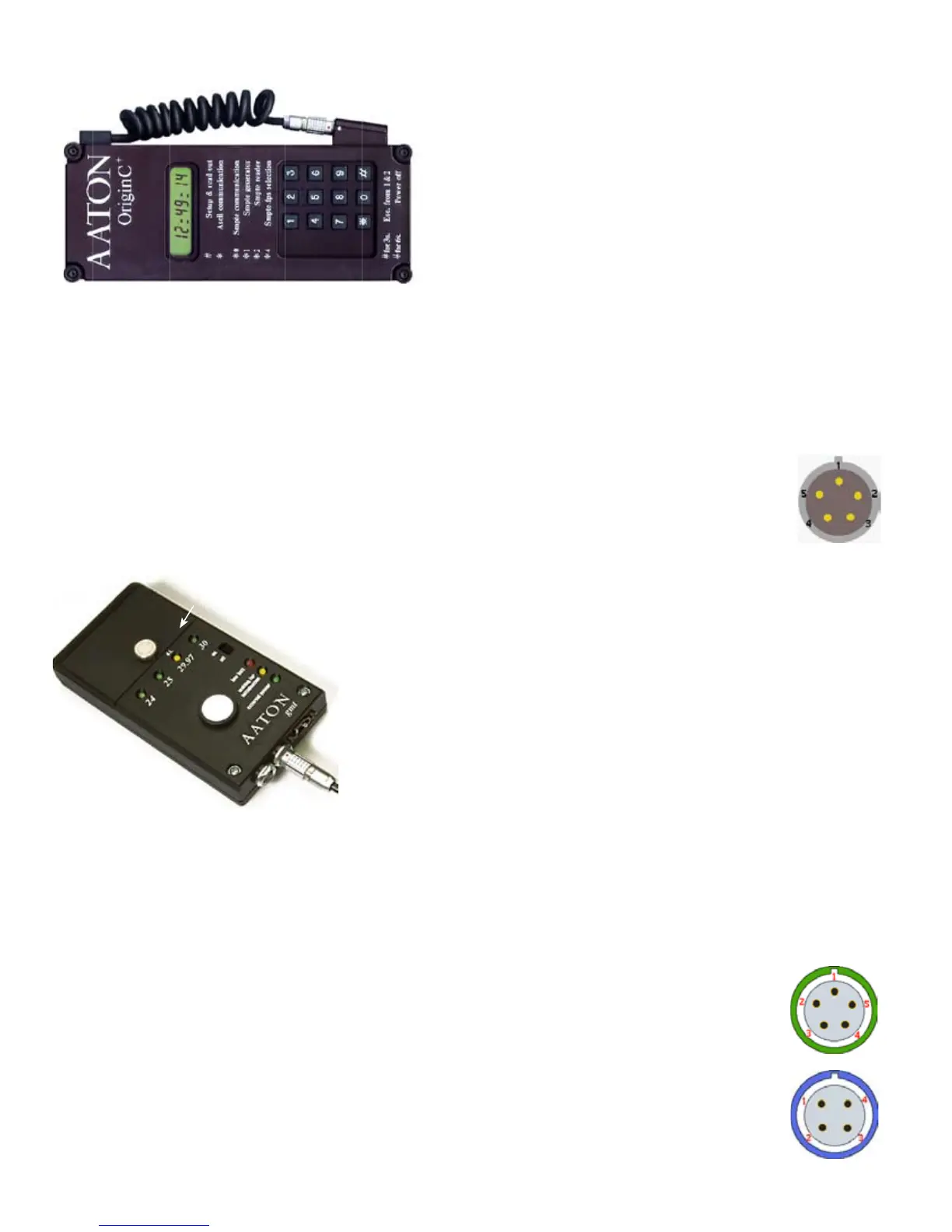
OriginC master-clock sets cam-
eras and recorders TC
Start OriginC
by pressing the [#] key.
Enter all of the Prod ID digits, Date and
Time. Press [#] to scan through the
display. All fields being set, press [*] to
start the clock. To shut-down, press [#]
for five seconds until 'Stopped' appears.
ASCII initialize Cantar, cameras
or other machines with ASCII (an fps
agnostic protocol), plug the
Lemo 5 into the LTC socket
of the machine, press [#].
OriginC's answer back
should be 'good 00.0'.
ASCII check a camera
clock, press [#]. OriginC
displays 'good' 'fair' 'bad' or 'diff-time',
followed by the amount of drift in frame
tenths.
LTC init a machine with SMPTE LTC,
simultaneously press [#] [0].
Get or check LTC generated by a IVS-
TC, Fostex PD6, etc. or to simply read
external timecode, press [*] [2].
Send continuous LTC to a non-TC
recorder, press [*] [1], OriginC generates
a SMPTE LTC signal to be recorded on
an unused audio track.
Select 24, 25, 30fps SMPTE LTC out,
press [*] [4], then [#] to confirm.
Technical Specifications
•1 ppm TCXO, ±1/2 frame shift after four
hours •Six hour automatic-shutoff •150
hours on a Li-Ion 9V battery.
•180x90x20mm. 375gr.
Order an Aaton L5-XLR3-SCH cable for
connection to LTC XLR-3sockets.
Lemo 5 plug
(ref: PHG OB-305-CLLD42)
1-Gnd 2-LTC out
3-ASCII in/out
4-NC 5-LTC in
COMPANIONS ORIGIN-C & GMT
GMT, 1 ppm low-power LTC genera-
tor for SD/HD cameras.
Momentarily initialized from an ASCII
master-clock or any LTC source (whatever
its frame-rate), and attached to a camera,
its (internally adjustable level) LTC-out is
sent to the A3 audio track. This bonds
the Video-TC of the camera to the free-run
Audio-TC also running in Cantar and
other cameras on the set. During image
import, the NLE extracts this Audio-TC to
«autosync» images and audio (p.46).
Emergency master-clock
Turn 'ON' GMT, press the [white] button to
initialize the clock from hour 01. The date
generated by a brand new
GMT starts at Y92/M01/
D01, it is incremented by one
day at each power 'ON'
followed by a [white] button
initialization. The “Year/
Month/Day” is stored in non-
volatile memory, resulting in
a never-twice-the-same date
from a given GMT.
Remote roll (GMT-u only)
• Whatever the initialization mode,
pressing the GMT-u [white] button for
more than three seconds makes the LTC
output freeze on the last TC value (the
four frame-rate LEDs blink). A short push
on the [white] button unfreezes the LTC.
Sent by wire or radio, this signal stops
and starts the Cantar recording (p.21).
Technical Specifications
• 150 gr • 63x123x26mm • 9V battery
(150 hours working) • 7 to 18 VDC ext.
supply • 6mA consumption • 1 ppm
clock • LTC-out: -20 to -60dBu & TTL • FPS
selector: 1 = 24, 2 = 25, 3 = 29.97 DF,
4 = 30 ; selected fps LED flashes.
5 = 23.98NDF [24 – 0.1%], 6 = 29.97NDF
[30 – 0.1%]; three LEDs, other than the
selected fps, flash.
Connections
- Momentary initialization is done through
the Lemo5 socket.
GMT-s delivered Lemo5 cable:
Gnd blue, LTC adj. white, LTC TTL red.
- Permanent LTC generation to a video
camera should preferably go through the
Fischer4 which lets the camera +7/+12V
be used instead of the internal 9V battery.
GMT-u delivered Fischer4 cable: Gnd blue,
LTC adj. white, Power-in red.
Lemo 5
1-Gnd 2-LTC in
3-ASCII in/out
4-LTC out, adj. level
5-LTC out, TTL level
Fischer 4 (GMT-u only)
1-Gnd 2-[White] button
3-LTC-out adj. 4-Power in
(Fischer 4 plug ref: S102A053130
LEDs flash on frame 00; 'three
but the one' in – 0.1%
NTSC
[white]
three second push
freezes LTC-out
9V battery and fps rotary
selector (under cover)
• low battery
• init request
• ext power



 To Next Page