ACH580 Installation, Operation and Maintenance Manual 85
ACH580-01 Installation
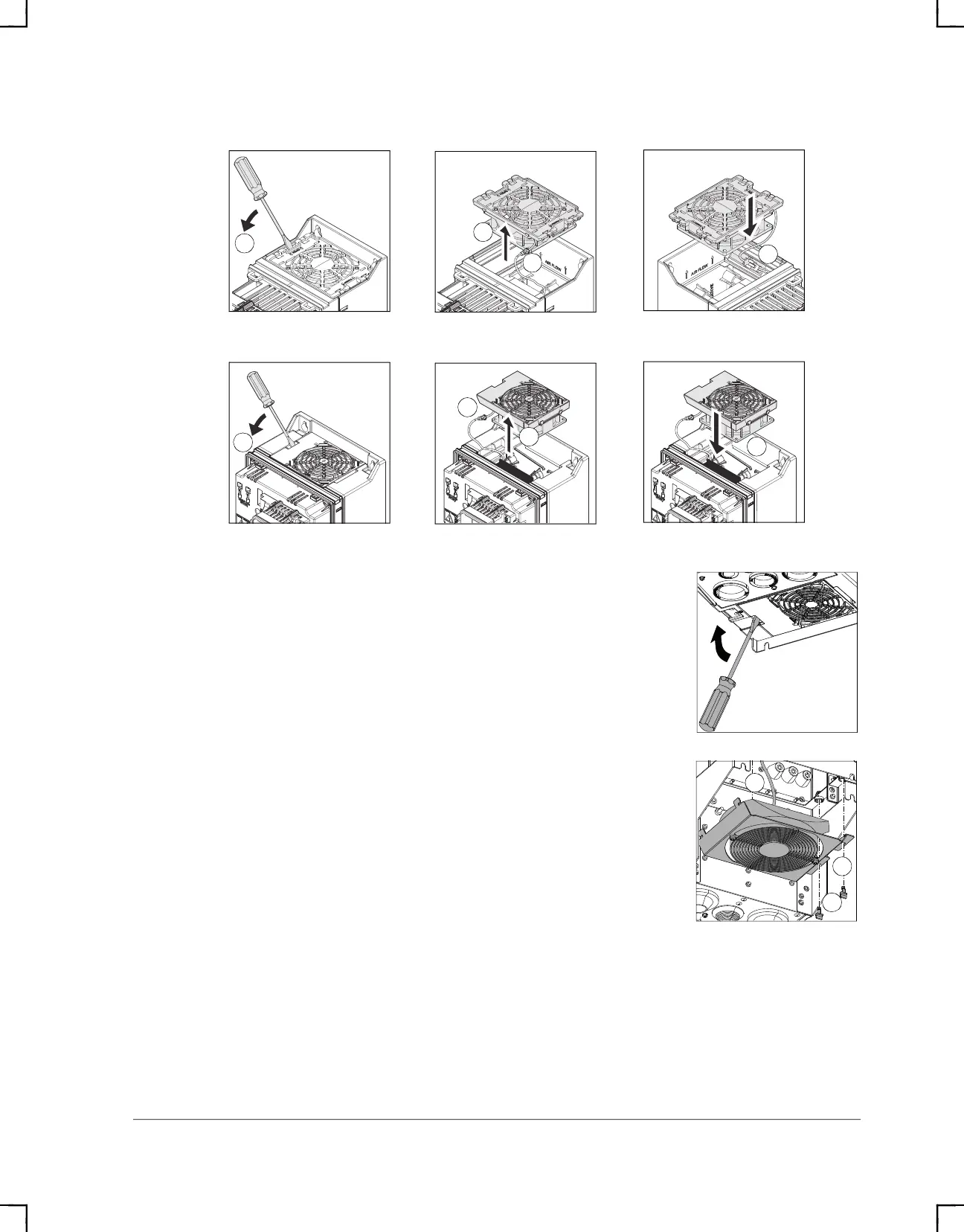
R1...R2
R3
Frame Size R4
To replace the fan:
1. Remove power from drive.
2. Pry the fan assembly off the drive frame with a screwdriver
and pull it out.
3. Disconnect the fan cable.
4. Install the fan in reverse order.
5. Restore power.
Frame Sizes R5…R8
To replace the fan:
1. Remove power from drive.
2. Remove the 2 screws attaching the fan mounting plate at
the bottom of the drive.
3. Pull the mounting plate down from the side edge.
4. Disconnect the fan cable.
5. Lift the mounting plate off.
6. Remove the fan from the mounting plate.
7. Install the fan in reverse order.
8. Restore power.
2a
2b
2b
3
2a
2b
2b
3
2
3
4
ACH580_Inst_Op_Maint_Rev G.book Page 85


 To Next Page