12-2 Startup Assistant & Parameters 3AXD50000011888
Table 12-1 Initial Start-up / Motor Data and ID Run
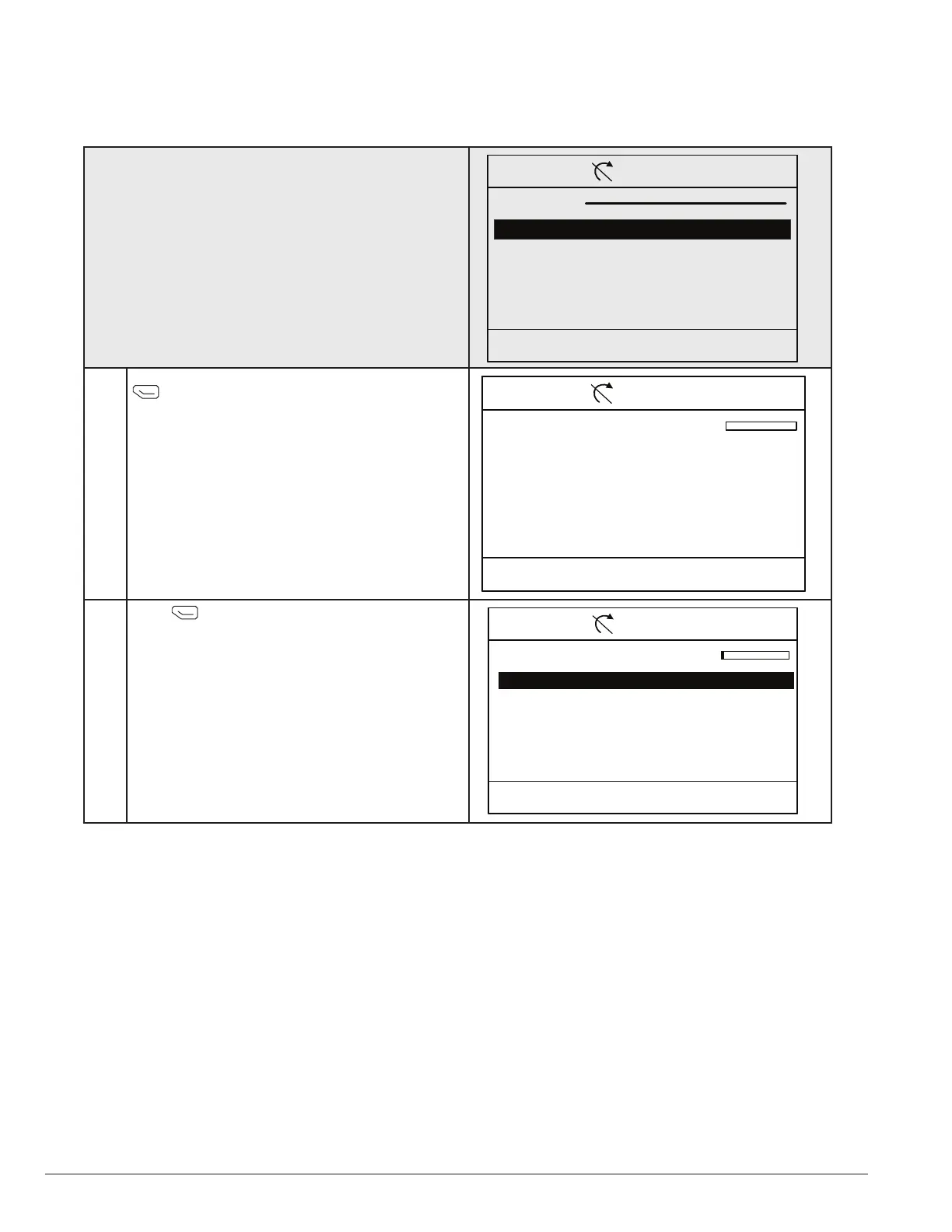
On initial startup, the drive goes into the Motor data setup.
and this screen will not be shown.
Note: This screen will not show on first startup.
On subsequent startups, select “Motor Data and ID Run”
from the Assistants menu, which is located off of the main
menu.
00:00 SelectBack
CTDD 0.0 rpmRemote
Assistants
Motor Data & ID Run
CTDD Setup
Motor Data and ID Run Assistant will load. Press
(continue) to begin the cooling tower startup
assistant.
00:00 ContinueExit
CTDD 0.0 rpmRemote
Motor Set-up
Use arrow keys and soft keys to
Navigate the assistant
Press (next) to start the set-up assistant.
00:00 NextExit
CTDD 0.0 rpmRemote
Set-up Assistant
Start set-up
Exit and don’t show at power-up








 To Next Page