12-6 Startup Assistant & Parameters 3AXD50000011888
Table 12-1 Initial Start-up / Motor Data and ID Run
Motor ID Run
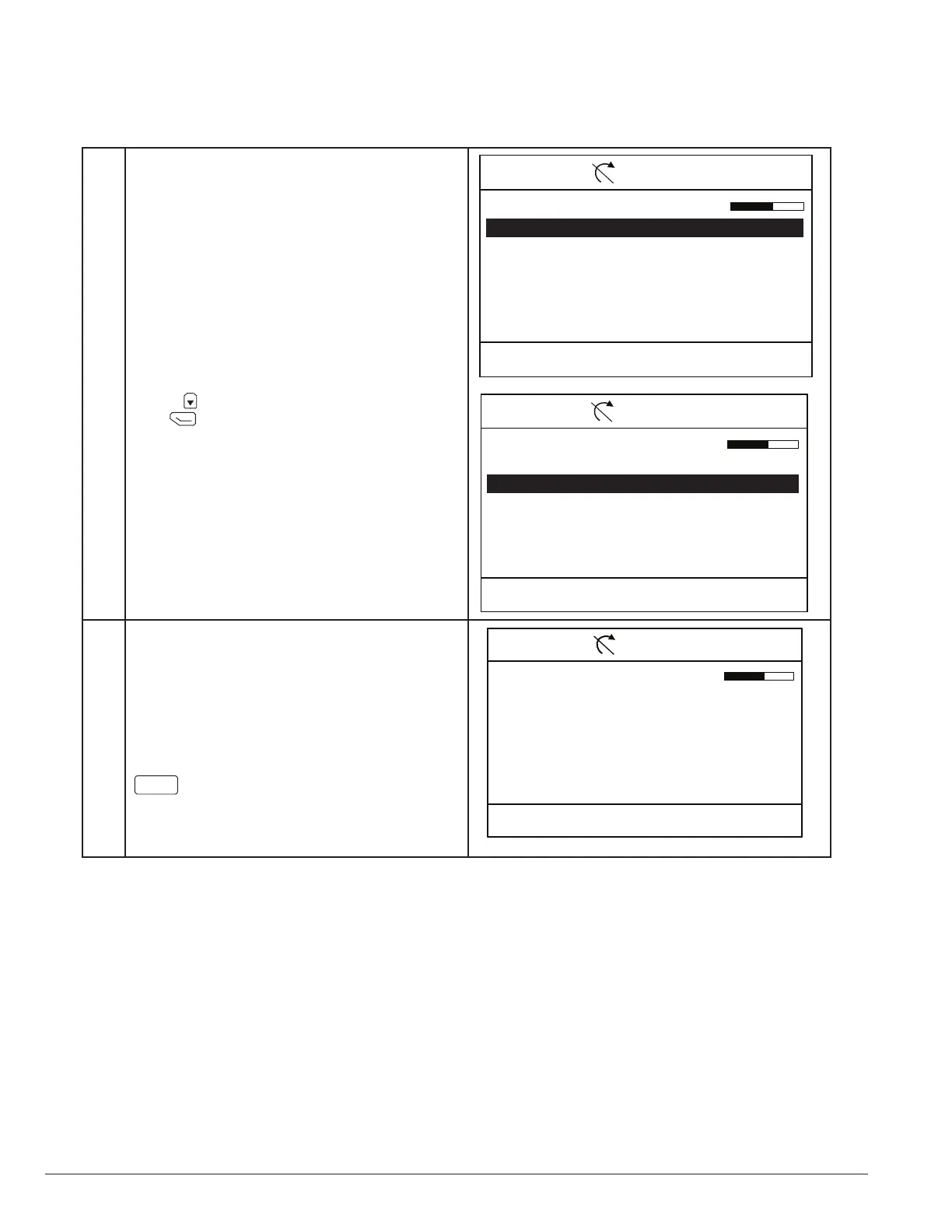
The drive is now ready to run the motor identication
routine (ID run). The motor is injected with DC
current.
00:00Back
CTDD 50.0 rpmLocal
ID run?
None
Standstill ID run
Next
Use the key to select Standstill ID run and then
press (next).
Note: On initial startup, an ID run must be performed
and Next will not advance to next step.
00:00Back
CTDD 50.0 rpmLocal
ID run?
None
Standstill ID run
Next
Motor ID Run
No command rotation is given, however with a
permanent magnet motor the shaft could rotate up
to half a revolution.
You must press Local Keypad START to activate ID
Run.
Note: ID Run requires Local control, press
Loc/Rem
if the Keypad does not indicated
local control is active.
Next is not visible until ID run is performed
once.
00:00Back
CTDD 50.0 rpmLocal
Press Start for ID run
When you press Start, the motor is
injected with DC
Current for about 1 minute, and may
Rotate up to half a
Revolution. After the ID run the drive
stops.
Next








 To Next Page