12-10 Startup Assistant & Parameters 3AXD50000011888
Table 12-2 Drive Assistant
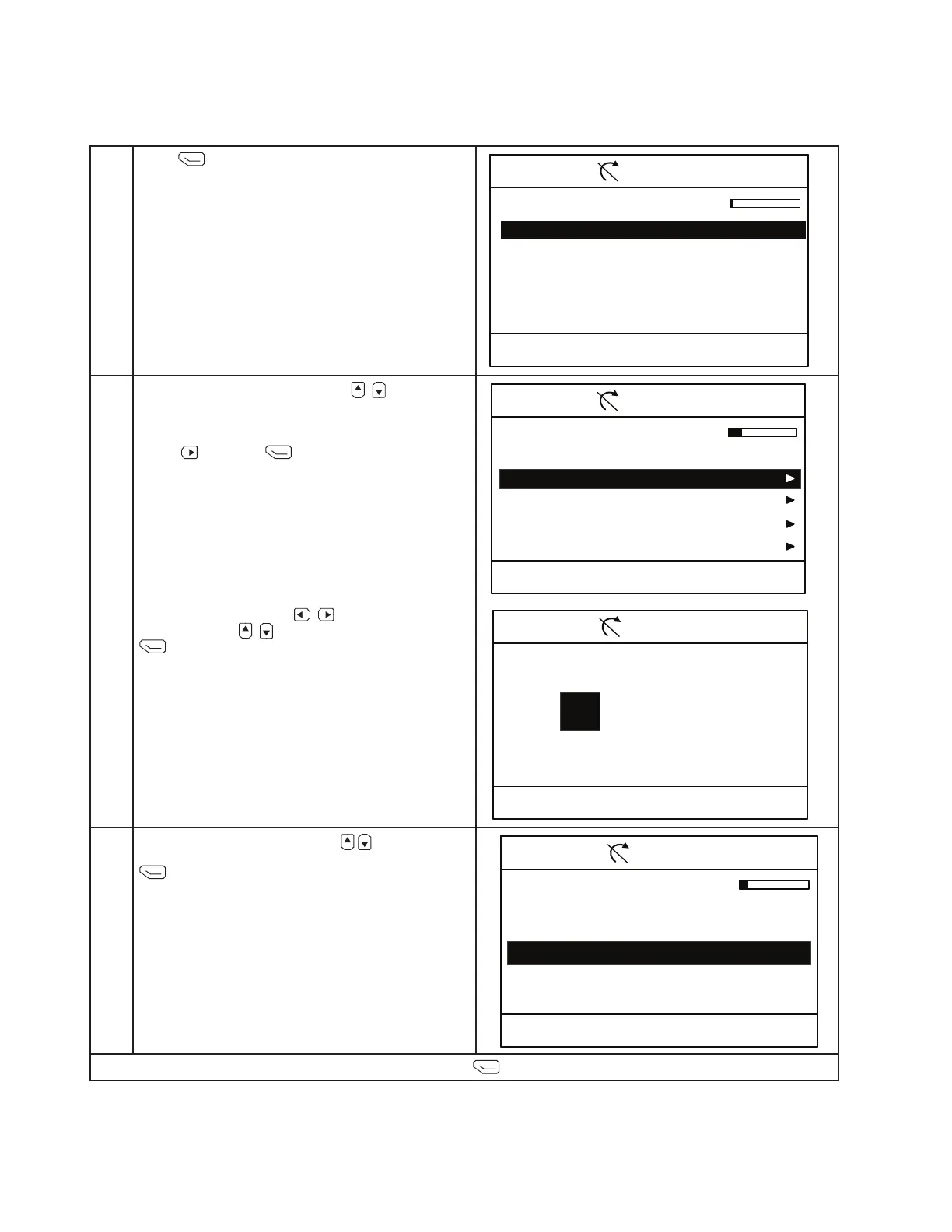
Press (next) to start the set-up assistant.
“Restore ....” will reload all default parameters
except for motor data.
00:00 NextExit
CTDD 0.0 rpmRemote
Set-up Assistant
Start set-up
Restore default CTDD parameters.
In the Date & Time menu, use the to highlight
the value to edit. It is recommended to set the
current date & time so that faults & alarms can
provide accurate time stamps. Highlight date and
press to edit or (next) to continued.
Date
Time
Show date as
Show time as
00:00 NextExit
CTDD 0.0 rpmLocal
Date & Time
Please enter the current date and time.
01.01.2014
12:34:56
day.month.year
24-hour
In the month screen use to select the value
for editing. Use to modify the value. Pressing
(save) returns to the date & time menu.
(See Motor Data)
03/20/2014
00:00 SaveCancel
CTDD 0.0 rpmLocal
Date
Month day Year
Thursday
Highlight the language with the and press
(continued).
00:00 NextExit
CTDD 0.0 rpmLocal
Language
Language changes take some time.
Not selected
English
Deutsch
Italiano
NOTE: After editing all desired date & time values, press (next) to continue.








 To Next Page