5
2 ELECTRICAL INSTALLATION
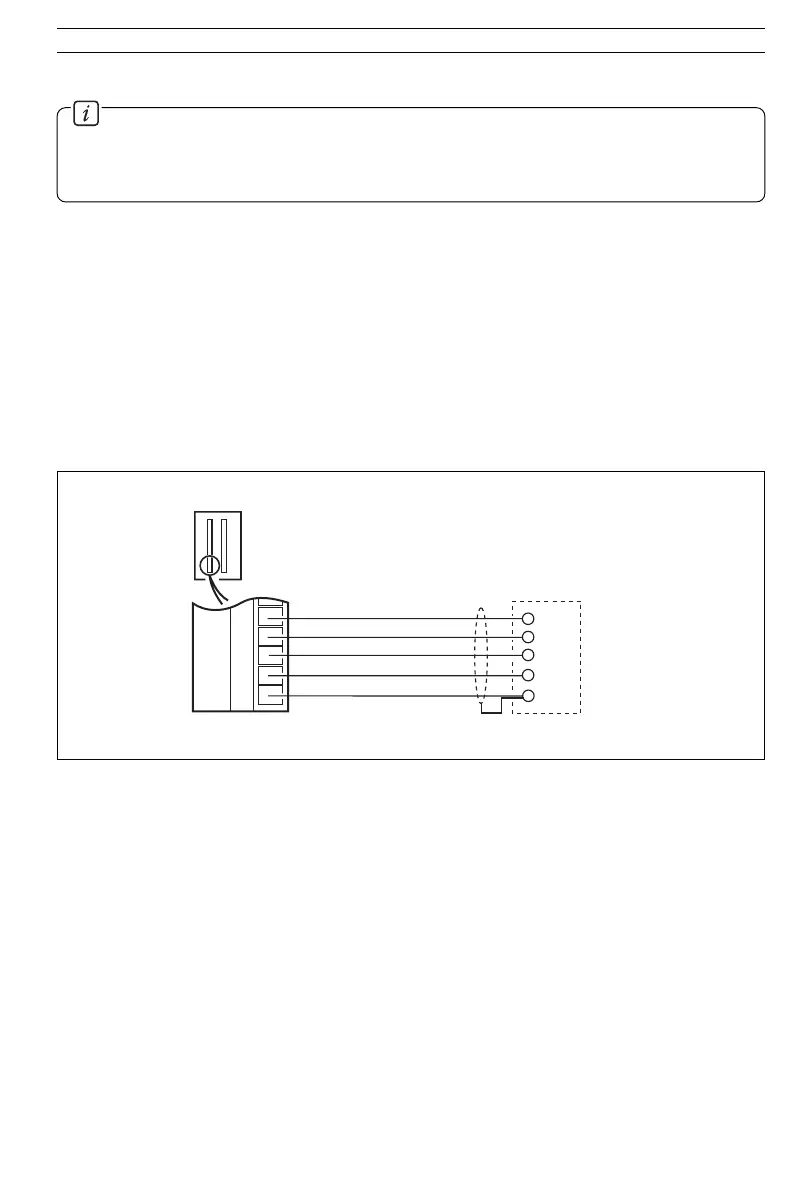
Fig. 2.4 OPTO22 Board Connections
2.6 Serial Connections – Figs. 2.1 to 2.4
Information.
• Up to 10 slaves can be connected to a single RS422 adaptor card on a PC.
• Up to 32 slaves can be connected to a single RS485 adaptor card on a PC.
The number of slaves can be increased if the driver's serial port permits.
Connections to the MODBUS serial board must be made as shown in Figs. 2.1, 2.2 or 2.4.
Connections on links with multiple slaves must be made in parallel, as shown in Fig. 2.3. When
connecting cable screens, ensure that no 'ground loops' are introduced.
The maximum serial data transmission line length for both RS422 and RS485 systems is 1200m. The types
of cable that can be used are determined by the total line length:
Up to 6m – standard screened or twisted pair cable.
Up to 300m – twin twisted pair with overall foil screen and an integral drain wire, e.g. Belden 9502
or equivalent.
Up to 1200m – twin twisted pair with separate foil screens and integral drain wires, e.g. Belden
9729 or equivalent.
Rx+
Rx–
C500
Tx+
GND
Rx+
Rx–
Tx+
Tx–
GND
OPTO22 Adaptor
Board Connections
Screen
Tx–
8
9
4
5
3
32
33
34
35
36



 To Next Page