15
EN
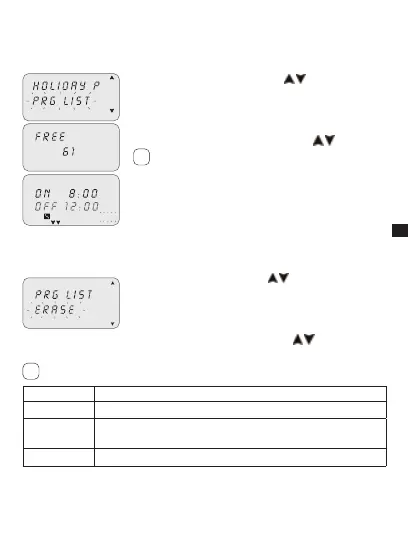
3-5 PRG List
This menu enables any program in the memory to be displayed, modified or
deleted.
c1
P02
Scroll to “PRG LIST” using keys 1. .
Press2. OK to confirm.
The number of free programs appears.»
The first program in the memory is displayed.»
Select the desired program using keys 3.
.
Ref. subsections 2-2 to 2-4 for details on checking,
modifying or deleting data.
3-6 Delete
This menu enables different type of deletions to be made.
Scroll to 1. ERASE using keys .
Press2. OK to confirm.
The type of deletion in the sub-menu is accessed »
(ref. table below).
Select deletion type using keys »
.
Press3. OK to confirm deletion.
Press MENU to cancel deletion.
Sub-menu Function
SING PROG Delete single programs selected
ALL PROG
Delete all programs
All programs in the memory will be deleted!
HOLIDAY P
Delete all holiday programs
i
i



 To Next Page