21
EN
3-8-5 Hour meter
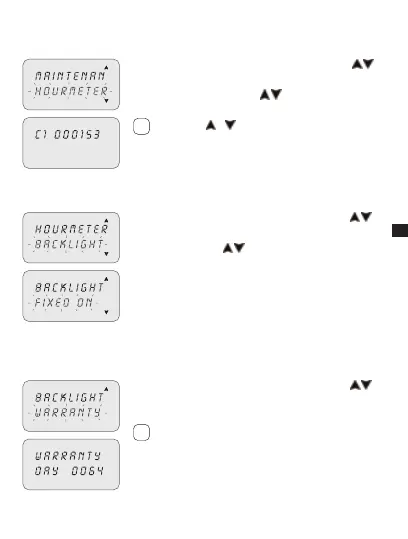
This enables the number of hours of the channels in the ON status to be displayed.
Select the “HOURMETER” sub-menu using keys 1. .
Press2. OK to confirm.
Select channel using keys 3.
.
The display shows the hours of operation.»
Press keys
+ to zero.
3-8-6 Back-lighting
This enables the display backlighting time to be set.
Select the “BACKLIGHT” sub-menu using keys 1. .
Press2. OK to confirm.
Select using keys 3.
between: FIXED ON,
FIXED OFF or TEMP 6SEC.
Press4. OK to confirm.
3-8-7 Warranty
This enables the time since the putting into service of the clock to be displayed
in days.
Select the “WARRANTY” sub-menu using keys 1. .
Press2. OK to confirm.
The display shows the time, as described above.»
Counter may not be zeroed.
i
i



 To Next Page