5
EN
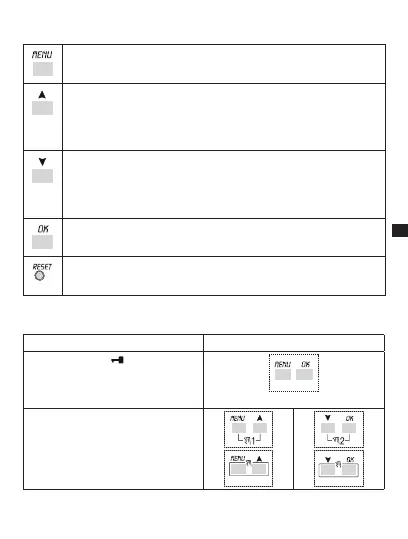
1-4 Function keys
Enter main menu (from initial screen).s
Exit from any settings
Scroll list upwards.s
Increase a numerical value or change a parameter.s
Hold down to display status of channel 1 until button is released s
(under normal operation).
Scroll list downwards.s
Decrease a numerical value or change a parameter.s
Hold down to display status of channel 2 (twin channel models) until s
button is released (under normal operation).
Confirm proposed setting.s
Reset equipment (NOTE: The programs and external input settings s
are not deleted).
1-5 Combined key functions
Function Combined keys
Lock / unlock keys ( ).
+
2 secs.
Temporary manual forcing of channel 1
and 2 (ref. subsection 3-7).
Alternate pressure to change it from
TEMP ON to TEMP OFF.
+
+
+
+



 To Next Page